WAU Manager, short for Windows Automatic Updates Manager, is a free, portable tool designed to replace the standard Windows Update interface. The recently released version 3.8.7.0 enhances user control over Windows Updates, allowing for a more tailored updating experience.
Key Features of WAU Manager:
1. Control Over Updates: WAU Manager provides users with complete authority over when and how updates are installed. Users can opt for manual updates via a desktop shortcut or set automatic updates at customizable intervals—daily, monthly, or yearly.
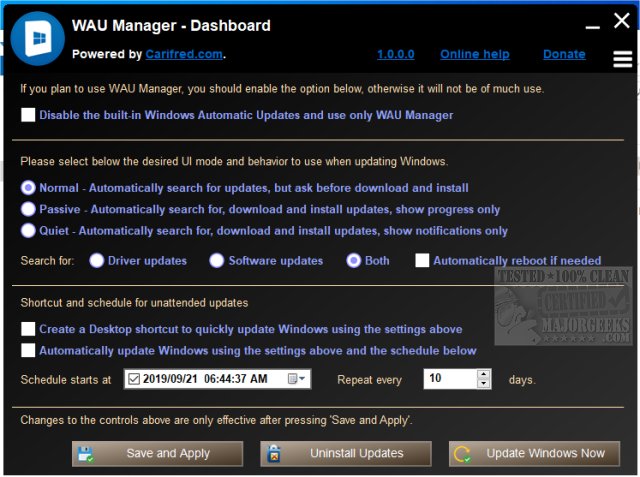
2. Dashboard Functionality: The main interface, or Dashboard, allows users to manage all update settings easily. Users can decide whether updates should be automatically downloaded and installed, and the tool operates independently of the built-in Windows Update schedule.
3. Modules for Comprehensive Management:
- Install Updates Module: This feature enables searching for available updates and installing selected ones. Users can also hide updates they do not wish to see.
- Uninstall Updates Module: Allows users to uninstall or hide previously installed updates.
- Unhide Updates Module: Users can view and unhide updates that have been hidden.
- View Update History Module: Displays the history of Windows Updates and allows for various maintenance actions related to updates.
4. Recommended Settings: The developer suggests disabling the default Windows Update feature to ensure WAU Manager operates efficiently, a process made easy through the Dashboard.
Extended Features and Potential Enhancements:
To build on the capabilities of WAU Manager, the following features could be considered for future updates:
- User-Friendly Notifications: Implement a notification system that alerts users of critical updates or issues without overwhelming them.
- Advanced Reporting: Provide in-depth reporting features that analyze update trends and potential system impacts, giving users insight into their update choices.
- Integration with Third-Party Tools: Collaborate with popular system optimization tools to provide a more holistic approach to system maintenance.
- Multi-User Support: Allow for user profiles, enabling different configurations for multiple users on a single machine, enhancing usability in shared environments.
- Backup and Restore Options: Introduce a feature for users to back up their current update settings and configurations, making it easier to restore them if needed.
In summary, WAU Manager 3.8.7.0 is a powerful alternative for managing Windows Updates, offering flexibility and control that the default interface lacks. With additional features, it could further enhance user experience and system maintenance capabilities
Key Features of WAU Manager:
1. Control Over Updates: WAU Manager provides users with complete authority over when and how updates are installed. Users can opt for manual updates via a desktop shortcut or set automatic updates at customizable intervals—daily, monthly, or yearly.
2. Dashboard Functionality: The main interface, or Dashboard, allows users to manage all update settings easily. Users can decide whether updates should be automatically downloaded and installed, and the tool operates independently of the built-in Windows Update schedule.
3. Modules for Comprehensive Management:
- Install Updates Module: This feature enables searching for available updates and installing selected ones. Users can also hide updates they do not wish to see.
- Uninstall Updates Module: Allows users to uninstall or hide previously installed updates.
- Unhide Updates Module: Users can view and unhide updates that have been hidden.
- View Update History Module: Displays the history of Windows Updates and allows for various maintenance actions related to updates.
4. Recommended Settings: The developer suggests disabling the default Windows Update feature to ensure WAU Manager operates efficiently, a process made easy through the Dashboard.
Extended Features and Potential Enhancements:
To build on the capabilities of WAU Manager, the following features could be considered for future updates:
- User-Friendly Notifications: Implement a notification system that alerts users of critical updates or issues without overwhelming them.
- Advanced Reporting: Provide in-depth reporting features that analyze update trends and potential system impacts, giving users insight into their update choices.
- Integration with Third-Party Tools: Collaborate with popular system optimization tools to provide a more holistic approach to system maintenance.
- Multi-User Support: Allow for user profiles, enabling different configurations for multiple users on a single machine, enhancing usability in shared environments.
- Backup and Restore Options: Introduce a feature for users to back up their current update settings and configurations, making it easier to restore them if needed.
In summary, WAU Manager 3.8.7.0 is a powerful alternative for managing Windows Updates, offering flexibility and control that the default interface lacks. With additional features, it could further enhance user experience and system maintenance capabilities
WAU Manager 3.8.7.0 released
WAU Manager (Windows Automatic Updates Manager) is a free portable replacement for the default Windows Updating interface.