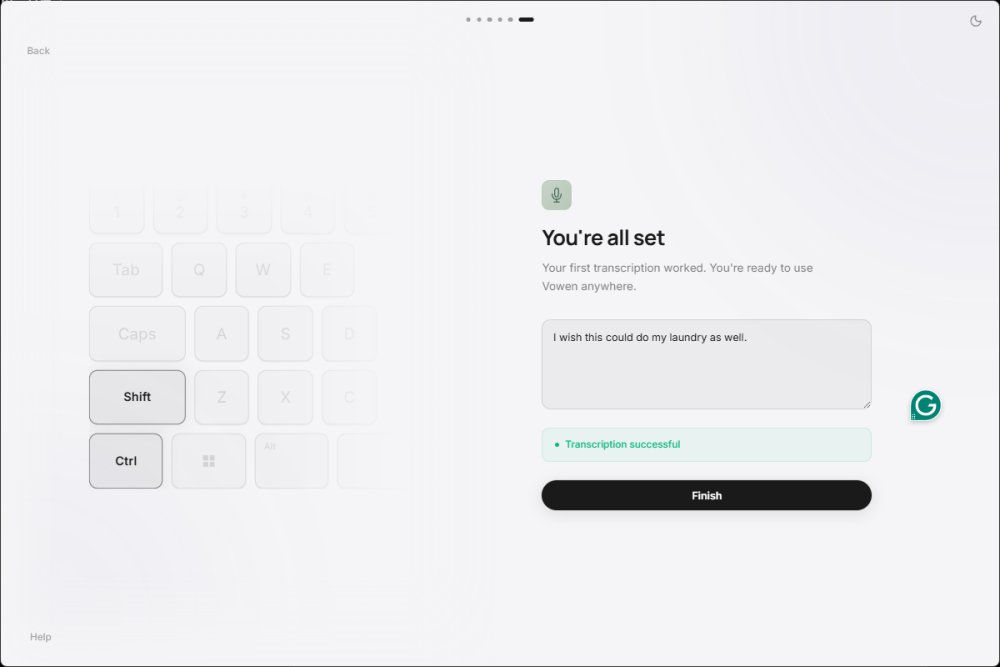
Vowen is a free, privacy-centric voice productivity application designed for Windows and macOS. It allows users to convert speech into text using offline AI transcription, making it a valuable tool for writers, coders, and anyone who prefers to speak rather than type. The key advantage of Vowen is its commitment to privacy; it processes dictation locally without automatically sending recordings to the cloud, unless the user opts to do so.
Core Features and Functionality
Vowen operates as a system-wide voice dictation tool that enables users to input text into nearly any application. By holding a designated shortcut (Control+Shift), users can dictate text wherever their cursor is positioned. Vowen enhances productivity by allowing users to create notes, translate text, summarize information, and issue voice commands depending on their configuration.
The offline speech-to-text functionality is particularly appealing for those who wish to avoid reliance on cloud services. This makes Vowen an ideal choice for individuals dealing with sensitive information, such as private notes or internal business materials.
Use Cases and Benefits
Vowen is especially beneficial in situations where typing may not be feasible, such as during meetings or while multitasking. For instance, users can dictate emails, jot down thoughts for a to-do list, or capture organized notes from virtual meetings by simply clicking the NOTES tab and recording. The app is also advantageous for accessibility users, developers writing code or documentation, and writers who prefer to speak their initial drafts.
Advanced Features and Customization
Vowen's offline AI transcription is powered by local Whisper-based speech recognition, which ensures that basic dictation does not rely on cloud processing. For advanced functionalities, users can integrate AI assistance plugins, connecting to services like OpenAI or Claude, provided they have the necessary API keys. While this setup may appeal to power users, casual users might find it slightly complex.
Moreover, Vowen supports voice commands for desktop automation, allowing users to launch apps and manage tasks through spoken instructions. The app's design prioritizes user privacy, with optional email registration and no immediate prompts for personal information upon installation.
Getting Started and Limitations
To use Vowen, users need to install the app, select their microphone, and configure their preferred dictation shortcut. It's advisable to familiarize oneself with basic dictation features first before exploring the advanced AI capabilities. Some Windows users may also need to install the Microsoft Visual C++ 2010 Redistributable Package for optimal functionality.
While Vowen excels in offline dictation, the integration of AI features may require additional setup that might not be user-friendly for everyone. The interface may feel more geared towards experienced users, and beginners might need some time to become comfortable with the app's offerings.
Conclusion: A Valuable Tool for Many Users
Vowen stands out as a free voice productivity app that effectively prioritizes privacy and offline functionality. It boasts system-wide dictation capabilities and optional AI tools that cater to both casual users and power users. Despite some complexities in setup and advanced features, Vowen is a worthwhile option for those looking for a faster, more efficient way to translate thoughts into text. As someone who has personally benefited from Vowen while writing this review, I can confidently say that it has become an essential tool, particularly for those facing typing difficulties
Core Features and Functionality
Vowen operates as a system-wide voice dictation tool that enables users to input text into nearly any application. By holding a designated shortcut (Control+Shift), users can dictate text wherever their cursor is positioned. Vowen enhances productivity by allowing users to create notes, translate text, summarize information, and issue voice commands depending on their configuration.
The offline speech-to-text functionality is particularly appealing for those who wish to avoid reliance on cloud services. This makes Vowen an ideal choice for individuals dealing with sensitive information, such as private notes or internal business materials.
Use Cases and Benefits
Vowen is especially beneficial in situations where typing may not be feasible, such as during meetings or while multitasking. For instance, users can dictate emails, jot down thoughts for a to-do list, or capture organized notes from virtual meetings by simply clicking the NOTES tab and recording. The app is also advantageous for accessibility users, developers writing code or documentation, and writers who prefer to speak their initial drafts.
Advanced Features and Customization
Vowen's offline AI transcription is powered by local Whisper-based speech recognition, which ensures that basic dictation does not rely on cloud processing. For advanced functionalities, users can integrate AI assistance plugins, connecting to services like OpenAI or Claude, provided they have the necessary API keys. While this setup may appeal to power users, casual users might find it slightly complex.
Moreover, Vowen supports voice commands for desktop automation, allowing users to launch apps and manage tasks through spoken instructions. The app's design prioritizes user privacy, with optional email registration and no immediate prompts for personal information upon installation.
Getting Started and Limitations
To use Vowen, users need to install the app, select their microphone, and configure their preferred dictation shortcut. It's advisable to familiarize oneself with basic dictation features first before exploring the advanced AI capabilities. Some Windows users may also need to install the Microsoft Visual C++ 2010 Redistributable Package for optimal functionality.
While Vowen excels in offline dictation, the integration of AI features may require additional setup that might not be user-friendly for everyone. The interface may feel more geared towards experienced users, and beginners might need some time to become comfortable with the app's offerings.
Conclusion: A Valuable Tool for Many Users
Vowen stands out as a free voice productivity app that effectively prioritizes privacy and offline functionality. It boasts system-wide dictation capabilities and optional AI tools that cater to both casual users and power users. Despite some complexities in setup and advanced features, Vowen is a worthwhile option for those looking for a faster, more efficient way to translate thoughts into text. As someone who has personally benefited from Vowen while writing this review, I can confidently say that it has become an essential tool, particularly for those facing typing difficulties
Vowen 0.4.5 released
Vowen is a free, privacy-focused voice productivity app for Windows and macOS that turns speech into text using offline AI transcription.