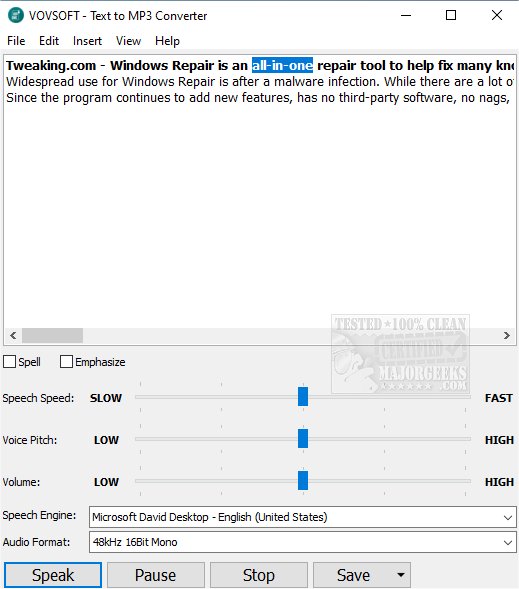
VOVSOFT has released version 4.6 of its Text to MP3 Converter, a user-friendly tool that enables users to convert written text into spoken audio files in both WAV and MP3 formats. This software is ideal for various applications, including e-learning, presentations, and content creation for platforms such as YouTube.
Utilizing the Microsoft SAPI Text-to-Speech engines, VOVSOFT Text to MP3 Converter allows users to customize their audio output by installing additional TTS languages through Windows Settings. Users can easily add new languages by navigating to the Region & Language settings and may need to restart their system to finalize the installation.
This converter not only supports straightforward text-to-speech conversions but also provides features that enhance user experience. For instance, it includes options to adjust speech speed, allowing for playback and recording speeds ranging from 10 times slower to 10 times faster. Users can also modify voice pitch, spell words aloud, emphasize certain phrases, and insert silences as needed.
Overall, VOVSOFT Text to MP3 Converter is a powerful and efficient tool for anyone looking to create audio content from text with ease.
Extended Features and Use Cases:
In addition to the features mentioned, VOVSOFT Text to MP3 Converter can be particularly beneficial for individuals with visual impairments or reading difficulties, as it allows them to access written content auditorily. Additionally, educators can use this tool to create audio resources for students, accommodating various learning styles. Content creators can enhance their videos with voiceovers generated from scripts effortlessly. Furthermore, the integration of multiple speech engines offers diverse voice options, catering to a broad audience and enhancing the overall listening experience
Utilizing the Microsoft SAPI Text-to-Speech engines, VOVSOFT Text to MP3 Converter allows users to customize their audio output by installing additional TTS languages through Windows Settings. Users can easily add new languages by navigating to the Region & Language settings and may need to restart their system to finalize the installation.
This converter not only supports straightforward text-to-speech conversions but also provides features that enhance user experience. For instance, it includes options to adjust speech speed, allowing for playback and recording speeds ranging from 10 times slower to 10 times faster. Users can also modify voice pitch, spell words aloud, emphasize certain phrases, and insert silences as needed.
Overall, VOVSOFT Text to MP3 Converter is a powerful and efficient tool for anyone looking to create audio content from text with ease.
Extended Features and Use Cases:
In addition to the features mentioned, VOVSOFT Text to MP3 Converter can be particularly beneficial for individuals with visual impairments or reading difficulties, as it allows them to access written content auditorily. Additionally, educators can use this tool to create audio resources for students, accommodating various learning styles. Content creators can enhance their videos with voiceovers generated from scripts effortlessly. Furthermore, the integration of multiple speech engines offers diverse voice options, catering to a broad audience and enhancing the overall listening experience
VOVSOFT Text to MP3 Converter 4.6 released
VOVSOFT Text to MP3 Converter allows you to convert text to speech and save it in WAV or MP3 formats.