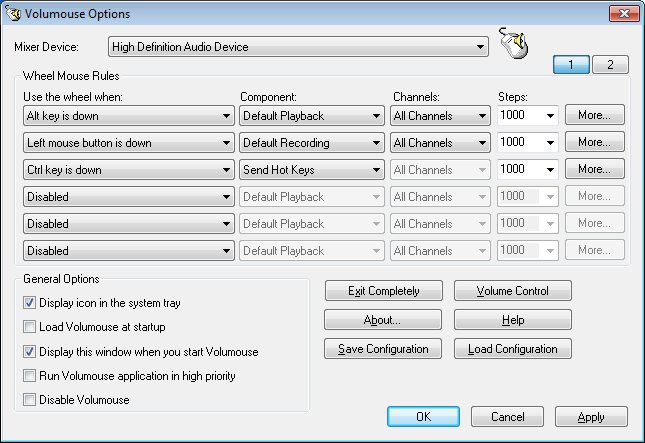
Volumouse version 2.21 has been released, offering users a simple and efficient way to control their system's sound volume using their mouse. With Volumouse, users can adjust the volume by rolling the wheel of their mouse, while also having the capability to set specific rules for when this functionality is activated. For instance, users can configure the software to change the volume only when the Alt key is pressed or when the left mouse button is held down while hovering over the taskbar. Outside these defined conditions, the mouse wheel will continue to perform its standard scrolling functions.
In addition to its primary volume control feature, Volumouse could be beneficial for those looking to enhance their overall user experience. It provides a seamless integration that allows users to multitask without interruption. The software's flexibility in setting rules makes it customizable to individual workflows, allowing for increased productivity.
For users experiencing issues with their mouse performance, such as slow movement or erratic cursor behavior, Volumouse also complements troubleshooting steps. Solutions such as enabling or disabling "Enhance Mouse Pointer Precision" or adjusting settings to prevent the pointer from snapping to default buttons can further improve mouse functionality.
Overall, Volumouse 2.21 enhances the audio control experience and integrates well with existing mouse usage, making it a useful tool for anyone looking to streamline their audio adjustments on their system
In addition to its primary volume control feature, Volumouse could be beneficial for those looking to enhance their overall user experience. It provides a seamless integration that allows users to multitask without interruption. The software's flexibility in setting rules makes it customizable to individual workflows, allowing for increased productivity.
For users experiencing issues with their mouse performance, such as slow movement or erratic cursor behavior, Volumouse also complements troubleshooting steps. Solutions such as enabling or disabling "Enhance Mouse Pointer Precision" or adjusting settings to prevent the pointer from snapping to default buttons can further improve mouse functionality.
Overall, Volumouse 2.21 enhances the audio control experience and integrates well with existing mouse usage, making it a useful tool for anyone looking to streamline their audio adjustments on their system
Volumouse 2.21 released
Volumouse provides you a quick and easy way to control the sound volume on your system.