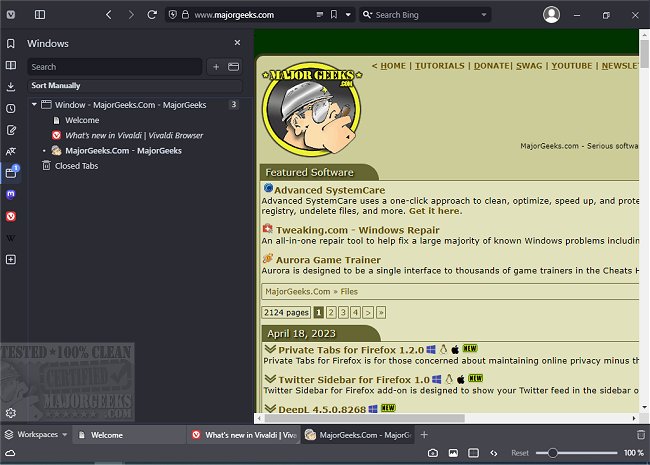
Vivaldi 8.1.4087.75 has been released, marking a continuous evolution of this free web browser developed by the original founders of the Opera Web Browser in 1994. Designed for both Windows and Linux, Vivaldi offers a user-friendly interface reminiscent of Google Chrome, featuring essential navigation buttons such as forward, back, refresh, and home keys conveniently located next to the address bar. Users can easily open new tabs or close them with simple buttons.
The browser includes a sidebar for quick access to bookmarks, and while the mail feature is not yet available, it also allows access to downloads, contacts, and notes. One suggestion for improvement is relocating the options gear icon from the bottom left to the top right or the sidebar, where users might expect to find it.
Vivaldi provides unique features to enhance the browsing experience, such as options to show or hide images and display only cached images, which can significantly speed up browsing. It also includes a zoom functionality for better readability, allowing users to adjust the page view in numerous ways, including grayscale filters and font adjustments. This makes Vivaldi particularly appealing for those with reading difficulties or anyone who enjoys customizing their browsing experience.
As Vivaldi enters a saturated and competitive browser market, its distinctive offerings could position it as a strong contender among well-established browsers. While the name "Vivaldi" may not be the most memorable, the browser's innovative features and user-centric design could potentially attract a loyal user base.
Looking ahead, Vivaldi has the opportunity to enhance its market presence by continuing to develop its features and addressing user feedback. As the browser landscape evolves, Vivaldi may carve out a niche for itself, appealing to users seeking both functionality and personalization in their web browsing experience.
In addition to its core features, users may find it beneficial to explore related topics, such as managing autofill entries in popular browsers like Google Chrome or ways to edit saved credit card information across multiple platforms
The browser includes a sidebar for quick access to bookmarks, and while the mail feature is not yet available, it also allows access to downloads, contacts, and notes. One suggestion for improvement is relocating the options gear icon from the bottom left to the top right or the sidebar, where users might expect to find it.
Vivaldi provides unique features to enhance the browsing experience, such as options to show or hide images and display only cached images, which can significantly speed up browsing. It also includes a zoom functionality for better readability, allowing users to adjust the page view in numerous ways, including grayscale filters and font adjustments. This makes Vivaldi particularly appealing for those with reading difficulties or anyone who enjoys customizing their browsing experience.
As Vivaldi enters a saturated and competitive browser market, its distinctive offerings could position it as a strong contender among well-established browsers. While the name "Vivaldi" may not be the most memorable, the browser's innovative features and user-centric design could potentially attract a loyal user base.
Looking ahead, Vivaldi has the opportunity to enhance its market presence by continuing to develop its features and addressing user feedback. As the browser landscape evolves, Vivaldi may carve out a niche for itself, appealing to users seeking both functionality and personalization in their web browsing experience.
In addition to its core features, users may find it beneficial to explore related topics, such as managing autofill entries in popular browsers like Google Chrome or ways to edit saved credit card information across multiple platforms
Vivaldi 8.1.4087.75 released
Vivaldi is a free web browser from the original Opera Web Browser founders in 1994, designed for Windows and Linux. Download the beta version here.