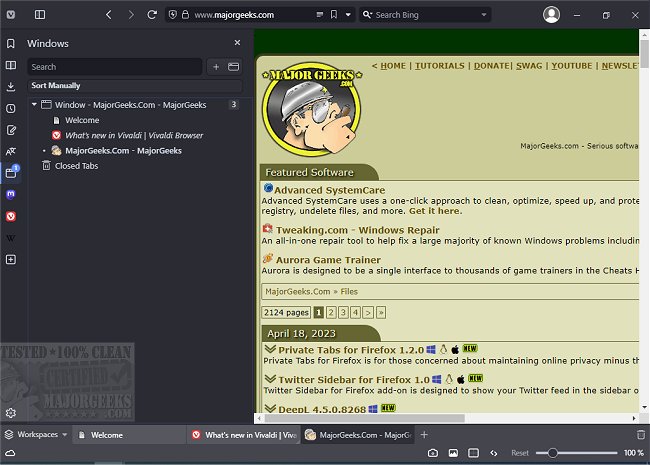
The latest version of Vivaldi, 8.1.4087.61, has been released, continuing the legacy of innovation from the original Opera Web Browser founders established in 1994. This free web browser is designed for both Windows and Linux platforms and offers users a beta version for download. Vivaldi's interface is reminiscent of Google Chrome, featuring essential navigation tools such as back, forward, refresh, and home buttons conveniently located next to the address bar. Users can manage tabs easily with a simple "+" to open new ones and an "X" to close them.
A notable aspect of Vivaldi is its sidebar, which provides quick access to bookmarks, downloads, contacts, and notes (with the mail feature still in development). However, some users have suggested repositioning the options gear icon from the bottom left to the top right or sidebar for better accessibility. The browser also includes features that enhance the browsing experience, such as the ability to show or hide images and display only cached versions to improve loading speeds.
For those who find web pages difficult to read, Vivaldi offers an adjustable zoom feature and an array of rendering options, including filters like grayscale and font adjustments, making it a versatile tool for improving readability or simply customizing the browsing experience for fun.
Vivaldi enters a highly competitive browser market, where user loyalty runs deep. While the name "Vivaldi" may not be the easiest to remember, the browser has garnered positive attention and could potentially emerge as a significant player in this space.
In light of the growing demand for customizable and user-friendly browsing experiences, Vivaldi's unique features and commitment to user satisfaction position it well for future success. As the market evolves, it will be interesting to see how Vivaldi adapts and what new functionalities it may introduce to better serve its users.
Moreover, users seeking guidance on optimizing their experience across different browsers can explore related articles, such as managing autofill entries in Google Chrome or updating saved credit card information across multiple platforms
A notable aspect of Vivaldi is its sidebar, which provides quick access to bookmarks, downloads, contacts, and notes (with the mail feature still in development). However, some users have suggested repositioning the options gear icon from the bottom left to the top right or sidebar for better accessibility. The browser also includes features that enhance the browsing experience, such as the ability to show or hide images and display only cached versions to improve loading speeds.
For those who find web pages difficult to read, Vivaldi offers an adjustable zoom feature and an array of rendering options, including filters like grayscale and font adjustments, making it a versatile tool for improving readability or simply customizing the browsing experience for fun.
Vivaldi enters a highly competitive browser market, where user loyalty runs deep. While the name "Vivaldi" may not be the easiest to remember, the browser has garnered positive attention and could potentially emerge as a significant player in this space.
In light of the growing demand for customizable and user-friendly browsing experiences, Vivaldi's unique features and commitment to user satisfaction position it well for future success. As the market evolves, it will be interesting to see how Vivaldi adapts and what new functionalities it may introduce to better serve its users.
Moreover, users seeking guidance on optimizing their experience across different browsers can explore related articles, such as managing autofill entries in Google Chrome or updating saved credit card information across multiple platforms
Vivaldi 8.1.4087.61 released
Vivaldi is a free web browser from the original Opera Web Browser founders in 1994, designed for Windows and Linux. Download the beta version here.