Vivaldi has recently released version 8.1.4087.46 of its web browser, which is developed by the original founders of the Opera Web Browser from 1994. This free browser is compatible with Windows and Linux operating systems, and users can download the beta version through the provided link.
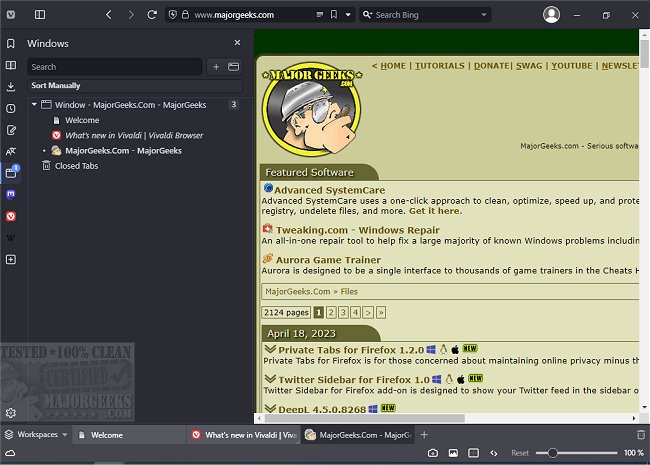
Vivaldi's interface bears a resemblance to Google Chrome, featuring standard navigation buttons such as forward, back, refresh, and home, located next to the address bar. Users can easily open new tabs with a simple "+" icon and close them using an "X" icon. The browser also includes a sidebar for quick access to bookmarks, downloads, contacts, and notes, although the email feature is not yet available.
One notable aspect of Vivaldi is its customization options. Users can adjust the display settings to show or hide images, utilize cached images for faster browsing, and can zoom in or out on web pages for better readability. The browser offers a variety of rendering options, allowing users to apply filters, change fonts, and experiment with grayscale effects, which can be particularly beneficial for individuals with reading difficulties or those looking for a fun browsing experience.
Despite entering a competitive browser market where user loyalty is strong, Vivaldi has carved out a niche for itself. Although its name may not be the easiest to pronounce, the browser's unique features and capabilities may position it as a potential contender in the web browsing space.
As web browsing continues to evolve, Vivaldi's commitment to user-friendly design and customization could help it attract a dedicated user base. It remains to be seen if Vivaldi can achieve widespread popularity, but its innovative approach might just make it the next big thing in web browsing.
For users looking to enhance their browsing experience, Vivaldi offers a robust alternative to mainstream browsers like Google Chrome, Firefox, and Edge, emphasizing customization and user control
Vivaldi's interface bears a resemblance to Google Chrome, featuring standard navigation buttons such as forward, back, refresh, and home, located next to the address bar. Users can easily open new tabs with a simple "+" icon and close them using an "X" icon. The browser also includes a sidebar for quick access to bookmarks, downloads, contacts, and notes, although the email feature is not yet available.
One notable aspect of Vivaldi is its customization options. Users can adjust the display settings to show or hide images, utilize cached images for faster browsing, and can zoom in or out on web pages for better readability. The browser offers a variety of rendering options, allowing users to apply filters, change fonts, and experiment with grayscale effects, which can be particularly beneficial for individuals with reading difficulties or those looking for a fun browsing experience.
Despite entering a competitive browser market where user loyalty is strong, Vivaldi has carved out a niche for itself. Although its name may not be the easiest to pronounce, the browser's unique features and capabilities may position it as a potential contender in the web browsing space.
As web browsing continues to evolve, Vivaldi's commitment to user-friendly design and customization could help it attract a dedicated user base. It remains to be seen if Vivaldi can achieve widespread popularity, but its innovative approach might just make it the next big thing in web browsing.
For users looking to enhance their browsing experience, Vivaldi offers a robust alternative to mainstream browsers like Google Chrome, Firefox, and Edge, emphasizing customization and user control
Vivaldi 8.1.4087.46 released
Vivaldi is a free web browser from the original Opera Web Browser founders in 1994, designed for Windows and Linux. Download the beta version here.