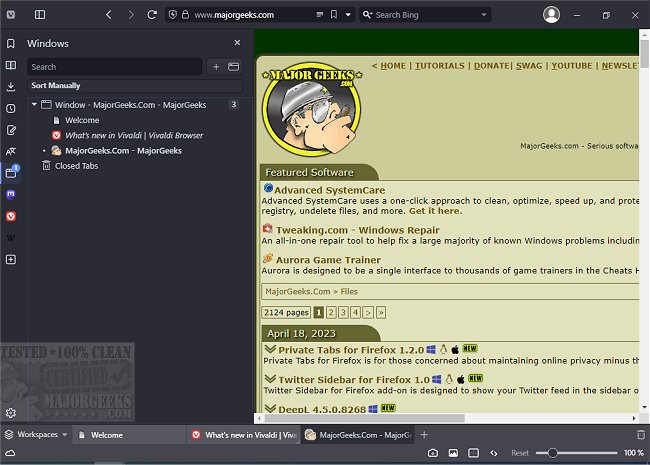
Vivaldi 7.9.3970.59 has been released, continuing the legacy of the original Opera Web Browser founders from 1994. This free web browser is available for both Windows and Linux users, and those interested can download the beta version. Vivaldi features an interface reminiscent of Google Chrome, with essential navigation tools like back, forward, refresh, and home buttons conveniently located next to the address bar. New tabs can be added easily with a simple + tab button, while existing tabs can be closed using an X tab.
One of the unique aspects of Vivaldi is its sidebar, offering quick access to bookmarks, and a future mail feature, as well as downloads, contacts, and notes. However, some users may find the placement of the options gear icon less intuitive, suggesting it might be better positioned in the top right corner or within the sidebar for easier access.
For users who need assistance with readability, Vivaldi provides various features, such as the ability to show or hide images, display only cached images for faster browsing, and adjust text size with a zoom slider. The browser also includes multiple rendering options, allowing users to modify how web pages appear with filters like grayscale, intensify, or even 3D effects, making it an excellent choice for those who may struggle with reading online content or simply want to customize their browsing experience.
As Vivaldi enters a competitive browser market filled with passionate users, its unique offerings could potentially help it carve out a niche. While the name Vivaldi may not be the most memorable, its innovative features and user-centric design could lead to increased popularity and possibly establish it as a significant player in the future.
In conclusion, Vivaldi provides a distinctive browsing experience with its customizable interface and unique features aimed at enhancing user accessibility. As the browser continues to evolve, it will be interesting to see how it competes with established names in the industry and whether it can attract a loyal user base
One of the unique aspects of Vivaldi is its sidebar, offering quick access to bookmarks, and a future mail feature, as well as downloads, contacts, and notes. However, some users may find the placement of the options gear icon less intuitive, suggesting it might be better positioned in the top right corner or within the sidebar for easier access.
For users who need assistance with readability, Vivaldi provides various features, such as the ability to show or hide images, display only cached images for faster browsing, and adjust text size with a zoom slider. The browser also includes multiple rendering options, allowing users to modify how web pages appear with filters like grayscale, intensify, or even 3D effects, making it an excellent choice for those who may struggle with reading online content or simply want to customize their browsing experience.
As Vivaldi enters a competitive browser market filled with passionate users, its unique offerings could potentially help it carve out a niche. While the name Vivaldi may not be the most memorable, its innovative features and user-centric design could lead to increased popularity and possibly establish it as a significant player in the future.
In conclusion, Vivaldi provides a distinctive browsing experience with its customizable interface and unique features aimed at enhancing user accessibility. As the browser continues to evolve, it will be interesting to see how it competes with established names in the industry and whether it can attract a loyal user base
Vivaldi 7.9.3970.59 released
Vivaldi is a free web browser from the original Opera Web Browser founders in 1994, designed for Windows and Linux. Download the beta version here.