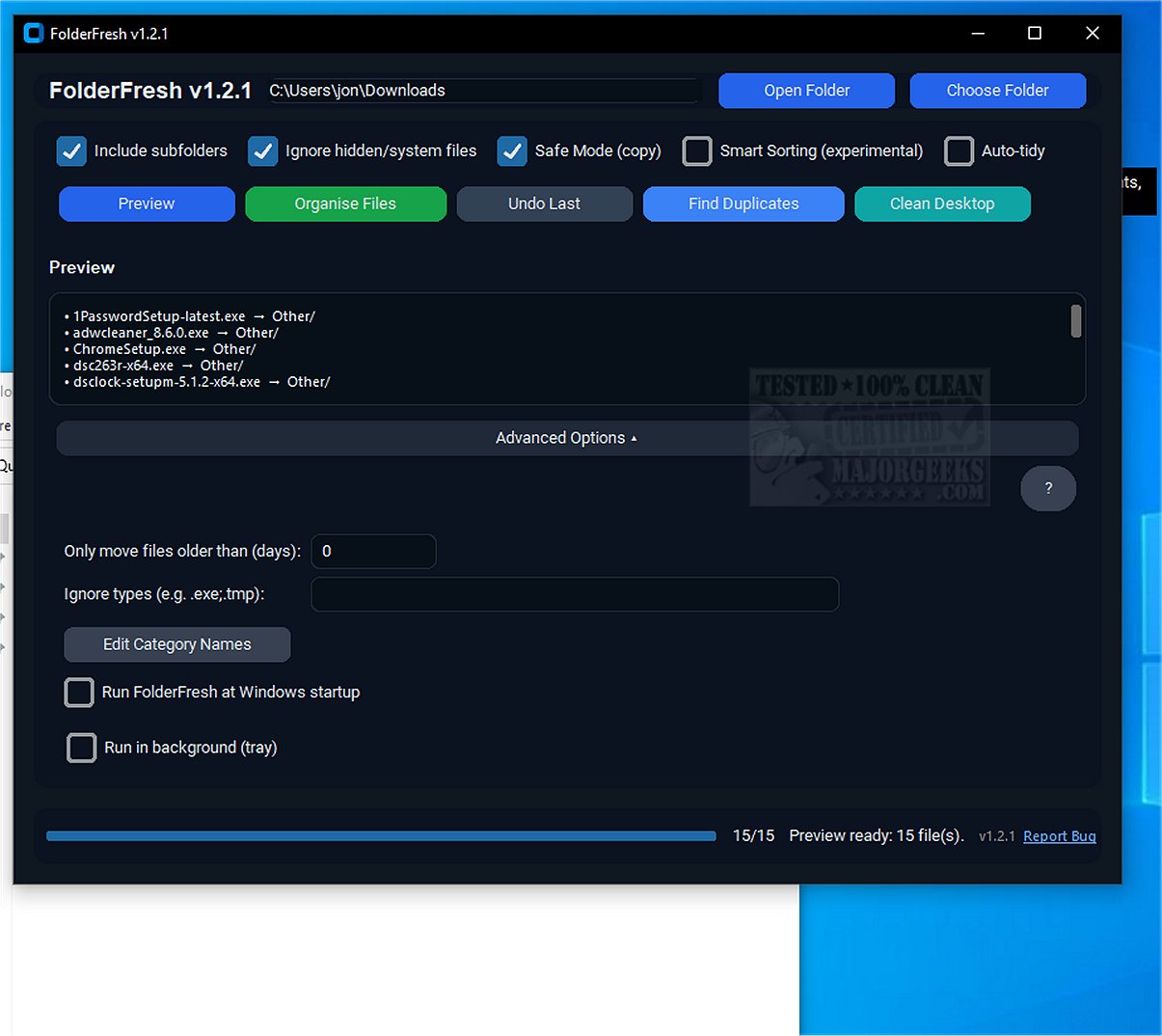
FolderFresh is a cutting-edge application designed to streamline the organization of files into well-structured folders as they appear. The latest release, version 3.0.3, enhances its functionality, making it an essential tool for users looking to declutter their digital spaces.
What is FolderFresh?
FolderFresh is an intelligent file management application that automatically categorizes files into designated folders based on file types. It features a user-friendly interface and a variety of tools, including preview mode, an undo function, Smart Sorting, Auto-tidy, and customizable category names, all backed by robust safety measures.
Core Functionality:
With FolderFresh, users can transform chaotic folders into organized collections with just one click. The application allows users to select a target directory and its sub-folders, generating a preview of the new folder structure before any changes are made. The automatic categorization ensures that files are sorted into appropriate folders, such as Documents, Images, Videos, and more. Importantly, FolderFresh prioritizes data safety by creating copies of files before moving them, minimizing the risk of data loss.
Key Features:
- Automatic Sorting: Organizes files into specific category folders effortlessly.
- Preview Mode: Provides a visual representation of the proposed folder structure before implementation.
- Undo Function: Restores files to their original locations with a single click, making the process reversible.
- Safe Mode: Prioritizes file safety by copying rather than moving files during sorting.
- Smart Sorting: Identifies and categorizes specific file types, including screenshots and invoices.
- Auto-tidy: Monitors designated folders and automatically sorts new files as they are added.
- Duplicate Finder: Efficiently identifies and removes duplicate files to free up disk space.
- Age & Ignore Filters: Allows users to selectively move older files or skip certain file types.
- Run at Startup: Users can configure the app to launch automatically on startup.
- Custom Category Names: Offers flexibility in renaming category folders for personalized sorting.
Who Can Benefit from FolderFresh?
FolderFresh is particularly beneficial for users who frequently encounter issues with duplicate files, especially those with unstable internet connections that lead to repeated downloads. The duplicate finder feature simplifies the identification and removal of redundant files, enhancing disk space utilization and overall system performance.
Geek Verdict: FreshFolder
FolderFresh presents an effective and intuitive solution for managing disorganized files, making it a valuable tool for anyone struggling with desktop clutter or unwieldy downloads folders. By generating sub-folders as categories and automating the sorting process, FolderFresh contributes significantly to achieving a neat and efficient digital workspace.
Future Enhancements:
As technology evolves, the potential for FolderFresh to incorporate advanced machine learning algorithms could further improve its Smart Sorting capabilities, enabling it to learn user preferences over time. Additionally, integrating cloud storage options could enhance accessibility and provide users with seamless access to their organized files from any device. Overall, FolderFresh stands out as a practical, user-friendly application that addresses the common frustrations associated with file management
What is FolderFresh?
FolderFresh is an intelligent file management application that automatically categorizes files into designated folders based on file types. It features a user-friendly interface and a variety of tools, including preview mode, an undo function, Smart Sorting, Auto-tidy, and customizable category names, all backed by robust safety measures.
Core Functionality:
With FolderFresh, users can transform chaotic folders into organized collections with just one click. The application allows users to select a target directory and its sub-folders, generating a preview of the new folder structure before any changes are made. The automatic categorization ensures that files are sorted into appropriate folders, such as Documents, Images, Videos, and more. Importantly, FolderFresh prioritizes data safety by creating copies of files before moving them, minimizing the risk of data loss.
Key Features:
- Automatic Sorting: Organizes files into specific category folders effortlessly.
- Preview Mode: Provides a visual representation of the proposed folder structure before implementation.
- Undo Function: Restores files to their original locations with a single click, making the process reversible.
- Safe Mode: Prioritizes file safety by copying rather than moving files during sorting.
- Smart Sorting: Identifies and categorizes specific file types, including screenshots and invoices.
- Auto-tidy: Monitors designated folders and automatically sorts new files as they are added.
- Duplicate Finder: Efficiently identifies and removes duplicate files to free up disk space.
- Age & Ignore Filters: Allows users to selectively move older files or skip certain file types.
- Run at Startup: Users can configure the app to launch automatically on startup.
- Custom Category Names: Offers flexibility in renaming category folders for personalized sorting.
Who Can Benefit from FolderFresh?
FolderFresh is particularly beneficial for users who frequently encounter issues with duplicate files, especially those with unstable internet connections that lead to repeated downloads. The duplicate finder feature simplifies the identification and removal of redundant files, enhancing disk space utilization and overall system performance.
Geek Verdict: FreshFolder
FolderFresh presents an effective and intuitive solution for managing disorganized files, making it a valuable tool for anyone struggling with desktop clutter or unwieldy downloads folders. By generating sub-folders as categories and automating the sorting process, FolderFresh contributes significantly to achieving a neat and efficient digital workspace.
Future Enhancements:
As technology evolves, the potential for FolderFresh to incorporate advanced machine learning algorithms could further improve its Smart Sorting capabilities, enabling it to learn user preferences over time. Additionally, integrating cloud storage options could enhance accessibility and provide users with seamless access to their organized files from any device. Overall, FolderFresh stands out as a practical, user-friendly application that addresses the common frustrations associated with file management
FolderFresh 3.0.3 released
FolderFresh is an innovative application designed to efficiently organize files into neatly categorized folders as they appear.