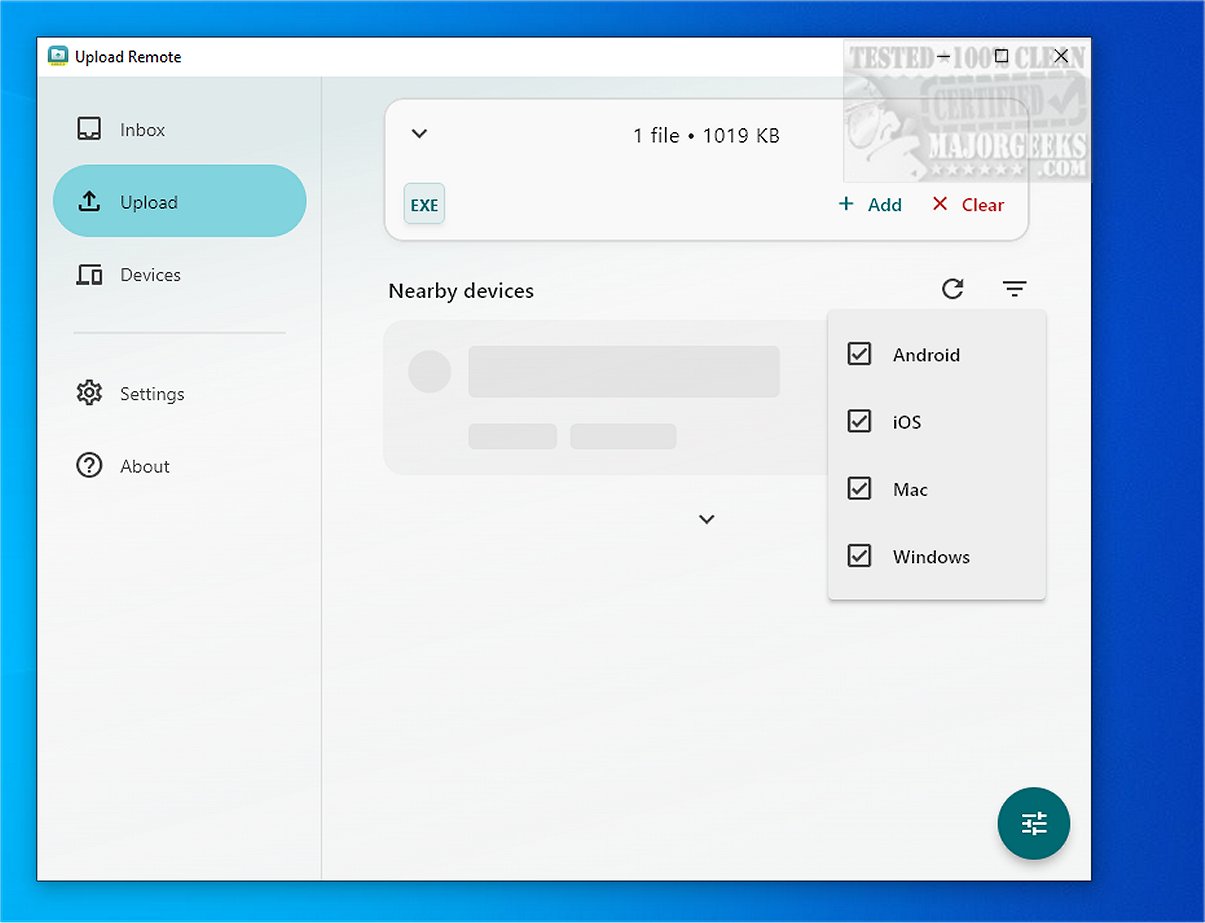
Upload Remote is a powerful file-sharing application designed for easy and secure file transfers between various devices, including computers, smartphones, and tablets. This cross-platform tool allows users to exchange files quickly over local networks or Wi-Fi, prioritizing security with end-to-end encryption. Notably, all data remains on users' devices, never transferred to external servers, ensuring high privacy and control over shared content.
Streamlined File-Sharing Experience
The application enhances the file-sharing process by making it straightforward and efficient. When sending files, users can directly transfer selected items to the recipient's Inbox without requiring any confirmation from the receiving device. This approach not only saves time but also reduces unnecessary steps, making the experience smooth for both parties involved.
User-Friendly Interface
Upload Remote features a clean and organized interface divided into three primary tabs:
1. Inbox Tab: Displays incoming files, with new uploads highlighted at the top, similar to email applications. Users can easily open, save, share, or delete files directly from this tab.
2. Upload Tab: Here, users can choose files to send, including photos and videos, with nearby devices listed below. To upload, users simply tap on the desired device.
3. Devices Tab: This tab simplifies the management of paired devices, allowing users to reorder their device list, edit names and permissions, or remove devices as necessary.
Upload Notifications
New files uploaded to Upload Remote are marked with an "unread" indicator, ensuring they are easily identifiable, akin to notifications in email applications. Additionally, if a sender attempts to upload a file with an existing name in the Inbox, the application prompts a confirmation dialogue to prevent accidental overwriting or duplication.
Permissions and Security
Upload Remote is primarily designed for personal devices, enabling users to transfer and access files seamlessly. However, users can enhance security by setting up a password to permit others to upload data to their device. This feature protects against unauthorized access while allowing selected individuals to share content securely.
Geek Verdict
Experience effortless and efficient file transferring with Upload Remote. Whether sharing documents, photos, or videos, the intuitive user interface caters to all users, regardless of their technical proficiency. The latest version, 2.0.3, promises to further enhance the user experience with improved performance and added features.
Future Enhancements
Looking ahead, Upload Remote plans to introduce additional features such as cloud integration for users who prefer online backups, enhanced support for larger file sizes, and a more robust notification system for real-time updates. These improvements aim to make file sharing even more versatile and user-friendly, catering to the evolving needs of both personal and professional users
Streamlined File-Sharing Experience
The application enhances the file-sharing process by making it straightforward and efficient. When sending files, users can directly transfer selected items to the recipient's Inbox without requiring any confirmation from the receiving device. This approach not only saves time but also reduces unnecessary steps, making the experience smooth for both parties involved.
User-Friendly Interface
Upload Remote features a clean and organized interface divided into three primary tabs:
1. Inbox Tab: Displays incoming files, with new uploads highlighted at the top, similar to email applications. Users can easily open, save, share, or delete files directly from this tab.
2. Upload Tab: Here, users can choose files to send, including photos and videos, with nearby devices listed below. To upload, users simply tap on the desired device.
3. Devices Tab: This tab simplifies the management of paired devices, allowing users to reorder their device list, edit names and permissions, or remove devices as necessary.
Upload Notifications
New files uploaded to Upload Remote are marked with an "unread" indicator, ensuring they are easily identifiable, akin to notifications in email applications. Additionally, if a sender attempts to upload a file with an existing name in the Inbox, the application prompts a confirmation dialogue to prevent accidental overwriting or duplication.
Permissions and Security
Upload Remote is primarily designed for personal devices, enabling users to transfer and access files seamlessly. However, users can enhance security by setting up a password to permit others to upload data to their device. This feature protects against unauthorized access while allowing selected individuals to share content securely.
Geek Verdict
Experience effortless and efficient file transferring with Upload Remote. Whether sharing documents, photos, or videos, the intuitive user interface caters to all users, regardless of their technical proficiency. The latest version, 2.0.3, promises to further enhance the user experience with improved performance and added features.
Future Enhancements
Looking ahead, Upload Remote plans to introduce additional features such as cloud integration for users who prefer online backups, enhanced support for larger file sizes, and a more robust notification system for real-time updates. These improvements aim to make file sharing even more versatile and user-friendly, catering to the evolving needs of both personal and professional users
Upload Remote 2.0.3 released
Upload Remote is a versatile file-sharing application that facilitates seamless and secure transfers across various devices, including computers, phones, and tablets.