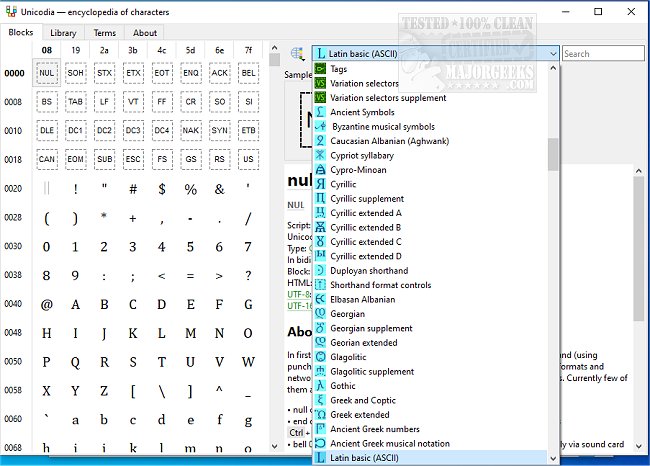
Unicodia version 3.1.8 has been released, offering an Open Source encyclopedia dedicated to Unicode characters. This software serves as a robust alternative character map for Windows users, presenting an intuitive interface that facilitates the easy browsing of various ASCII symbols, which can be easily copied to the clipboard for use. One of the key features of Unicodia is its portability; it can be stored on a USB drive, allowing users to access it from any location.
The latest version includes support for all characters of Unicode 15 on Windows 10/11, while Windows 7 users can access characters from the Base Multilingual Plane, along with important scripts like Phoenician, Aramaic, Brahmi, and Old Gothic. Unicodia also indicates which characters are supported by the user's system and identifies the corresponding font, enhancing usability. Additionally, users can copy character codes in various formats including HTML, UTF-8, and UTF-16, and a simple search function streamlines the process of finding specific characters.
To install Unicodia, users will need 7-zip or a similar tool to unpack the 7z archive, although a zero-dependency portable version is also available in PortableApps format. For those preferring an installer, MajorGeeks offers a convenient download option.
In summary, Unicodia is a versatile tool for anyone needing access to a wide array of Unicode characters, whether for professional or personal use. Its combination of portability, comprehensive character support, and ease of use makes it an invaluable resource for enhancing text representation across various applications. Going forward, future updates could potentially include additional character sequences and improved integration with modern software platforms, further expanding its utility
The latest version includes support for all characters of Unicode 15 on Windows 10/11, while Windows 7 users can access characters from the Base Multilingual Plane, along with important scripts like Phoenician, Aramaic, Brahmi, and Old Gothic. Unicodia also indicates which characters are supported by the user's system and identifies the corresponding font, enhancing usability. Additionally, users can copy character codes in various formats including HTML, UTF-8, and UTF-16, and a simple search function streamlines the process of finding specific characters.
To install Unicodia, users will need 7-zip or a similar tool to unpack the 7z archive, although a zero-dependency portable version is also available in PortableApps format. For those preferring an installer, MajorGeeks offers a convenient download option.
In summary, Unicodia is a versatile tool for anyone needing access to a wide array of Unicode characters, whether for professional or personal use. Its combination of portability, comprehensive character support, and ease of use makes it an invaluable resource for enhancing text representation across various applications. Going forward, future updates could potentially include additional character sequences and improved integration with modern software platforms, further expanding its utility
Unicodia 3.1.8 released
Unicodia is an Open Source encyclopedia of Unicode characters.