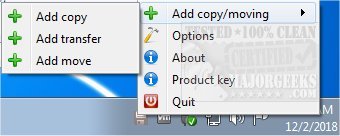
Ultracopier 3.0.2.1 has been released, enhancing its capabilities as an Open Source file management utility. This software is specifically designed to facilitate fast copying, moving, and transferring of files and folders, making it an excellent alternative to the default file copy dialogs in Windows Explorer.
With Ultracopier, users can efficiently organize their files without the hassle of excessive clicks and time-consuming processes. The software allows users to view a comprehensive list of files, choose the order in which they wish to copy, and offers the ability to pause, resume, or skip specific files during the transfer process. Its intuitive interface caters to users of all skill levels, providing enhanced control and speed in file management tasks.
Key features of Ultracopier include:
- Play/pause functionality for managing transfers
- Speed limitation settings to control transfer rates
- On-error resume capabilities to continue interrupted transfers
- Error and collision management to handle issues that arise during file transfers
- Data security features to protect sensitive information
- Intelligent reorganization of file transfers to optimize performance
In addition to these features, Ultracopier is a valuable tool for individuals looking to improve their file management efficiency. Users may also find related resources helpful, such as guides on changing default drag-and-drop actions, resetting folder view settings, and displaying hidden files in Windows.
As Ultracopier continues to evolve, future updates may introduce even more functionalities, catering to the ever-changing needs of file management in various operating systems. Users are encouraged to explore its features and consider how Ultracopier can enhance their daily file transfer routines
With Ultracopier, users can efficiently organize their files without the hassle of excessive clicks and time-consuming processes. The software allows users to view a comprehensive list of files, choose the order in which they wish to copy, and offers the ability to pause, resume, or skip specific files during the transfer process. Its intuitive interface caters to users of all skill levels, providing enhanced control and speed in file management tasks.
Key features of Ultracopier include:
- Play/pause functionality for managing transfers
- Speed limitation settings to control transfer rates
- On-error resume capabilities to continue interrupted transfers
- Error and collision management to handle issues that arise during file transfers
- Data security features to protect sensitive information
- Intelligent reorganization of file transfers to optimize performance
In addition to these features, Ultracopier is a valuable tool for individuals looking to improve their file management efficiency. Users may also find related resources helpful, such as guides on changing default drag-and-drop actions, resetting folder view settings, and displaying hidden files in Windows.
As Ultracopier continues to evolve, future updates may introduce even more functionalities, catering to the ever-changing needs of file management in various operating systems. Users are encouraged to explore its features and consider how Ultracopier can enhance their daily file transfer routines
Ultracopier 3.0.2.1 released
Ultracopier is an Open Source file management utility designed for fast copying, moving, and transferring of files/folders.