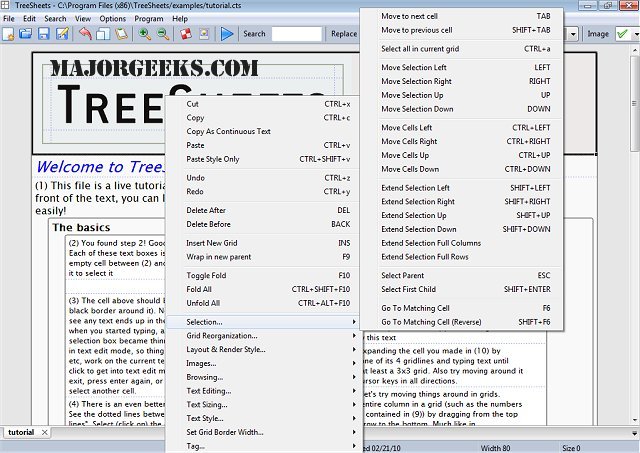
TreeSheets is a multifaceted office application that merges the functionalities of spreadsheets, mind mappers, outliners, personal information managers, text editors, and small database utilities into a single platform designed for efficient data organization. It aims to provide a more flexible and user-friendly alternative to traditional spreadsheets, which can often feel rigid and limiting.
Key Features and Functionalities
TreeSheets stands out by offering a unique hierarchical spreadsheet format that enhances both data entry and organization. Here’s how it excels in various areas:
- Hierarchical Structure: Unlike conventional spreadsheets that can become cluttered with numerous sheets and complex formulas, TreeSheets presents a cleaner, tree-like organization that facilitates easier data management.
- Outliner and Mind-Mapping Capabilities: It allows users to arrange ideas and tasks hierarchically, making it an effective tool for brainstorming while maintaining the structured feel of a spreadsheet.
- Personal Information Management: TreeSheets serves as a compact database for managing contacts, inventories, and linked notes, providing a structured approach to various tasks without needing multiple applications.
Despite its versatility, TreeSheets faces the challenge of balancing its multi-purpose design. While it excels at managing to-do lists and project planning, it doesn’t fully capture the intricacies of dedicated software for specific tasks. Nonetheless, its structured and multi-dimensional approach makes it a strong candidate for those juggling various data-related needs.
Practical Use Cases
TreeSheets is not just about aesthetics; it’s designed for practical applications across numerous tasks:
- Project Planning: Users can break down goals into actionable steps and cross-link them for clarity.
- To-Do Lists: Its hierarchical structure makes it more efficient than traditional nested outlines.
- Brainstorming: Ideas can be visualized in a hierarchical format without becoming lost among separate sheets.
- Information Organization: It keeps related data together in a compact and structured manner.
Additionally, TreeSheets supports various file formats for saving work, including XML, CSV, HTML, text, and images, and allows for easy import from other projects.
System Requirements and Performance
TreeSheets is remarkably lightweight, operating efficiently with a small memory footprint—only about 5MB even when multiple documents are open. This efficiency allows it to run quietly in the background, making it convenient for quick data entries or document outlines without significant system slowdowns. Its low resource demands make it particularly suitable for users on older systems, such as Windows 7.
Conclusion
TreeSheets presents a compelling solution for users seeking a versatile data organization tool that integrates features from spreadsheets, outlines, and mind maps. Its hierarchical structure simplifies data management without overwhelming users with complexity. However, it is important to note that it does not claim to offer advanced AI capabilities or to perfectly fulfill every specific function like dedicated software.
For those in need of an all-in-one solution for diverse data-heavy tasks, TreeSheets is worth exploring. Its unique blend of functionalities may help streamline workflows without the cumbersome nature of specialized applications.
Extension Ideas
Future developments could focus on enhancing TreeSheets' AI capabilities, potentially integrating smart suggestions for data organization or automated task management. Additionally, expanding compatibility with cloud services could improve collaboration and data sharing among users.
Moreover, introducing customizable templates for specific industries or tasks could further enhance TreeSheets’ appeal, making it a go-to tool for professionals across various fields. Finally, ongoing user feedback could help refine existing features and introduce new ones aligned with evolving data organization needs
Key Features and Functionalities
TreeSheets stands out by offering a unique hierarchical spreadsheet format that enhances both data entry and organization. Here’s how it excels in various areas:
- Hierarchical Structure: Unlike conventional spreadsheets that can become cluttered with numerous sheets and complex formulas, TreeSheets presents a cleaner, tree-like organization that facilitates easier data management.
- Outliner and Mind-Mapping Capabilities: It allows users to arrange ideas and tasks hierarchically, making it an effective tool for brainstorming while maintaining the structured feel of a spreadsheet.
- Personal Information Management: TreeSheets serves as a compact database for managing contacts, inventories, and linked notes, providing a structured approach to various tasks without needing multiple applications.
Despite its versatility, TreeSheets faces the challenge of balancing its multi-purpose design. While it excels at managing to-do lists and project planning, it doesn’t fully capture the intricacies of dedicated software for specific tasks. Nonetheless, its structured and multi-dimensional approach makes it a strong candidate for those juggling various data-related needs.
Practical Use Cases
TreeSheets is not just about aesthetics; it’s designed for practical applications across numerous tasks:
- Project Planning: Users can break down goals into actionable steps and cross-link them for clarity.
- To-Do Lists: Its hierarchical structure makes it more efficient than traditional nested outlines.
- Brainstorming: Ideas can be visualized in a hierarchical format without becoming lost among separate sheets.
- Information Organization: It keeps related data together in a compact and structured manner.
Additionally, TreeSheets supports various file formats for saving work, including XML, CSV, HTML, text, and images, and allows for easy import from other projects.
System Requirements and Performance
TreeSheets is remarkably lightweight, operating efficiently with a small memory footprint—only about 5MB even when multiple documents are open. This efficiency allows it to run quietly in the background, making it convenient for quick data entries or document outlines without significant system slowdowns. Its low resource demands make it particularly suitable for users on older systems, such as Windows 7.
Conclusion
TreeSheets presents a compelling solution for users seeking a versatile data organization tool that integrates features from spreadsheets, outlines, and mind maps. Its hierarchical structure simplifies data management without overwhelming users with complexity. However, it is important to note that it does not claim to offer advanced AI capabilities or to perfectly fulfill every specific function like dedicated software.
For those in need of an all-in-one solution for diverse data-heavy tasks, TreeSheets is worth exploring. Its unique blend of functionalities may help streamline workflows without the cumbersome nature of specialized applications.
Extension Ideas
Future developments could focus on enhancing TreeSheets' AI capabilities, potentially integrating smart suggestions for data organization or automated task management. Additionally, expanding compatibility with cloud services could improve collaboration and data sharing among users.
Moreover, introducing customizable templates for specific industries or tasks could further enhance TreeSheets’ appeal, making it a go-to tool for professionals across various fields. Finally, ongoing user feedback could help refine existing features and introduce new ones aligned with evolving data organization needs
TreeSheets 3136 released
TreeSheets combines spreadsheet tools, mind mappers, outliners, personal information managers, text editors and small database utilities into an all-in-one office application.