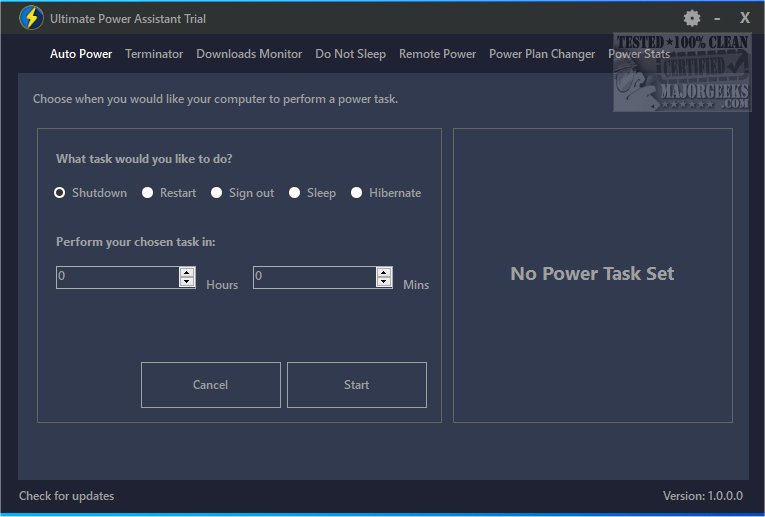
The Ultimate Power Assistant is a newly released tool aimed at enhancing the management of your computer's power settings and tasks. It offers a streamlined approach to customize energy usage, extend battery life, and boost overall system performance. Users can conveniently schedule tasks and automate power-related actions, giving them more control over their computer's power management.
User-Friendly Interface
This tool is designed with a user-friendly interface that simplifies the scheduling and implementation of various power options within the Windows operating system. A standout feature allows users to toggle between different power plans automatically when launching specific programs or games. Once the program or game is closed, the power settings revert to their original state, providing a seamless experience.
Preventing Idle State
Ultimate Power Assistant includes a feature that prevents the computer from entering an idle state. This ensures that the display remains active, preventing it from going blank or activating the screensaver. For those who prefer not to manually adjust display settings, a one-click option is available to easily enable this feature.
Timed App/Game Termination
Another practical functionality of Ultimate Power Assistant is the ability to set a timer for automatically closing a program or game after a specified duration. This feature helps in efficient power management by terminating unnecessary applications and freeing up system resources.
Conclusion
With Ultimate Power Assistant, users can gain comprehensive control over their computer's power settings and tasks. This advanced tool is designed to optimize performance and energy efficiency, making it an invaluable asset for anyone looking to enhance their computing experience.
Further Learning Resources
For users interested in learning more about power management, the following resources are available:
- How to Change Power Plan Settings in Windows 10 & 11
- How to See Your Active Power Plan in Windows
- How to Turn on the Ultimate Performance Power Plan in Windows 10 & 11
- How to Add or Remove Select Power Plan Context Menu in Windows 10 & 11
- How to See if Power Throttling is Enabled in Windows 10 & 11
Future Updates
As technology evolves, further updates to Ultimate Power Assistant may introduce additional features, enhance user experience, and adapt to new operating system updates. Users are encouraged to stay informed about the latest functionalities and improvements
User-Friendly Interface
This tool is designed with a user-friendly interface that simplifies the scheduling and implementation of various power options within the Windows operating system. A standout feature allows users to toggle between different power plans automatically when launching specific programs or games. Once the program or game is closed, the power settings revert to their original state, providing a seamless experience.
Preventing Idle State
Ultimate Power Assistant includes a feature that prevents the computer from entering an idle state. This ensures that the display remains active, preventing it from going blank or activating the screensaver. For those who prefer not to manually adjust display settings, a one-click option is available to easily enable this feature.
Timed App/Game Termination
Another practical functionality of Ultimate Power Assistant is the ability to set a timer for automatically closing a program or game after a specified duration. This feature helps in efficient power management by terminating unnecessary applications and freeing up system resources.
Conclusion
With Ultimate Power Assistant, users can gain comprehensive control over their computer's power settings and tasks. This advanced tool is designed to optimize performance and energy efficiency, making it an invaluable asset for anyone looking to enhance their computing experience.
Further Learning Resources
For users interested in learning more about power management, the following resources are available:
- How to Change Power Plan Settings in Windows 10 & 11
- How to See Your Active Power Plan in Windows
- How to Turn on the Ultimate Performance Power Plan in Windows 10 & 11
- How to Add or Remove Select Power Plan Context Menu in Windows 10 & 11
- How to See if Power Throttling is Enabled in Windows 10 & 11
Future Updates
As technology evolves, further updates to Ultimate Power Assistant may introduce additional features, enhance user experience, and adapt to new operating system updates. Users are encouraged to stay informed about the latest functionalities and improvements
Ultimate Power Assistant 1.1.26.0 released
Ultimate Power Assistant provides a more efficient way to manage your computer's power settings and tasks.