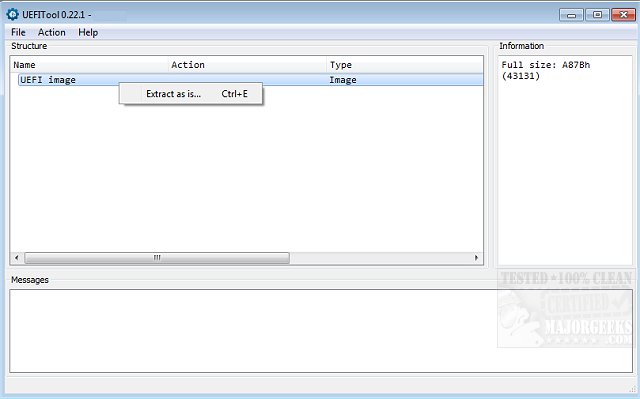
The recently released UEFITool A75 is a powerful utility designed for managing UEFI firmware images. This tool provides users with capabilities to modify, parse, and extract data from UEFI firmware, making it a valuable asset for developers and advanced users alike. UEFITool supports a wide range of BIOS image formats, including ROM, BIN, FD, CAP, BIO, WPH, and EFI. It effectively parses full BIOS images, including critical components like the flash descriptor and any binary files that contain UEFI volumes.
With UEFITool A75, users can extract specific data, insert new elements into the image structure, and remove any unnecessary components as needed. The interface displays all loaded images along with essential details such as their name, type, subtype, and accompanying text, facilitating easy navigation and editing. After making the necessary modifications, users can conveniently export the edited image.
In addition to its core functionalities, UEFITool A75 places a strong emphasis on user experience, providing clear options for managing BIOS settings effectively. The tool also offers guidance on related tasks such as resetting BIOS to optimal factory settings, checking the current BIOS version, and troubleshooting common issues like boot device errors.
As UEFI firmware continues to evolve, tools like UEFITool A75 are crucial for ensuring that users can keep their systems updated and functioning optimally. This release is expected to enhance the toolkit available for BIOS management, allowing for more flexibility and control over firmware modifications.
Overall, UEFITool A75 is a significant upgrade that not only streamlines the process of working with UEFI firmware but also empowers users to take charge of their system's firmware configurations with ease
With UEFITool A75, users can extract specific data, insert new elements into the image structure, and remove any unnecessary components as needed. The interface displays all loaded images along with essential details such as their name, type, subtype, and accompanying text, facilitating easy navigation and editing. After making the necessary modifications, users can conveniently export the edited image.
In addition to its core functionalities, UEFITool A75 places a strong emphasis on user experience, providing clear options for managing BIOS settings effectively. The tool also offers guidance on related tasks such as resetting BIOS to optimal factory settings, checking the current BIOS version, and troubleshooting common issues like boot device errors.
As UEFI firmware continues to evolve, tools like UEFITool A75 are crucial for ensuring that users can keep their systems updated and functioning optimally. This release is expected to enhance the toolkit available for BIOS management, allowing for more flexibility and control over firmware modifications.
Overall, UEFITool A75 is a significant upgrade that not only streamlines the process of working with UEFI firmware but also empowers users to take charge of their system's firmware configurations with ease
UEFITool A75 released
UEFITool allows the modification, parsing, and extraction of UEFI firmware images.