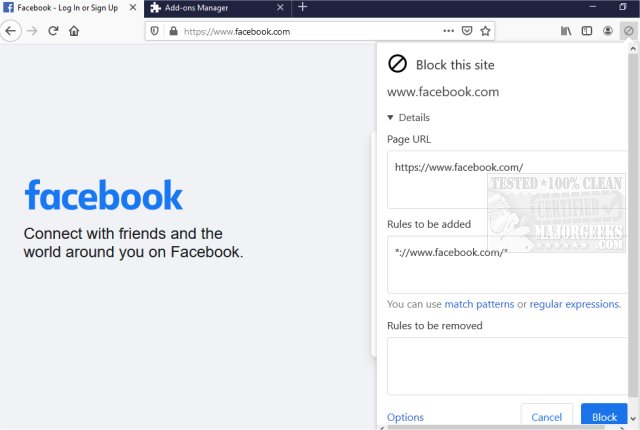
The latest version, 9.9.0, of uBlacklist for Chrome and Firefox has been released, enhancing users' ability to customize their Google search results by removing specific websites. This tool empowers users to create rules for blocking unwanted sites directly from the search result pages by using either match patterns (like *://*.example.com/*) or regular expressions (such as /example\.(net|org)/). Adding sites to the blacklist is straightforward, though users must remember that the blocks are specific to each address, which allows for continued visibility of other relevant topics.
Additionally, uBlacklist offers the functionality to sync blacklists across devices via Google Drive and allows users to subscribe to public blacklists, making it an excellent resource for tailoring search results. This extension is particularly beneficial for researchers and users looking to avoid distractions from less relevant or time-wasting results, enabling a more focused search experience.
In summary, uBlacklist is a powerful browser extension that enhances search efficiency, enabling users to filter out unwanted content and optimize their browsing experience. With its user-friendly interface and synchronization features, it stands out as a valuable tool for anyone looking to refine their online searches.
Future developments could include improved user customization options, such as more intuitive interface updates or additional integrations with other browsing tools, further enhancing the user experience and functionality of uBlacklist
Additionally, uBlacklist offers the functionality to sync blacklists across devices via Google Drive and allows users to subscribe to public blacklists, making it an excellent resource for tailoring search results. This extension is particularly beneficial for researchers and users looking to avoid distractions from less relevant or time-wasting results, enabling a more focused search experience.
In summary, uBlacklist is a powerful browser extension that enhances search efficiency, enabling users to filter out unwanted content and optimize their browsing experience. With its user-friendly interface and synchronization features, it stands out as a valuable tool for anyone looking to refine their online searches.
Future developments could include improved user customization options, such as more intuitive interface updates or additional integrations with other browsing tools, further enhancing the user experience and functionality of uBlacklist
uBlacklist for Chrome and Firefox 9.9.0 released
uBlacklist for Chrome and Firefox removes specific sites from showing up in Google search.
uBlacklist for Chrome and Firefox 9.9.0 released @ MajorGeeks