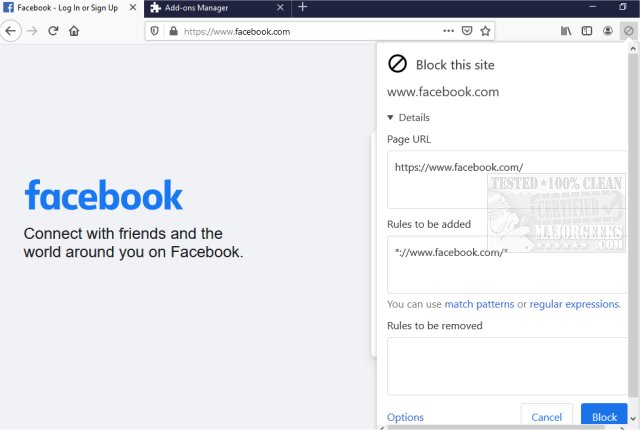
The recently released version 10.0.3 of uBlacklist for both Chrome and Firefox offers users the ability to filter out unwanted websites from their Google search results. This tool is particularly useful for those who want to customize their browsing experience by removing specific sites that may be irrelevant or distracting. Users can easily add websites to their blacklist by clicking on the toolbar icon and specifying the rules through match patterns or regular expressions.
Additionally, uBlacklist supports syncing of blacklists across devices using Google Drive, and users can also subscribe to publicly available blacklists. This flexibility makes it an effective tool for research, allowing users to focus on more pertinent topics instead of the usual top search results. Furthermore, it helps in avoiding time-wasting content that may clutter search result pages.
In summary, uBlacklist is not just a browser extension; it is a powerful tool for enhancing online research and improving the overall browsing experience by allowing users to tailor their search results according to their preferences. As digital landscapes continue to evolve, tools like uBlacklist become essential for managing the information we encounter online.
Going forward, users might also find similar browser enhancements, such as improving browsing speed with specific Google Chrome flags, methods to prevent browsers from storing history, or tips for revitalizing the performance of Chrome and Firefox. These complementary tools can further enhance the browsing experience, making it more efficient and user-friendly
Additionally, uBlacklist supports syncing of blacklists across devices using Google Drive, and users can also subscribe to publicly available blacklists. This flexibility makes it an effective tool for research, allowing users to focus on more pertinent topics instead of the usual top search results. Furthermore, it helps in avoiding time-wasting content that may clutter search result pages.
In summary, uBlacklist is not just a browser extension; it is a powerful tool for enhancing online research and improving the overall browsing experience by allowing users to tailor their search results according to their preferences. As digital landscapes continue to evolve, tools like uBlacklist become essential for managing the information we encounter online.
Going forward, users might also find similar browser enhancements, such as improving browsing speed with specific Google Chrome flags, methods to prevent browsers from storing history, or tips for revitalizing the performance of Chrome and Firefox. These complementary tools can further enhance the browsing experience, making it more efficient and user-friendly
uBlacklist for Chrome and Firefox 10.0.3 released
uBlacklist for Chrome and Firefox removes specific sites from showing up in Google search.
uBlacklist for Chrome and Firefox 10.0.3 released @ MajorGeeks