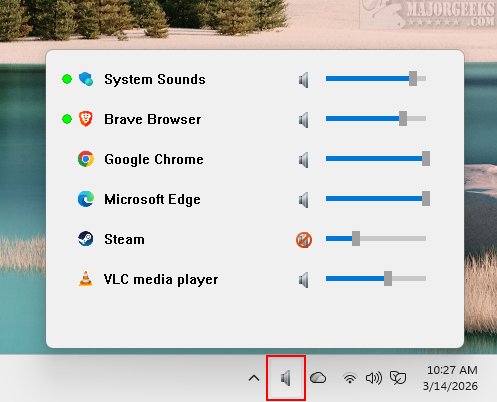
TweakNow Volume Hub version 1.3.0 has been released, offering a compact and efficient portable volume mixer specifically designed for Windows 11 users. This application allows for easy adjustment of audio levels for individual applications, providing a tailored audio experience without disrupting your workflow. It operates quietly from the system tray, eliminating the need for multiple steps to access the Windows volume mixer, which can often be cumbersome when managing system sounds and media from various applications.
The primary advantage of TweakNow Volume Hub is its ability to simplify audio management. Users can access a straightforward menu that lists all applications currently producing sound, allowing for quick manual volume adjustments through dedicated sliders for each application. This instant control facilitates faster audio management, enhancing user convenience.
The application is designed for seamless operation from the system tray, ensuring minimal impact on system resources. Its intuitive interface allows users to quickly bring the application to the foreground with a click while easily hiding it to maintain workflow continuity. With a modern aesthetic that fits well within the Windows 11 environment, TweakNow Volume Hub stands out as a portable and efficient tool for audio control.
For those who find navigating through multiple menus to adjust audio levels frustrating, TweakNow Volume Hub is the ideal solution. As a lightweight and portable tool, it serves as a convenient "one-click" utility that provides immediate access to the entire Windows Audio Engine, making it an invaluable resource for users seeking streamlined audio management.
Extended Insights:
In addition to its core functionalities, TweakNow Volume Hub could potentially integrate advanced features such as audio presets for specific use cases (e.g., gaming, video conferencing, or media playback), allowing users to switch between tailored audio settings quickly. Furthermore, the application could benefit from cloud synchronization, enabling users to save their settings and preferences across multiple devices seamlessly. As technology continues to evolve, incorporating artificial intelligence could also enhance the user experience by automatically adjusting audio levels based on context, such as lowering background music during a call or boosting sound effects while gaming. Overall, TweakNow Volume Hub offers a promising foundation for further enhancements in the realm of audio control on Windows 11
The primary advantage of TweakNow Volume Hub is its ability to simplify audio management. Users can access a straightforward menu that lists all applications currently producing sound, allowing for quick manual volume adjustments through dedicated sliders for each application. This instant control facilitates faster audio management, enhancing user convenience.
The application is designed for seamless operation from the system tray, ensuring minimal impact on system resources. Its intuitive interface allows users to quickly bring the application to the foreground with a click while easily hiding it to maintain workflow continuity. With a modern aesthetic that fits well within the Windows 11 environment, TweakNow Volume Hub stands out as a portable and efficient tool for audio control.
For those who find navigating through multiple menus to adjust audio levels frustrating, TweakNow Volume Hub is the ideal solution. As a lightweight and portable tool, it serves as a convenient "one-click" utility that provides immediate access to the entire Windows Audio Engine, making it an invaluable resource for users seeking streamlined audio management.
Extended Insights:
In addition to its core functionalities, TweakNow Volume Hub could potentially integrate advanced features such as audio presets for specific use cases (e.g., gaming, video conferencing, or media playback), allowing users to switch between tailored audio settings quickly. Furthermore, the application could benefit from cloud synchronization, enabling users to save their settings and preferences across multiple devices seamlessly. As technology continues to evolve, incorporating artificial intelligence could also enhance the user experience by automatically adjusting audio levels based on context, such as lowering background music during a call or boosting sound effects while gaming. Overall, TweakNow Volume Hub offers a promising foundation for further enhancements in the realm of audio control on Windows 11
TweakNow Volume Hub 1.3.0 released
TweakNow Volume Hub: an efficient and lightweight portable volume mixer designed specifically for Windows 11. It lets you easily adjust the volume for individual applications, providing a customized audio experience.