Kalmuri version 4.2.6 has been released, enhancing its reputation as an easy-to-use screen capture application. This versatile tool allows users to seamlessly capture and record their screens, functioning as both a snapshot utility and a screen recorder. It operates quietly in the system tray, ensuring that it does not disrupt ongoing tasks.
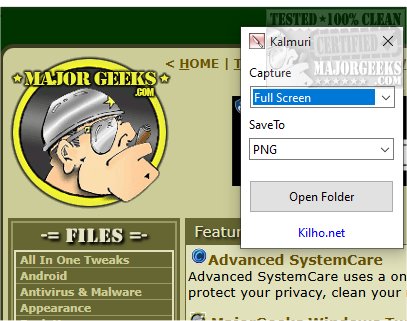
The application features a user-friendly interface with two primary drop-down menus. The first menu enables users to select their desired action, while the second menu allows them to choose the output format. Although the initial options may appear limited, a right-click in the main window reveals an extensive menu with additional features, including options for file naming, sound settings adjustments, setting default hotkeys for screen captures, and designating default folders for saving images and videos.
Kalmuri supports various output formats to cater to different needs. Users can select from popular image formats such as PNG, JPG, GIF, and BMP, allowing flexibility for specific project requirements. Screenshots can be saved locally, copied to the clipboard, printed, or uploaded to Imgbox. Additionally, Kalmuri includes a built-in browser for capturing website snapshots.
As a screen recorder, Kalmuri offers the option to record videos in MP4 format, allowing users to capture the entire screen or a specific area, with the option to include the cursor. This feature is particularly useful for creating video tutorials.
Overall, Kalmuri is an efficient and user-friendly screen-capturing tool that combines a streamlined set of features with a minimalistic design, making it accessible for all users. Whether for presentations, tutorials, or saving important information, Kalmuri provides reliable functionality that is definitely worth exploring.
In summary, Kalmuri 4.2.6 is a powerful tool for anyone looking to capture screen activity efficiently. It combines ease of use with robust features, making it ideal for both casual users and professionals alike. As technology continues to evolve, it would be interesting to see how Kalmuri develops further, perhaps incorporating advanced features like cloud storage integration or enhanced editing tools directly within the application. This would not only improve user convenience but also broaden its appeal in a competitive market
The application features a user-friendly interface with two primary drop-down menus. The first menu enables users to select their desired action, while the second menu allows them to choose the output format. Although the initial options may appear limited, a right-click in the main window reveals an extensive menu with additional features, including options for file naming, sound settings adjustments, setting default hotkeys for screen captures, and designating default folders for saving images and videos.
Kalmuri supports various output formats to cater to different needs. Users can select from popular image formats such as PNG, JPG, GIF, and BMP, allowing flexibility for specific project requirements. Screenshots can be saved locally, copied to the clipboard, printed, or uploaded to Imgbox. Additionally, Kalmuri includes a built-in browser for capturing website snapshots.
As a screen recorder, Kalmuri offers the option to record videos in MP4 format, allowing users to capture the entire screen or a specific area, with the option to include the cursor. This feature is particularly useful for creating video tutorials.
Overall, Kalmuri is an efficient and user-friendly screen-capturing tool that combines a streamlined set of features with a minimalistic design, making it accessible for all users. Whether for presentations, tutorials, or saving important information, Kalmuri provides reliable functionality that is definitely worth exploring.
In summary, Kalmuri 4.2.6 is a powerful tool for anyone looking to capture screen activity efficiently. It combines ease of use with robust features, making it ideal for both casual users and professionals alike. As technology continues to evolve, it would be interesting to see how Kalmuri develops further, perhaps incorporating advanced features like cloud storage integration or enhanced editing tools directly within the application. This would not only improve user convenience but also broaden its appeal in a competitive market
Kalmuri 4.2.6 released
Capture and record your screen with Kalmuri, the easy-to-use screen capture app.