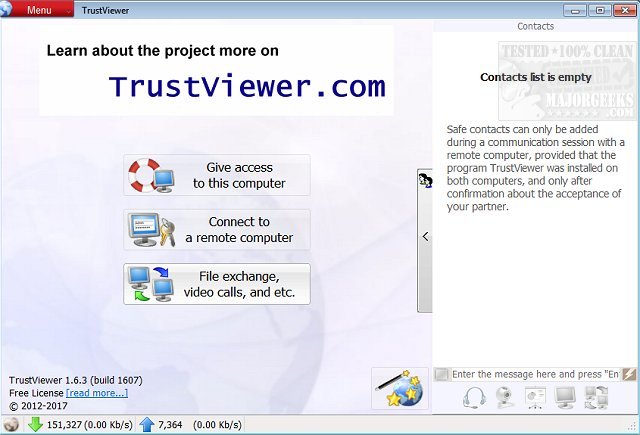
TrustViewer version 2.15.1.6176 has been released, providing users with a versatile tool for connecting to other computers to share files, perform repairs, and more. Despite its simplistic, old-school interface and a small file size of around 2MB, TrustViewer offers a user-friendly layout with four main options on the home screen: granting access, connecting to a remote computer, exchanging files, and installing the software on the current device as opposed to using it in portable mode.
To utilize the software, users must create and share a nine-digit password for remote access. Additional features, such as setting a profile picture and configuring logging options, are available under the settings menu. Some advanced features may require a subscription for a minimal fee, typical of many free software models aimed at personal use.
Overall, TrustViewer impresses with its simplicity, quick connectivity, and extensive functionality, positioning it among the top remote access applications available today.
To extend this summary, it's worth noting that TrustViewer can be especially beneficial for IT support staff and businesses that require efficient remote troubleshooting. The ability to conduct video calls, alongside file sharing and repair functionalities, enhances collaboration and communication during remote sessions. Additionally, the software could be useful for educational purposes, allowing teachers to assist students directly on their devices. As remote work and online interactions continue to rise, tools like TrustViewer will likely become even more integral to everyday operations in various fields
To utilize the software, users must create and share a nine-digit password for remote access. Additional features, such as setting a profile picture and configuring logging options, are available under the settings menu. Some advanced features may require a subscription for a minimal fee, typical of many free software models aimed at personal use.
Overall, TrustViewer impresses with its simplicity, quick connectivity, and extensive functionality, positioning it among the top remote access applications available today.
To extend this summary, it's worth noting that TrustViewer can be especially beneficial for IT support staff and businesses that require efficient remote troubleshooting. The ability to conduct video calls, alongside file sharing and repair functionalities, enhances collaboration and communication during remote sessions. Additionally, the software could be useful for educational purposes, allowing teachers to assist students directly on their devices. As remote work and online interactions continue to rise, tools like TrustViewer will likely become even more integral to everyday operations in various fields
TrustViewer 2.15.1.6176 released
TrustViewer allows you to connect or be connected to another computer to share files, make repairs, and more.