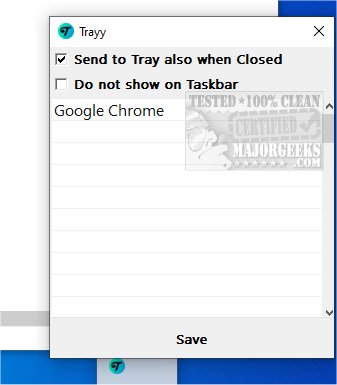
Trayy is a cutting-edge Open Source tool that revolutionizes the system tray experience by allowing users to seamlessly integrate web applications, shortcuts, and various utilities directly into the systray. This integration facilitates quick and easy access to frequently used tools, streamlining workflows and boosting productivity.
What is Trayy?
Trayy enhances the systray experience by focusing on the integration of Progressive Web Apps (PWAs) alongside other applications that typically lack system tray support. Inspired by RBTray, Trayy aims to provide a minimalistic interface that reduces desktop clutter while fostering an organized workspace.
Key Features of Trayy:
- Send to Tray: Users can effortlessly send their favorite applications to the system tray, creating a tidy workspace.
- Hide and Seek Champion: The tool allows for complete hiding of applications from the taskbar, maintaining a clean desktop environment.
- App Support: Trayy is particularly effective for PWAs and other applications, such as Thunderbird, that may not traditionally support system tray features.
- Windows Compatibility: It has been tested on Windows 10 and 11, boasting support for toast notifications.
- Lightweight Design: Trayy is fully portable, lightweight, and designed for efficiency, ensuring a focused workflow.
Boosting Productivity:
By offering easy access to frequently used applications, Trayy helps users maintain focus, ensuring that workflows remain uninterrupted. Its support for PWAs allows users to maximize the functionalities of web-based tools, ultimately enhancing productivity. Trayy simplifies the management of multiple applications, leading to a smoother user experience.
Getting Started with Trayy:
For new users, the Getting Started section provides straightforward instructions on how to set up and utilize Trayy effectively.
Geek Verdict:
Trayy emerges as a standout application for system tray management, making it an excellent choice for individuals seeking to optimize their workspace and minimize distractions while focusing on important tasks.
Related Tools:
For those interested in enhancing their Windows experience, other resources include MajorGeeks Registry Tweaks, guides on customizing the Start and Taskbar colors, and tutorials on adjusting text sizes in Windows 10.
In conclusion, Trayy 3.1 is not just an upgrade but a significant step forward in how users can manage their applications and enhance their productivity in an increasingly digital workspace. With its unique features and user-friendly design, Trayy is poised to become an essential tool for anyone looking to streamline their daily tasks
What is Trayy?
Trayy enhances the systray experience by focusing on the integration of Progressive Web Apps (PWAs) alongside other applications that typically lack system tray support. Inspired by RBTray, Trayy aims to provide a minimalistic interface that reduces desktop clutter while fostering an organized workspace.
Key Features of Trayy:
- Send to Tray: Users can effortlessly send their favorite applications to the system tray, creating a tidy workspace.
- Hide and Seek Champion: The tool allows for complete hiding of applications from the taskbar, maintaining a clean desktop environment.
- App Support: Trayy is particularly effective for PWAs and other applications, such as Thunderbird, that may not traditionally support system tray features.
- Windows Compatibility: It has been tested on Windows 10 and 11, boasting support for toast notifications.
- Lightweight Design: Trayy is fully portable, lightweight, and designed for efficiency, ensuring a focused workflow.
Boosting Productivity:
By offering easy access to frequently used applications, Trayy helps users maintain focus, ensuring that workflows remain uninterrupted. Its support for PWAs allows users to maximize the functionalities of web-based tools, ultimately enhancing productivity. Trayy simplifies the management of multiple applications, leading to a smoother user experience.
Getting Started with Trayy:
For new users, the Getting Started section provides straightforward instructions on how to set up and utilize Trayy effectively.
Geek Verdict:
Trayy emerges as a standout application for system tray management, making it an excellent choice for individuals seeking to optimize their workspace and minimize distractions while focusing on important tasks.
Related Tools:
For those interested in enhancing their Windows experience, other resources include MajorGeeks Registry Tweaks, guides on customizing the Start and Taskbar colors, and tutorials on adjusting text sizes in Windows 10.
In conclusion, Trayy 3.1 is not just an upgrade but a significant step forward in how users can manage their applications and enhance their productivity in an increasingly digital workspace. With its unique features and user-friendly design, Trayy is poised to become an essential tool for anyone looking to streamline their daily tasks
Trayy 3.1 released
Trayy is an Open Source tool designed to enhance the systray experience by enabling you to integrate web applications, shortcuts, and various utilities directly into the tray.