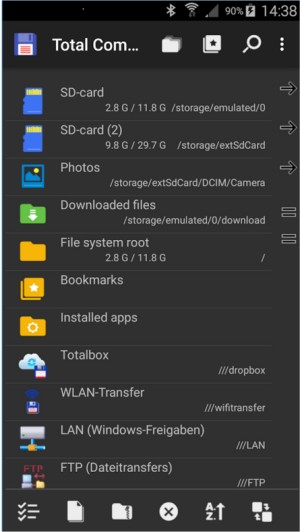
Total Commander has released version 11.58 RC2 and version 11.57, solidifying its reputation as a powerful file manager for both Windows and Android platforms. Unlike the default Windows Explorer, Total Commander offers a more robust approach to file management, featuring a dual-pane interface that allows users to navigate and manage files efficiently without the hassle of constant back-and-forth navigation.
This file manager supports an extensive range of archive formats—including ZIP, RAR, 7Z, TAR, and GZ—enabling users to browse, extract, or create archives directly within the app. Additionally, it includes a built-in FTP client that simplifies remote server access for tasks like backups and website maintenance, supporting secure protocols such as FTPS and SFTP.
Total Commander also excels in customization and efficiency. Users can integrate the Everything search tool for fast file searches, and the software's extensive plugin library allows for additional features, such as browsing Android devices or cloud syncing with services like Dropbox and OneDrive. Keyboard shortcuts enhance navigation speed, making it ideal for users who prioritize efficiency over graphical interfaces.
For practical tasks, the Multi-Rename Tool is highlighted as one of the best in its class for batch renaming files with live preview options. Users can easily manage large backups, locate duplicate files, and delete unnecessary temporary files using the program's search capabilities.
Pros of Total Commander include its lightweight design, stability, and the absence of intrusive ads. However, its user interface may seem dated to some, and there is a learning curve associated with its layout and shortcuts.
In summary, Total Commander is a utility-focused file manager that caters to power users, sysadmins, and developers who appreciate function over form. It provides a seamless experience for file management tasks, making it a valuable tool for anyone looking to enhance their file organization and processing capabilities. Whether it's for cleaning up old files, managing servers, or simply seeking a more efficient alternative to Windows Explorer, Total Commander proves itself as an essential application that deserves a place on your device.
To extend this summary, it's worth noting that with ongoing developments and updates, Total Commander continues to evolve and adapt to user needs. Future versions could potentially introduce even more features, such as enhanced cloud integration or advanced automation tools, further solidifying its position as the go-to file manager for both casual users and IT professionals alike. As technology progresses, the demand for effective file management solutions will likely increase, and Total Commander is well-positioned to meet those demands with its ongoing commitment to utility and user satisfaction
This file manager supports an extensive range of archive formats—including ZIP, RAR, 7Z, TAR, and GZ—enabling users to browse, extract, or create archives directly within the app. Additionally, it includes a built-in FTP client that simplifies remote server access for tasks like backups and website maintenance, supporting secure protocols such as FTPS and SFTP.
Total Commander also excels in customization and efficiency. Users can integrate the Everything search tool for fast file searches, and the software's extensive plugin library allows for additional features, such as browsing Android devices or cloud syncing with services like Dropbox and OneDrive. Keyboard shortcuts enhance navigation speed, making it ideal for users who prioritize efficiency over graphical interfaces.
For practical tasks, the Multi-Rename Tool is highlighted as one of the best in its class for batch renaming files with live preview options. Users can easily manage large backups, locate duplicate files, and delete unnecessary temporary files using the program's search capabilities.
Pros of Total Commander include its lightweight design, stability, and the absence of intrusive ads. However, its user interface may seem dated to some, and there is a learning curve associated with its layout and shortcuts.
In summary, Total Commander is a utility-focused file manager that caters to power users, sysadmins, and developers who appreciate function over form. It provides a seamless experience for file management tasks, making it a valuable tool for anyone looking to enhance their file organization and processing capabilities. Whether it's for cleaning up old files, managing servers, or simply seeking a more efficient alternative to Windows Explorer, Total Commander proves itself as an essential application that deserves a place on your device.
To extend this summary, it's worth noting that with ongoing developments and updates, Total Commander continues to evolve and adapt to user needs. Future versions could potentially introduce even more features, such as enhanced cloud integration or advanced automation tools, further solidifying its position as the go-to file manager for both casual users and IT professionals alike. As technology progresses, the demand for effective file management solutions will likely increase, and Total Commander is well-positioned to meet those demands with its ongoing commitment to utility and user satisfaction
Total Commander 11.58 RC2 / 11.57 released
Total Commander is an all-in-one file manager for your Windows and Android devices.