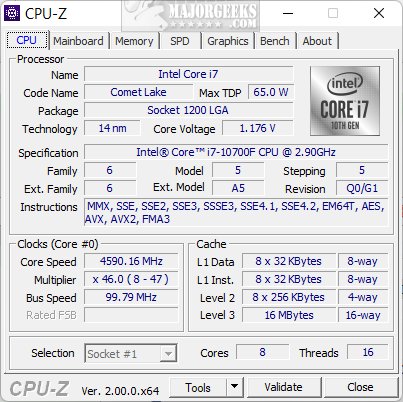
CPU-Z 2.20.2 has been released, providing users with a free utility from CPUID that offers in-depth information regarding computer hardware. This tool is particularly useful for PC enthusiasts, performance seekers, and anyone needing to diagnose issues or optimize their system's performance.
CPU-Z simplifies the process of understanding hardware specifications. Users can easily check essential details about their CPU, motherboard, RAM, and GPU without physically opening their machines. This makes it an invaluable resource for those looking to upgrade components or troubleshoot problems.
Key features of CPU-Z include:
- Processor Information: Displays the name, core and thread count, clock speeds, cache sizes, and manufacturing codenames of the CPU.
- Motherboard Details: Provides insights into the motherboard's manufacturer, model, chipset, and BIOS version.
- Memory (RAM) Insights: Offers information on RAM type, size, speed, and latency, aiding in upgrade decisions.
- Graphics Card Specifications: Lists details about the integrated or discrete GPU, including name and memory specifications.
- Real-Time Monitoring: Tracks core voltages, frequencies, and utilization, essential for overclockers.
- Benchmarking Tool: Allows users to test CPU performance in different tasks and compare results.
- Report Generation: Users can export hardware data for easy sharing or documentation purposes.
CPU-Z is portable and customizable, allowing users to run it from a USB drive without installation. It is available on Windows and Android platforms, but unfortunately not on Mac. Customization options enhance the user experience, including adjusting settings for reports and enabling a "ghost mode" for data extraction without the interface.
Whether for hardware upgrades, overclocking, troubleshooting, or documentation, CPU-Z serves a broad range of practical purposes. Its efficiency and accessibility make it a must-have for anyone keen on understanding their PC's performance.
In conclusion, CPU-Z 2.20.2 is a powerful tool that can help users uncover the mysteries of their computer hardware, making it easier to optimize performance and address issues. Its combination of depth, simplicity, and portability solidifies its place as a go-to utility for computer enthusiasts and casual users alike. Don't miss out on this essential software—download CPU-Z today and take control of your system's hardware insights
CPU-Z simplifies the process of understanding hardware specifications. Users can easily check essential details about their CPU, motherboard, RAM, and GPU without physically opening their machines. This makes it an invaluable resource for those looking to upgrade components or troubleshoot problems.
Key features of CPU-Z include:
- Processor Information: Displays the name, core and thread count, clock speeds, cache sizes, and manufacturing codenames of the CPU.
- Motherboard Details: Provides insights into the motherboard's manufacturer, model, chipset, and BIOS version.
- Memory (RAM) Insights: Offers information on RAM type, size, speed, and latency, aiding in upgrade decisions.
- Graphics Card Specifications: Lists details about the integrated or discrete GPU, including name and memory specifications.
- Real-Time Monitoring: Tracks core voltages, frequencies, and utilization, essential for overclockers.
- Benchmarking Tool: Allows users to test CPU performance in different tasks and compare results.
- Report Generation: Users can export hardware data for easy sharing or documentation purposes.
CPU-Z is portable and customizable, allowing users to run it from a USB drive without installation. It is available on Windows and Android platforms, but unfortunately not on Mac. Customization options enhance the user experience, including adjusting settings for reports and enabling a "ghost mode" for data extraction without the interface.
Whether for hardware upgrades, overclocking, troubleshooting, or documentation, CPU-Z serves a broad range of practical purposes. Its efficiency and accessibility make it a must-have for anyone keen on understanding their PC's performance.
In conclusion, CPU-Z 2.20.2 is a powerful tool that can help users uncover the mysteries of their computer hardware, making it easier to optimize performance and address issues. Its combination of depth, simplicity, and portability solidifies its place as a go-to utility for computer enthusiasts and casual users alike. Don't miss out on this essential software—download CPU-Z today and take control of your system's hardware insights
CPU-Z 2.20.2 released
CPU-Z is a free utility from CPUID that provides detailed information about your computer's hardware.