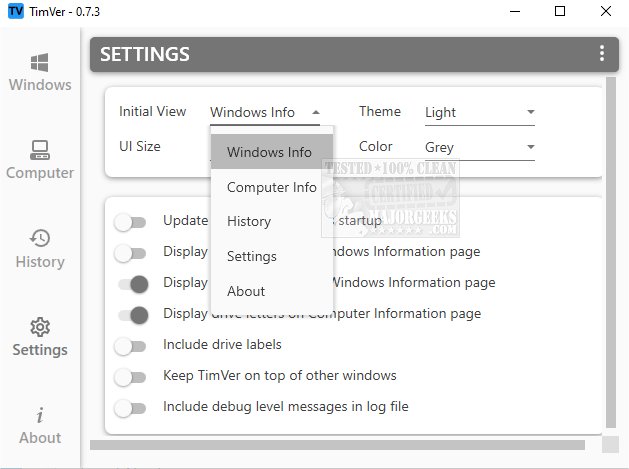
TimVer has launched its version 0.14.0, providing users with an in-depth overview of their installed Windows version. Unlike the standard Winver command, which offers basic information, TimVer serves as a robust alternative that delivers extensive details including the version number, build number, release date, and various system specifications. This comprehensive data is especially valuable for troubleshooting, as it aids in identifying potential conflicts with both software and hardware.
One of TimVer's standout features is its capability to verify the compatibility of new applications or hardware upgrades, allowing users to make informed decisions about their systems. The tool is user-friendly, pulling essential data from the Environment, Windows Management Information (WMI), and the Windows registry. The interface is structured into several accessible sections, enabling users to easily navigate and find detailed information about their computer’s specifications and performance metrics.
Additionally, TimVer includes a history log that tracks past activities and changes within the system, providing users with a comprehensive overview of their system’s evolution. Customization options are also available, allowing users to modify the appearance of the interface with different themes, colors, and layouts to better reflect their personal style.
The name "TimVer" initially piqued interest, but its open-source nature and the wealth of information it provides over the standard Winver solidified its appeal.
With ongoing updates and enhancements, TimVer is positioned as a valuable tool for users looking to optimize their Windows experience. Its capabilities open the door to more informed system management and troubleshooting, making it a must-have for tech-savvy individuals and casual users alike.
Future Enhancements and Community Contributions
As TimVer continues to evolve, users can look forward to potential future enhancements such as additional compatibility checks, user feedback integration, and expanded customization options. The open-source model encourages community contributions, allowing developers and users to suggest features or improvements, fostering a collaborative environment for ongoing development.
In conclusion, TimVer 0.14.0 not only serves as a powerful alternative to Winver but also positions itself as an essential tool for anyone seeking a deeper understanding of their Windows operating system. With its user-friendly interface, extensive compatibility verification features, and robust customization options, TimVer stands out as a premier choice for Windows users aiming to maximize their system's potential
One of TimVer's standout features is its capability to verify the compatibility of new applications or hardware upgrades, allowing users to make informed decisions about their systems. The tool is user-friendly, pulling essential data from the Environment, Windows Management Information (WMI), and the Windows registry. The interface is structured into several accessible sections, enabling users to easily navigate and find detailed information about their computer’s specifications and performance metrics.
Additionally, TimVer includes a history log that tracks past activities and changes within the system, providing users with a comprehensive overview of their system’s evolution. Customization options are also available, allowing users to modify the appearance of the interface with different themes, colors, and layouts to better reflect their personal style.
The name "TimVer" initially piqued interest, but its open-source nature and the wealth of information it provides over the standard Winver solidified its appeal.
With ongoing updates and enhancements, TimVer is positioned as a valuable tool for users looking to optimize their Windows experience. Its capabilities open the door to more informed system management and troubleshooting, making it a must-have for tech-savvy individuals and casual users alike.
Future Enhancements and Community Contributions
As TimVer continues to evolve, users can look forward to potential future enhancements such as additional compatibility checks, user feedback integration, and expanded customization options. The open-source model encourages community contributions, allowing developers and users to suggest features or improvements, fostering a collaborative environment for ongoing development.
In conclusion, TimVer 0.14.0 not only serves as a powerful alternative to Winver but also positions itself as an essential tool for anyone seeking a deeper understanding of their Windows operating system. With its user-friendly interface, extensive compatibility verification features, and robust customization options, TimVer stands out as a premier choice for Windows users aiming to maximize their system's potential
TimVer 0.14.0 released
TimVer offers comprehensive information about the Windows version installed on your system.