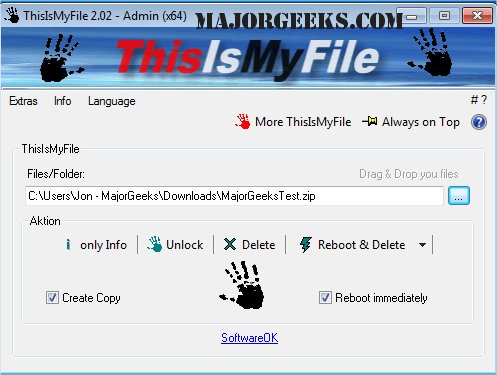
ThisIsMyFile is a portable utility designed to help users unlock or delete files and folders that are protected or locked. It is particularly useful when users encounter error messages indicating that a file is in use by another application or process, preventing them from completing desired actions. The utility streamlines the process of managing locked files, making it easier to identify the reasons for file locks, unlock them, and perform deletions as needed.
Key Features:
- Unlocking and Deleting: ThisIsMyFile can unlock files and folders or create a copy of a locked file for deletion.
- Minimalist Interface: The user interface is straightforward, allowing for easy navigation and use.
- Drag and Drop Support: Users can conveniently drag and drop files or folders into the application.
- Process Management: The tool can terminate processes associated with locked files if necessary.
- Reboot Options: Users have the flexibility to delete locked files upon reboot, with or without user prompts.
- Multilingual Support: The software is available in multiple languages, enhancing accessibility for a diverse user base.
Additional Resources:
The release notes also suggest related guides, such as how to take full ownership of files and folders, how to add secure delete options to Windows context menus, and methods to protect files and folders from deletion.
Conclusion:
ThisIsMyFile 4.51 is an essential tool for those who frequently deal with locked files, providing a comprehensive solution for file management issues. Its portable nature and user-friendly features make it a convenient addition to any user’s toolkit, enhancing their ability to maintain control over their files. As technology evolves, utilities like ThisIsMyFile will continue to adapt, offering users innovative solutions to overcome common file management challenges
Key Features:
- Unlocking and Deleting: ThisIsMyFile can unlock files and folders or create a copy of a locked file for deletion.
- Minimalist Interface: The user interface is straightforward, allowing for easy navigation and use.
- Drag and Drop Support: Users can conveniently drag and drop files or folders into the application.
- Process Management: The tool can terminate processes associated with locked files if necessary.
- Reboot Options: Users have the flexibility to delete locked files upon reboot, with or without user prompts.
- Multilingual Support: The software is available in multiple languages, enhancing accessibility for a diverse user base.
Additional Resources:
The release notes also suggest related guides, such as how to take full ownership of files and folders, how to add secure delete options to Windows context menus, and methods to protect files and folders from deletion.
Conclusion:
ThisIsMyFile 4.51 is an essential tool for those who frequently deal with locked files, providing a comprehensive solution for file management issues. Its portable nature and user-friendly features make it a convenient addition to any user’s toolkit, enhancing their ability to maintain control over their files. As technology evolves, utilities like ThisIsMyFile will continue to adapt, offering users innovative solutions to overcome common file management challenges
ThisIsMyFile 4.51 released
ThisIsMyFile is a portable utility that allows you to unlock/delete protected or locked files.