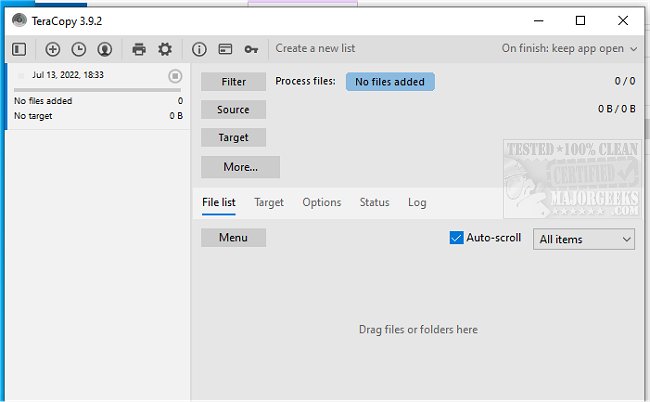
TeraCopy has recently released version 4.0, building upon the features of its previous version 3.17. This lightweight program is designed to enhance the efficiency of copying and moving files on your computer. One of the standout features of TeraCopy is its ability to dynamically adjust buffers to minimize seek times, allowing for faster file transfers. It also supports asynchronous copying, which can significantly speed up transfers between two separate physical hard drives.
A key advantage of TeraCopy is its user-friendly functionality that allows users to pause and resume file transfers. This feature is particularly beneficial for those who need to free up system resources temporarily, as users can easily pause the transfer and then resume it with a single click when ready. Additionally, TeraCopy ensures data integrity by verifying files after copying them, using hash comparisons between the source and target files to confirm they are identical.
Integration with Windows Explorer is seamless, allowing users to access TeraCopy directly from the right-click context menu and set it as the default copy handler. This accessibility streamlines the file management process. The program also includes robust error recovery capabilities; it attempts to copy files multiple times in case of errors and skips problematic files while continuing with the transfer. Users are presented with an interactive file list detailing any failed transfers, enabling them to address issues and re-attempt copying only the affected files.
In addition to its core functionalities, TeraCopy's latest version may include performance improvements and bug fixes. Users looking for enhanced file management in Windows can explore TeraCopy as a reliable tool for their copying and moving needs, benefiting from its speed, efficiency, and ease of use.
Furthermore, users might find it useful to check out related articles for optimizing their file management experience in Windows, such as disabling Quick Access, adding a details pane to the context menu, or resetting folder view settings in Windows 10 and 11
A key advantage of TeraCopy is its user-friendly functionality that allows users to pause and resume file transfers. This feature is particularly beneficial for those who need to free up system resources temporarily, as users can easily pause the transfer and then resume it with a single click when ready. Additionally, TeraCopy ensures data integrity by verifying files after copying them, using hash comparisons between the source and target files to confirm they are identical.
Integration with Windows Explorer is seamless, allowing users to access TeraCopy directly from the right-click context menu and set it as the default copy handler. This accessibility streamlines the file management process. The program also includes robust error recovery capabilities; it attempts to copy files multiple times in case of errors and skips problematic files while continuing with the transfer. Users are presented with an interactive file list detailing any failed transfers, enabling them to address issues and re-attempt copying only the affected files.
In addition to its core functionalities, TeraCopy's latest version may include performance improvements and bug fixes. Users looking for enhanced file management in Windows can explore TeraCopy as a reliable tool for their copying and moving needs, benefiting from its speed, efficiency, and ease of use.
Furthermore, users might find it useful to check out related articles for optimizing their file management experience in Windows, such as disabling Quick Access, adding a details pane to the context menu, or resetting folder view settings in Windows 10 and 11
TeraCopy 4.0 / 3.17 released
TeraCopy is a compact program designed for quickly copying and moving files.