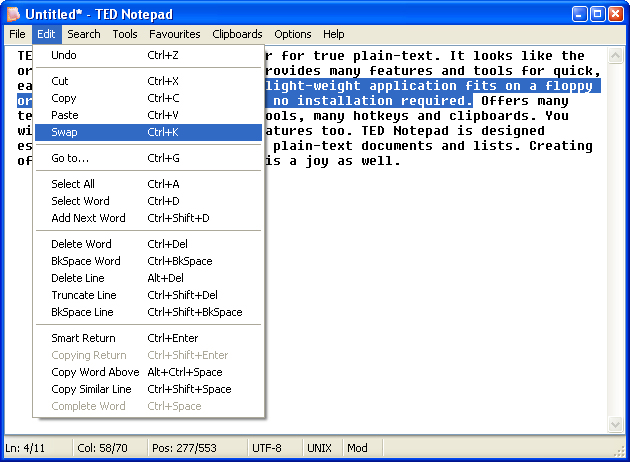
TED Notepad version 6.4.2 has been released, offering users a streamlined, chrome-less text editing experience. Unlike typical text editors, TED Notepad does not include toolbars or sidebars, allowing for a distraction-free environment. It boasts an impressive array of features, settings, and text-processing tools designed to enhance productivity for typing, text manipulation, and coding tasks.
Key features of TED Notepad include:
- Innovative auto-completion options that help speed up the writing process.
- Advanced clipboard management that automates routine copying and pasting tasks.
- Improved search and replace functionalities for efficient text editing.
- A comprehensive suite of text processing tools, akin to a "Swiss army knife" for managing various text-related tasks.
- A plethora of additional features and customizable settings to optimize user experience.
This text editor is particularly beneficial for advanced users who have complex demands and require a powerful tool to meet their needs. While there may be a learning curve to fully harness its capabilities, mastering TED Notepad can transform the way you work with text, making it a preferred choice for those looking to elevate their editing skills.
In addition to the current features, future updates could include enhanced collaboration tools, integration with cloud services for file access, and support for additional programming languages. These improvements would cater to a wider audience, making TED Notepad not just a tool for advanced users, but also accessible for casual users who wish to explore its capabilities. Overall, TED Notepad stands out as a versatile and efficient text editing solution for those willing to invest the time to learn its powerful features
Key features of TED Notepad include:
- Innovative auto-completion options that help speed up the writing process.
- Advanced clipboard management that automates routine copying and pasting tasks.
- Improved search and replace functionalities for efficient text editing.
- A comprehensive suite of text processing tools, akin to a "Swiss army knife" for managing various text-related tasks.
- A plethora of additional features and customizable settings to optimize user experience.
This text editor is particularly beneficial for advanced users who have complex demands and require a powerful tool to meet their needs. While there may be a learning curve to fully harness its capabilities, mastering TED Notepad can transform the way you work with text, making it a preferred choice for those looking to elevate their editing skills.
In addition to the current features, future updates could include enhanced collaboration tools, integration with cloud services for file access, and support for additional programming languages. These improvements would cater to a wider audience, making TED Notepad not just a tool for advanced users, but also accessible for casual users who wish to explore its capabilities. Overall, TED Notepad stands out as a versatile and efficient text editing solution for those willing to invest the time to learn its powerful features
TED Notepad 6.4.2 released
TED Notepad is a chrome-less text editor with a lot of features, settings and text-processing tools.