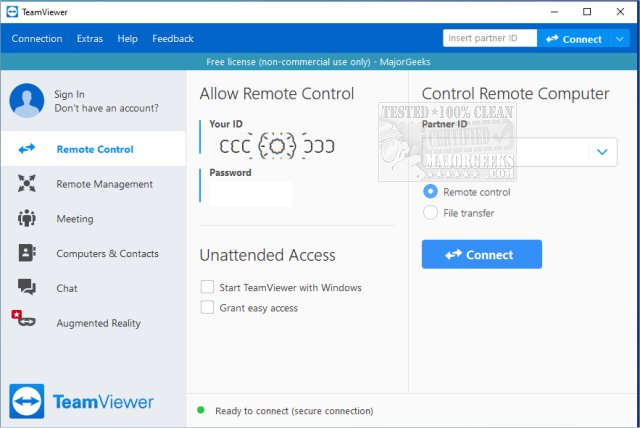
TeamViewer, a widely recognized remote access software, has introduced version 15.81.6, maintaining its reputation as a user-friendly tool for remote desktop access. This application allows users to connect to other computers or provide access to their own systems, regardless of geographical barriers. Available on multiple platforms including Windows, macOS, Linux, Android, and iOS, TeamViewer can be run as a portable application without installation, making it highly accessible.
Why TeamViewer Stands Out
Navigating tech issues over the phone can be a daunting task, akin to assembling furniture without clear instructions. TeamViewer simplifies this process by enabling remote connections that allow users to troubleshoot and assist one another in real time. The software generates a unique 9-digit ID and a session-specific password, ensuring secure access with end-to-end encryption (AES 256-bit). This setup not only enhances security but also ensures that even non-tech-savvy individuals can easily facilitate remote support.
Key Use Cases
TeamViewer is ideal for:
- Assisting friends or clients with software installations
- Resolving technical issues remotely
- Accessing personal computers while traveling
Additionally, it allows for two-way support, meaning users can share their screens to showcase projects or provide guided demonstrations.
Performance and Security
Connections established through TeamViewer are characterized by their speed and reliability, with minimal lag even on slower internet connections. The encryption protocols ensure that sensitive information remains protected during remote sessions.
Installation Options
Users can choose between a full installation, which offers features like unattended access and remote reboot, or opt for the portable version that eliminates the need for installation or admin rights, making it perfect for occasional assistance.
Pros and Cons
*Pros:*
- Free for personal use
- Portable version available
- Supports file transfer, chat, and multi-monitor setups
- End-to-end encryption
- Cross-platform compatibility
*Cons:*
- Commercial use incurs license restrictions
- Certain advanced features require full installation
Conclusion
In summary, TeamViewer occupies a unique position in the realm of remote access tools, balancing power and simplicity effectively. Its reliability, speed, and security make it a preferred choice for tech support, whether assisting family members or accessing files remotely. Frequent users can benefit greatly from its functionalities, and it remains a staple in many households for troubleshooting and tech support. As technology continues to evolve, TeamViewer's consistent updates and user-friendly interface ensure it remains a top choice for remote assistance needs.
Future Considerations
Looking ahead, TeamViewer may benefit from expanding its features to enhance remote collaboration capabilities, such as integrating more robust video conferencing tools or increasing support for various file types during transfers. Additionally, exploring options for customizable user interfaces could cater to a broader range of users, from casual to enterprise-level applications. As remote work and digital collaboration become increasingly integral to everyday life, tools like TeamViewer will likely continue to evolve to meet user demands
Why TeamViewer Stands Out
Navigating tech issues over the phone can be a daunting task, akin to assembling furniture without clear instructions. TeamViewer simplifies this process by enabling remote connections that allow users to troubleshoot and assist one another in real time. The software generates a unique 9-digit ID and a session-specific password, ensuring secure access with end-to-end encryption (AES 256-bit). This setup not only enhances security but also ensures that even non-tech-savvy individuals can easily facilitate remote support.
Key Use Cases
TeamViewer is ideal for:
- Assisting friends or clients with software installations
- Resolving technical issues remotely
- Accessing personal computers while traveling
Additionally, it allows for two-way support, meaning users can share their screens to showcase projects or provide guided demonstrations.
Performance and Security
Connections established through TeamViewer are characterized by their speed and reliability, with minimal lag even on slower internet connections. The encryption protocols ensure that sensitive information remains protected during remote sessions.
Installation Options
Users can choose between a full installation, which offers features like unattended access and remote reboot, or opt for the portable version that eliminates the need for installation or admin rights, making it perfect for occasional assistance.
Pros and Cons
*Pros:*
- Free for personal use
- Portable version available
- Supports file transfer, chat, and multi-monitor setups
- End-to-end encryption
- Cross-platform compatibility
*Cons:*
- Commercial use incurs license restrictions
- Certain advanced features require full installation
Conclusion
In summary, TeamViewer occupies a unique position in the realm of remote access tools, balancing power and simplicity effectively. Its reliability, speed, and security make it a preferred choice for tech support, whether assisting family members or accessing files remotely. Frequent users can benefit greatly from its functionalities, and it remains a staple in many households for troubleshooting and tech support. As technology continues to evolve, TeamViewer's consistent updates and user-friendly interface ensure it remains a top choice for remote assistance needs.
Future Considerations
Looking ahead, TeamViewer may benefit from expanding its features to enhance remote collaboration capabilities, such as integrating more robust video conferencing tools or increasing support for various file types during transfers. Additionally, exploring options for customizable user interfaces could cater to a broader range of users, from casual to enterprise-level applications. As remote work and digital collaboration become increasingly integral to everyday life, tools like TeamViewer will likely continue to evolve to meet user demands
TeamViewer 15.81.6 released
TeamViewer is a popular, easy-to-use free remote access program to access or let someone remotely access your computer. It can be installed or run as portable. Video tutorial available.