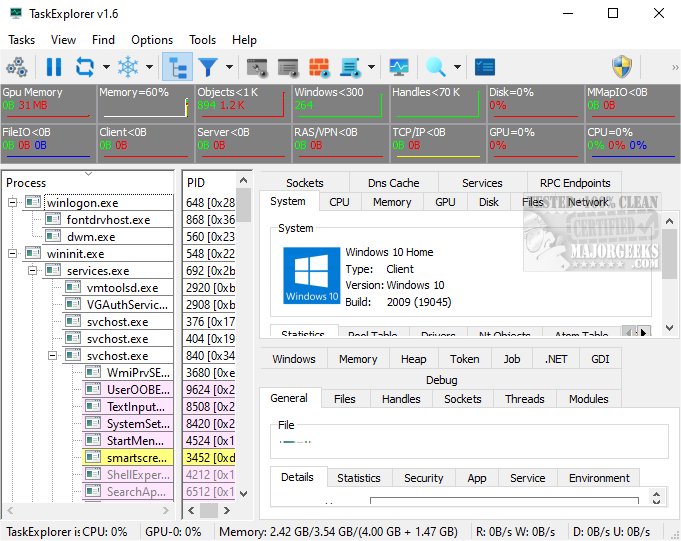
TaskExplorer is a sophisticated task management application designed to monitor the performance of active applications and provide detailed insights into their operations. By utilizing this tool, users can gain a clearer understanding of application behavior and the resources consumed by various processes.
Key Features of TaskExplorer
1. User-Centric Interface: The interface of TaskExplorer is thoughtfully crafted for speed and efficiency, allowing users to access real-time process data effortlessly. Information is organized into intuitive panels, avoiding clutter and enhancing navigation.
2. Process Details: When users select a process, comprehensive details populate the lower section of the interface, presenting relevant data in a focused manner. The streamlined design enables easy navigation with arrow keys, facilitating process analysis without losing context.
3. Task Info Panel: For users needing to compare multiple processes, double-clicking on a process opens its Task Info Panel in a separate window, providing an expanded view of critical information.
4. System Monitoring: TaskExplorer includes robust system monitoring features with real-time graphs that display CPU usage, network traffic, disk access, and more. The System Info Panels reveal open files and sockets and allow users to manage system services, including drivers.
5. Dynamic Refreshing: One of TaskExplorer's notable features is its ability to refresh data dynamically, enabling real-time observation of system changes. This allows users to quickly identify performance fluctuations and gain insights into overall system behavior.
6. Advanced Functionality: The software includes several advanced features such as:
- Thread Panel: Displays a detailed stack trace for selected threads, aiding in identifying deadlocks and performance bottlenecks.
- Memory Panel: Offers a memory editor with string search capabilities, enabling users to analyze and modify process memory effectively.
- Handles Panel: Lists all open handles along with essential details like file names and sizes, providing a comprehensive overview of disk operations.
User Benefits and Verdict:
TaskExplorer is an invaluable tool for anyone looking to enhance their understanding of system performance. With its continuous real-time updates, users can delve into complex data dynamics, uncovering causes behind crashes and performance issues. This user-friendly utility empowers individuals to take control of their system’s health, making it easier to maintain optimal performance.
Conclusion:
In summary, TaskExplorer is more than just a task manager; it is a powerful diagnostic tool that equips users with the insights needed to optimize application performance and manage system resources effectively. As technology continues to evolve, tools like TaskExplorer will play a critical role in ensuring system efficiency and reliability, making it essential for both casual users and tech enthusiasts alike.
Related Topics:
- How to Restore or Verify Default Services in Windows 7, 8, 10, and 11
- How to Identify Processes or Services on Your Computer
- How to Save a Text File of All Running Processes With TaskList
- How to Add Services to Control Panel in Windows
With the release of TaskExplorer 1.8.0, users can expect even more enhancements in tracking and managing system performance
Key Features of TaskExplorer
1. User-Centric Interface: The interface of TaskExplorer is thoughtfully crafted for speed and efficiency, allowing users to access real-time process data effortlessly. Information is organized into intuitive panels, avoiding clutter and enhancing navigation.
2. Process Details: When users select a process, comprehensive details populate the lower section of the interface, presenting relevant data in a focused manner. The streamlined design enables easy navigation with arrow keys, facilitating process analysis without losing context.
3. Task Info Panel: For users needing to compare multiple processes, double-clicking on a process opens its Task Info Panel in a separate window, providing an expanded view of critical information.
4. System Monitoring: TaskExplorer includes robust system monitoring features with real-time graphs that display CPU usage, network traffic, disk access, and more. The System Info Panels reveal open files and sockets and allow users to manage system services, including drivers.
5. Dynamic Refreshing: One of TaskExplorer's notable features is its ability to refresh data dynamically, enabling real-time observation of system changes. This allows users to quickly identify performance fluctuations and gain insights into overall system behavior.
6. Advanced Functionality: The software includes several advanced features such as:
- Thread Panel: Displays a detailed stack trace for selected threads, aiding in identifying deadlocks and performance bottlenecks.
- Memory Panel: Offers a memory editor with string search capabilities, enabling users to analyze and modify process memory effectively.
- Handles Panel: Lists all open handles along with essential details like file names and sizes, providing a comprehensive overview of disk operations.
User Benefits and Verdict:
TaskExplorer is an invaluable tool for anyone looking to enhance their understanding of system performance. With its continuous real-time updates, users can delve into complex data dynamics, uncovering causes behind crashes and performance issues. This user-friendly utility empowers individuals to take control of their system’s health, making it easier to maintain optimal performance.
Conclusion:
In summary, TaskExplorer is more than just a task manager; it is a powerful diagnostic tool that equips users with the insights needed to optimize application performance and manage system resources effectively. As technology continues to evolve, tools like TaskExplorer will play a critical role in ensuring system efficiency and reliability, making it essential for both casual users and tech enthusiasts alike.
Related Topics:
- How to Restore or Verify Default Services in Windows 7, 8, 10, and 11
- How to Identify Processes or Services on Your Computer
- How to Save a Text File of All Running Processes With TaskList
- How to Add Services to Control Panel in Windows
With the release of TaskExplorer 1.8.0, users can expect even more enhancements in tracking and managing system performance
TaskExplorer 1.8.0 released
TaskExplorer is an advanced task management tool that tracks the performance of running applications and offers comprehensive insights into their activities. This enables users to understand how applications operate and the resources they utilize.