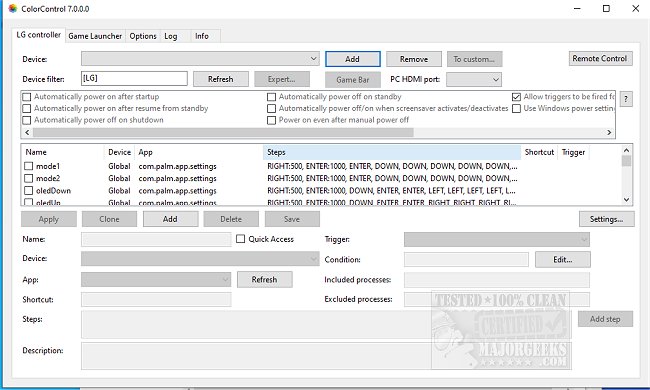
ColorControl is an open-source application designed to simplify the adjustment of display settings for NVIDIA and AMD graphics cards, as well as control features for LG TVs. The latest version, 11.0.0.0, enhances its user-friendly interface, allowing for both basic and advanced configuration options.
Features for NVIDIA and AMD Controllers:
ColorControl enables users to create custom presets that adjust various parameters, including color depth (ranging from 6 to 16 bits per channel), color formats (RGB or YUV), refresh rates, dithering options, and HDR settings. Users can also assign global keyboard shortcuts to these presets, facilitating quick changes to display settings.
For NVIDIA graphics cards, additional features are available:
- Dynamic Range: Choose between VESA (Full RGB) or CEA (Limited RGB/YUV).
- Color Space: Adjust the color space settings, although compatibility with TVs may vary.
- Dithering: Specify the dithering mode (Temporal or Spatial) and bit depth.
To implement a specific setting, users must include it in their preset via the "Include" menu option.
Versatile Tool for LG TVs:
ColorControl serves as a comprehensive tool that unlocks hidden features, allowing users to fine-tune their LG TV display settings through a single platform.
Additional Resources:
The app also provides guidance on related topics, including:
- Downloading the latest drivers for Windows
- Backing up and restoring drivers
- Managing Windows updates related to drivers
- Viewing recently updated Windows drivers
- Using the Driver Verifier Manager for troubleshooting
- Understanding Windows Hardware Quality Labs (WHQL)
Conclusion:
With its latest release, ColorControl 11.0.0.0 continues to empower users by providing easy access to advanced display settings, enhancing the overall viewing experience on compatible devices. The open-source nature of the app encourages community contributions, promising ongoing improvements and adaptations to meet user needs. Whether for gaming or general media consumption, ColorControl is poised to remain an essential tool for optimizing display configurations
Features for NVIDIA and AMD Controllers:
ColorControl enables users to create custom presets that adjust various parameters, including color depth (ranging from 6 to 16 bits per channel), color formats (RGB or YUV), refresh rates, dithering options, and HDR settings. Users can also assign global keyboard shortcuts to these presets, facilitating quick changes to display settings.
For NVIDIA graphics cards, additional features are available:
- Dynamic Range: Choose between VESA (Full RGB) or CEA (Limited RGB/YUV).
- Color Space: Adjust the color space settings, although compatibility with TVs may vary.
- Dithering: Specify the dithering mode (Temporal or Spatial) and bit depth.
To implement a specific setting, users must include it in their preset via the "Include" menu option.
Versatile Tool for LG TVs:
ColorControl serves as a comprehensive tool that unlocks hidden features, allowing users to fine-tune their LG TV display settings through a single platform.
Additional Resources:
The app also provides guidance on related topics, including:
- Downloading the latest drivers for Windows
- Backing up and restoring drivers
- Managing Windows updates related to drivers
- Viewing recently updated Windows drivers
- Using the Driver Verifier Manager for troubleshooting
- Understanding Windows Hardware Quality Labs (WHQL)
Conclusion:
With its latest release, ColorControl 11.0.0.0 continues to empower users by providing easy access to advanced display settings, enhancing the overall viewing experience on compatible devices. The open-source nature of the app encourages community contributions, promising ongoing improvements and adaptations to meet user needs. Whether for gaming or general media consumption, ColorControl is poised to remain an essential tool for optimizing display configurations
ColorControl 11.0.0.0 released
ColorControl is an Open Source app that allows straightforward changes to be made on NVIDIA and AMD display settings and/or control LG TVs.