The Oobabooga Text Generation Web UI has recently released version 4.7, providing users with a locally hosted, customizable interface for interacting with large language models (LLMs). This tool is perfect for those who want a ChatGPT-like experience without the privacy concerns of cloud services. Built using Gradio, a Python library for creating web-based ML interfaces, it offers a user-friendly environment for text generation and AI model experimentation.
With Oobabooga, users can run various LLMs locally, switch between models without needing to restart, and fine-tune them with LoRA support. It supports multiple backends, including Hugging Face Transformers and NVIDIA’s TensorRT-LLM, allowing for a diverse range of AI applications—from chatbots and story writing to automated content generation. Users can also save chat histories, replay conversations, and tweak advanced generation settings to meet specific project needs.
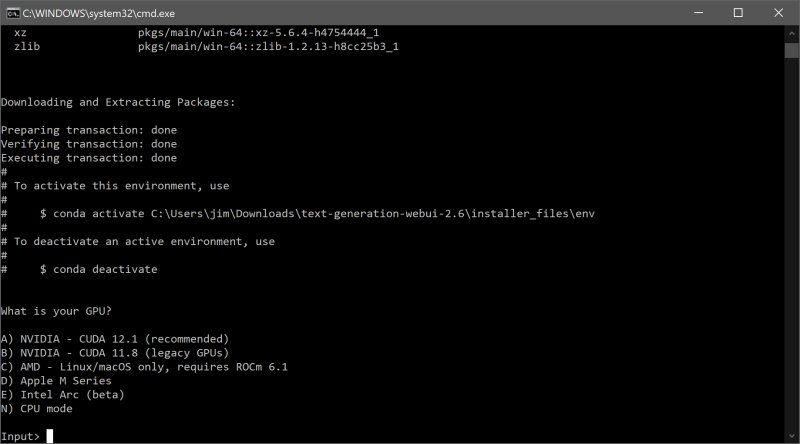
To install Oobabooga, users need to ensure they have sufficient storage, as the initial download is 28MB but can grow to about 2GB after necessary installations. After unzipping the program, users can initiate it by selecting the appropriate file for their operating system and choosing their GPU vendor. Then, they can access the web interface through a browser at http://localhost:7860.
To run models, users can easily download them from sources like Hugging Face, either manually or through a built-in script. It's straightforward to organize the models within the designated folder structure to ensure smooth operation.
With the growing interest in AI and machine learning, tools like Oobabooga are likely to become increasingly essential for developers, researchers, and hobbyists. As the landscape of language models evolves, so too will the functionalities of platforms like Oobabooga, possibly incorporating even more sophisticated features such as collaborative tools for sharing and refining AI models, advanced analytics for performance tracking, and enhanced user support resources.
In conclusion, Oobabooga Text Generation Web UI stands out as a robust solution for anyone looking to explore the potential of LLMs in a secure, local environment. Its balance of customizability, flexibility, and privacy positions it as a valuable resource in the rapidly advancing field of AI, making it an exciting tool for both seasoned developers and newcomers alike
With Oobabooga, users can run various LLMs locally, switch between models without needing to restart, and fine-tune them with LoRA support. It supports multiple backends, including Hugging Face Transformers and NVIDIA’s TensorRT-LLM, allowing for a diverse range of AI applications—from chatbots and story writing to automated content generation. Users can also save chat histories, replay conversations, and tweak advanced generation settings to meet specific project needs.
To install Oobabooga, users need to ensure they have sufficient storage, as the initial download is 28MB but can grow to about 2GB after necessary installations. After unzipping the program, users can initiate it by selecting the appropriate file for their operating system and choosing their GPU vendor. Then, they can access the web interface through a browser at http://localhost:7860.
To run models, users can easily download them from sources like Hugging Face, either manually or through a built-in script. It's straightforward to organize the models within the designated folder structure to ensure smooth operation.
Extensions and Future Prospects
The Oobabooga interface is not only powerful but also extensible, with built-in support for various functionalities such as multimodal tasks and streaming capabilities. Users can further enhance their experience by integrating additional extensions, which, while requiring some extra setup, significantly expand the tool's capabilities.With the growing interest in AI and machine learning, tools like Oobabooga are likely to become increasingly essential for developers, researchers, and hobbyists. As the landscape of language models evolves, so too will the functionalities of platforms like Oobabooga, possibly incorporating even more sophisticated features such as collaborative tools for sharing and refining AI models, advanced analytics for performance tracking, and enhanced user support resources.
In conclusion, Oobabooga Text Generation Web UI stands out as a robust solution for anyone looking to explore the potential of LLMs in a secure, local environment. Its balance of customizability, flexibility, and privacy positions it as a valuable resource in the rapidly advancing field of AI, making it an exciting tool for both seasoned developers and newcomers alike
Oobabooga Text Generation Web UI 4.7 released
Oobabooga Text Generation Web UI is a locally hosted, customizable interface designed for working with large language models (LLMs).