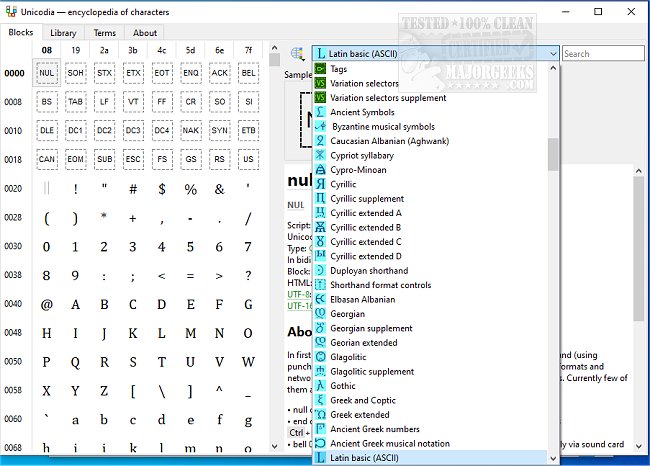
Unicodia 3.1.4 has been released, offering an Open Source encyclopedia of Unicode characters that serves as a versatile character map for Windows users. This software allows users to browse through a comprehensive collection of ASCII symbols easily, facilitating the copying of characters directly to the clipboard. One of Unicodia's key features is its portability, enabling it to be loaded onto a USB drive for use on various machines.
The software supports a wide range of Unicode characters, with Windows 10 and 11 users able to access all characters from Unicode 15, although named sequences are not currently supported. For those using Windows 7, Unicodia provides access to characters from the Base Multilingual Plane, including important scripts like Phoenician, Aramaic, Brahmi, and Old Gothic. Additionally, the application indicates whether a character is supported on the user's system and specifies the font that supports it.
Users can also copy character codes in HTML, UTF-8, and UTF-16 formats, and a simple search function enhances usability. To install Unicodia, users will require 7-zip or a similar tool to unpack the 7z archive, although a zero-dependency portable version is available in PortableApps format, and an installer can be downloaded from MajorGeeks.
In addition to its main features, users may find related resources helpful, such as guides on installing or uninstalling fonts in Windows, restoring default font settings, acquiring more fonts, and adjusting text size for title bars in Windows 10 and 11.
Overall, Unicodia stands out as an excellent resource for anyone needing a comprehensive Unicode character map, offering a user-friendly experience for both casual and advanced users alike
The software supports a wide range of Unicode characters, with Windows 10 and 11 users able to access all characters from Unicode 15, although named sequences are not currently supported. For those using Windows 7, Unicodia provides access to characters from the Base Multilingual Plane, including important scripts like Phoenician, Aramaic, Brahmi, and Old Gothic. Additionally, the application indicates whether a character is supported on the user's system and specifies the font that supports it.
Users can also copy character codes in HTML, UTF-8, and UTF-16 formats, and a simple search function enhances usability. To install Unicodia, users will require 7-zip or a similar tool to unpack the 7z archive, although a zero-dependency portable version is available in PortableApps format, and an installer can be downloaded from MajorGeeks.
In addition to its main features, users may find related resources helpful, such as guides on installing or uninstalling fonts in Windows, restoring default font settings, acquiring more fonts, and adjusting text size for title bars in Windows 10 and 11.
Overall, Unicodia stands out as an excellent resource for anyone needing a comprehensive Unicode character map, offering a user-friendly experience for both casual and advanced users alike
Unicodia 3.1.4 released
Unicodia is an Open Source encyclopedia of Unicode characters.