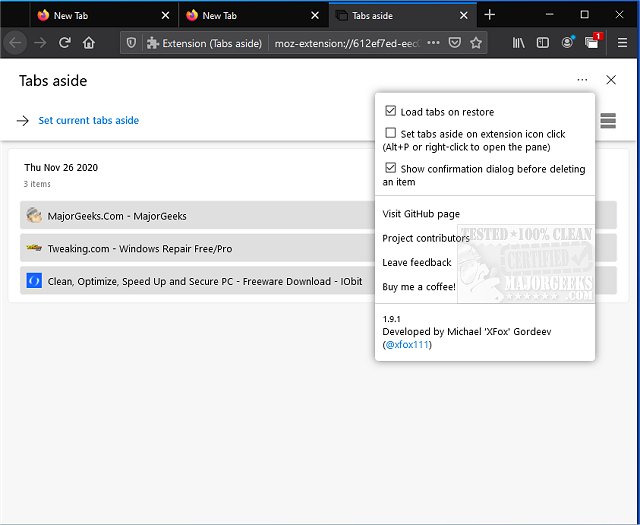
The latest version 3.3.3 of Tabs Aside, a browser extension available for Chrome, Firefox, and Edge, has been released, providing users with the ability to save and manage tabs for later use. This feature is particularly useful for users who accumulate numerous tabs that aren't significant enough to warrant bookmarking but still want to revisit them later. The extension draws inspiration from the now-discontinued Tabs Aside feature in Microsoft Edge, allowing users to conveniently set tabs aside and come back to them when needed.
A key aspect to remember is that if you enable the option to set tabs aside by clicking the extension icon, you will need to use the keyboard shortcut Alt + P or right-click to reopen the tab management pane. This detail is important as users may forget it during initial usage, leading to potential frustration.
Tabs Aside comes equipped with several notable features:
- A user interface reminiscent of the legacy Microsoft Edge, enhanced with improvements
- An auto dark mode for a better visual experience
- The ability to restore individual tabs from the set-aside collection without removing all others
- Convenient hotkeys for quick access
- On-demand loading of restored tabs
In addition to these features, users may also find related functionalities such as muting tabs in their browsers or restoring accidentally closed tabs useful for improving their overall browsing experience.
Overall, Tabs Aside serves as a practical tool for managing browser tabs efficiently, making it easier for users to keep their workspace organized and focused on the tasks at hand. As web browsing continues to evolve, tools like Tabs Aside can help streamline productivity by providing essential features that cater to the habits of modern internet users
A key aspect to remember is that if you enable the option to set tabs aside by clicking the extension icon, you will need to use the keyboard shortcut Alt + P or right-click to reopen the tab management pane. This detail is important as users may forget it during initial usage, leading to potential frustration.
Tabs Aside comes equipped with several notable features:
- A user interface reminiscent of the legacy Microsoft Edge, enhanced with improvements
- An auto dark mode for a better visual experience
- The ability to restore individual tabs from the set-aside collection without removing all others
- Convenient hotkeys for quick access
- On-demand loading of restored tabs
In addition to these features, users may also find related functionalities such as muting tabs in their browsers or restoring accidentally closed tabs useful for improving their overall browsing experience.
Overall, Tabs Aside serves as a practical tool for managing browser tabs efficiently, making it easier for users to keep their workspace organized and focused on the tasks at hand. As web browsing continues to evolve, tools like Tabs Aside can help streamline productivity by providing essential features that cater to the habits of modern internet users
Tabs Aside for Chrome, Firefox, and Edge 3.3.3 released
Tabs Aside for Chrome, Firefox, and Edge allows you to save tabs for later use.
Tabs Aside for Chrome, Firefox, and Edge 3.3.3 released @ MajorGeeks