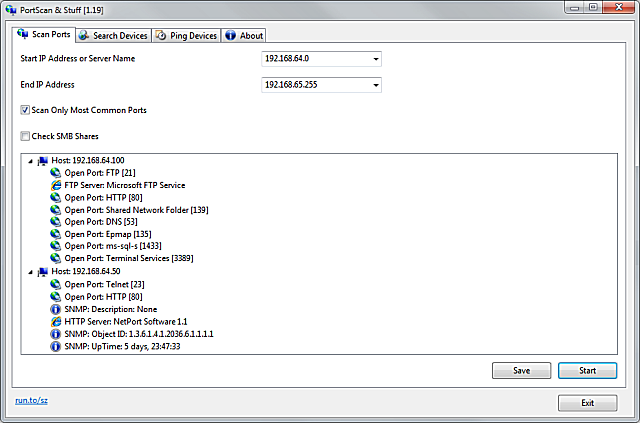
SZ PortScan 2.05 has been released, enhancing the way users can identify and analyze devices on their network. This powerful tool quickly identifies all active devices, providing their IP addresses and the services they are running. With its ability to scan ports, SZ PortScan displays a comprehensive list of open ports along with additional information such as the hostname, MAC address, and various services including HTTP, FTP, SMB, iSCSI, SMTP, and SNMP. To optimize performance, it employs up to 100 threads for scanning extensive IP address ranges, making it efficient for larger networks.
In addition to port scanning, SZ PortScan offers the capability to search for devices that support UPnP, including popular brands like Netgear, Samsung, and Freecom. This feature is particularly useful for users who may not know the specific IP addresses of their devices, allowing for easier identification and management.
Another significant feature is the ability to ping devices. Users can perform ping tests using three standard packet sizes, with options to ping continuously or for a specified number of times. This functionality helps in diagnosing network connectivity issues efficiently.
Overall, SZ PortScan 2.05 is an essential tool for network administrators and tech enthusiasts, aiding in the optimization and management of network performance.
In addition to the features outlined, users may benefit from related guides on improving wireless network performance, resetting TCP/IP settings, flushing the Windows DNS cache, and resetting Winsock on various Windows versions. These resources can help users enhance their overall network efficiency and troubleshoot common connectivity issues
In addition to port scanning, SZ PortScan offers the capability to search for devices that support UPnP, including popular brands like Netgear, Samsung, and Freecom. This feature is particularly useful for users who may not know the specific IP addresses of their devices, allowing for easier identification and management.
Another significant feature is the ability to ping devices. Users can perform ping tests using three standard packet sizes, with options to ping continuously or for a specified number of times. This functionality helps in diagnosing network connectivity issues efficiently.
Overall, SZ PortScan 2.05 is an essential tool for network administrators and tech enthusiasts, aiding in the optimization and management of network performance.
In addition to the features outlined, users may benefit from related guides on improving wireless network performance, resetting TCP/IP settings, flushing the Windows DNS cache, and resetting Winsock on various Windows versions. These resources can help users enhance their overall network efficiency and troubleshoot common connectivity issues
SZ PortScan 2.05 released
SZ PortScan quickly locates all active devices on your network and ascertains the IP address and open services per network device.