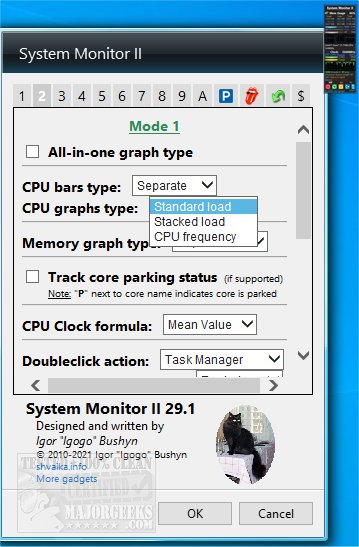
System Monitor II 33.0 has been released, offering users a comprehensive yet lightweight tool for monitoring their system's performance. This desktop gadget serves as an intuitive interface that provides real-time data on various system metrics, including memory usage and processor details.
The application displays critical information such as total, used, and free memory across different types (RAM, page file, and a combined view). It showcases the processor model, clock frequency, and load levels for individual cores, accommodating systems with up to 40 cores and multiple CPUs. Users can also monitor the core temperatures and power consumption of their CPUs, although this feature requires the installation of Core Temp.
In addition to monitoring capabilities, System Monitor II allows users to perform essential PC functions such as shutting down, restarting, or changing power schemes directly from the interface. The gadget is customizable, enabling users to adjust colors, backgrounds, graph details, and display sizes to suit their preferences.
For users running Windows 8.1 or 10 who encounter installation issues, using Desktop Gadgets Revived or similar applications may be necessary. Key features of System Monitor II include:
- Hovering over the core's bar to view minimum and maximum temperatures.
- Accessing maximum usage values for RAM and PageFile by hovering over specific elements.
- A flyout feature for viewing the Windows Experience Index (WEI) by clicking on the CPU vendor icon or the gadget’s title.
- Quick switching between CPUs using the mouse wheel in multi-CPU setups.
- Accessing Task Manager or Resource Monitor by double-clicking the background.
- Detailed insights into processor queue lengths and hyper-threading.
- A special PC control panel for enhanced system management.
System Monitor II not only serves as a reliable system information tool but also provides users with the ability to manage their PCs efficiently. It can be particularly helpful for tech enthusiasts and professionals aiming to optimize their system's performance. As technology continues to evolve, such tools will likely incorporate more advanced features and interfaces to enhance user experience further
The application displays critical information such as total, used, and free memory across different types (RAM, page file, and a combined view). It showcases the processor model, clock frequency, and load levels for individual cores, accommodating systems with up to 40 cores and multiple CPUs. Users can also monitor the core temperatures and power consumption of their CPUs, although this feature requires the installation of Core Temp.
In addition to monitoring capabilities, System Monitor II allows users to perform essential PC functions such as shutting down, restarting, or changing power schemes directly from the interface. The gadget is customizable, enabling users to adjust colors, backgrounds, graph details, and display sizes to suit their preferences.
For users running Windows 8.1 or 10 who encounter installation issues, using Desktop Gadgets Revived or similar applications may be necessary. Key features of System Monitor II include:
- Hovering over the core's bar to view minimum and maximum temperatures.
- Accessing maximum usage values for RAM and PageFile by hovering over specific elements.
- A flyout feature for viewing the Windows Experience Index (WEI) by clicking on the CPU vendor icon or the gadget’s title.
- Quick switching between CPUs using the mouse wheel in multi-CPU setups.
- Accessing Task Manager or Resource Monitor by double-clicking the background.
- Detailed insights into processor queue lengths and hyper-threading.
- A special PC control panel for enhanced system management.
System Monitor II not only serves as a reliable system information tool but also provides users with the ability to manage their PCs efficiently. It can be particularly helpful for tech enthusiasts and professionals aiming to optimize their system's performance. As technology continues to evolve, such tools will likely incorporate more advanced features and interfaces to enhance user experience further
System Monitor II 33.0 released
System Monitor II provides you with a desktop display showing an overview of your system, and more.