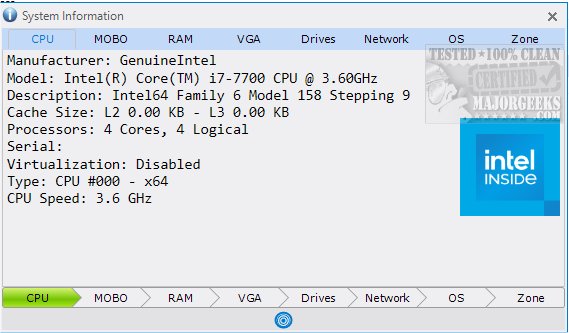
The recently released System Information 19.10 offers a straightforward, portable solution for users seeking to gather detailed information about their computer systems through an easy-to-navigate graphical user interface (GUI). Unlike more complex tools such as HWiNFO, System Information is designed for simplicity and accessibility, making it an ideal choice for users who want essential insights without overwhelming detail.
User-Friendly Interface
The application features an intuitively organized interface, where various categories such as CPU, motherboard, RAM, graphics card, and network details are conveniently positioned at the bottom of the screen for easy access. Users can click on specific sections to delve into detailed information regarding their computer components.
Convenient Data Management
System Information enhances user experience with additional functionalities that allow users to print, copy, save, and refresh data seamlessly via a blue button on the interface. This feature opens a menu for straightforward management of information, ensuring users can handle data according to their preferences.
Centralized Information Access
One of the key benefits of System Information is its capability to compile information from multiple sources into a single interface. This consolidation not only saves time but also simplifies the process of copying and sharing data when necessary. Users can quickly access vital information about their hardware, operating systems, and network setups, including processor models, RAM specifications, and OS versions.
Conclusion and Future Potential
In summary, System Information is an efficient tool for anyone needing quick and comprehensive insights into their computer configuration. As technology continues to evolve, the potential for future updates could enhance its capabilities further, possibly incorporating even more detailed analytics or integration with cloud services for enhanced data storage and sharing options.
Related Resources
For users interested in deeper exploration of their computer hardware, related guides include:
- How to Identify the Hardware in Your Computer
- How to Find the Serial Number of Your Windows PC
- How to Check What Graphic Card (GPU) Is in Your Computer
- How to Identify My Intel Processor and Generation
- How to Check Your Memory (RAM) Speed, Available Slots, and More.
These resources provide additional support for users looking to expand their knowledge about their computer systems
User-Friendly Interface
The application features an intuitively organized interface, where various categories such as CPU, motherboard, RAM, graphics card, and network details are conveniently positioned at the bottom of the screen for easy access. Users can click on specific sections to delve into detailed information regarding their computer components.
Convenient Data Management
System Information enhances user experience with additional functionalities that allow users to print, copy, save, and refresh data seamlessly via a blue button on the interface. This feature opens a menu for straightforward management of information, ensuring users can handle data according to their preferences.
Centralized Information Access
One of the key benefits of System Information is its capability to compile information from multiple sources into a single interface. This consolidation not only saves time but also simplifies the process of copying and sharing data when necessary. Users can quickly access vital information about their hardware, operating systems, and network setups, including processor models, RAM specifications, and OS versions.
Conclusion and Future Potential
In summary, System Information is an efficient tool for anyone needing quick and comprehensive insights into their computer configuration. As technology continues to evolve, the potential for future updates could enhance its capabilities further, possibly incorporating even more detailed analytics or integration with cloud services for enhanced data storage and sharing options.
Related Resources
For users interested in deeper exploration of their computer hardware, related guides include:
- How to Identify the Hardware in Your Computer
- How to Find the Serial Number of Your Windows PC
- How to Check What Graphic Card (GPU) Is in Your Computer
- How to Identify My Intel Processor and Generation
- How to Check Your Memory (RAM) Speed, Available Slots, and More.
These resources provide additional support for users looking to expand their knowledge about their computer systems
System Information 19.10 released
System Information provides a simple portable option for retrieving system information all through a single GUI.