Sys_Minion version 2026.05.105.0 has been released, designed to provide users with convenient shortcuts to a curated selection of common, hard-to-find, and even hidden Windows utilities. Initially developed as a private tool for the author’s personal use in managing his driver repository folder, it has been expanded and made publicly available, complete with a video tutorial for guidance.
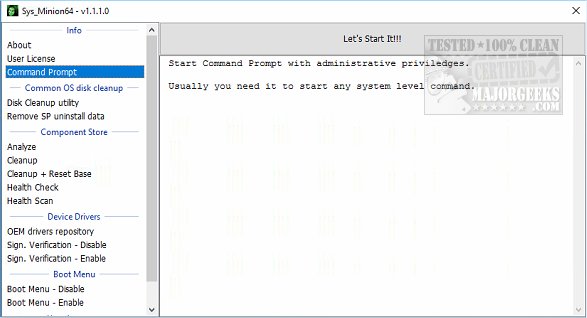
The application facilitates access to various complex and hidden system commands, each accompanied by a brief description. It operates through system commands to perform tasks without directly interacting with system objects, ensuring a safe user experience. Sys_Minion features a user-friendly interface, with a list of utilities and categories displayed on the left side, while the right side includes a prominent "Let's Start It!!!" button for launching the application.
Among the tools provided by Sys_Minion are options for common maintenance tasks, such as:
- Common Cleanup: Includes functionalities like Command Prompt access, Disk Cleanup, and removal of Service Pack uninstall data.
- Component Store Management: Offers analysis and cleanup options, as well as the ability to reset the base.
- Health Checks: Allows users to conduct health scans of their systems.
- Device Drivers Management: Includes an OEM Drivers Repository and options for signature verification.
- Boot Menu Management: Lets users enable or disable the boot menu.
- User Accounts Access: Provides a shortcut to manage user accounts.
Sys_Minion is available in both 32-bit and 64-bit versions and requires administrative privileges to run. It is important to note that Sys_Minion is not intended for everyone; rather, it serves as a practical solution for technicians who frequently waste time navigating to these utilities.
In addition to its core functionalities, users may find related articles helpful, such as guides on securely deleting files using PowerShell, erasing disks with Diskpart, and checking hard disk health with WMIC. This makes Sys_Minion not just a standalone tool but part of a broader toolkit for efficient system management.
Looking ahead, future updates may include additional utilities, enhanced features, and user feedback integration to further refine the experience for tech professionals
The application facilitates access to various complex and hidden system commands, each accompanied by a brief description. It operates through system commands to perform tasks without directly interacting with system objects, ensuring a safe user experience. Sys_Minion features a user-friendly interface, with a list of utilities and categories displayed on the left side, while the right side includes a prominent "Let's Start It!!!" button for launching the application.
Among the tools provided by Sys_Minion are options for common maintenance tasks, such as:
- Common Cleanup: Includes functionalities like Command Prompt access, Disk Cleanup, and removal of Service Pack uninstall data.
- Component Store Management: Offers analysis and cleanup options, as well as the ability to reset the base.
- Health Checks: Allows users to conduct health scans of their systems.
- Device Drivers Management: Includes an OEM Drivers Repository and options for signature verification.
- Boot Menu Management: Lets users enable or disable the boot menu.
- User Accounts Access: Provides a shortcut to manage user accounts.
Sys_Minion is available in both 32-bit and 64-bit versions and requires administrative privileges to run. It is important to note that Sys_Minion is not intended for everyone; rather, it serves as a practical solution for technicians who frequently waste time navigating to these utilities.
In addition to its core functionalities, users may find related articles helpful, such as guides on securely deleting files using PowerShell, erasing disks with Diskpart, and checking hard disk health with WMIC. This makes Sys_Minion not just a standalone tool but part of a broader toolkit for efficient system management.
Looking ahead, future updates may include additional utilities, enhanced features, and user feedback integration to further refine the experience for tech professionals
Sys_Minion 2026.05.105.0 released
Sys_Minion is geared towards providing shortcuts to a small list of common, hard-to-find, and even hidden Windows utilities. Video tutorial available.