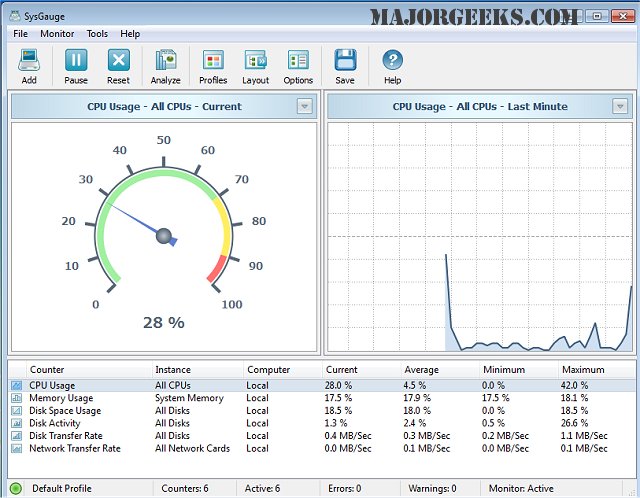
SysGauge version 13.1.24 has been released, offering enhanced capabilities for real-time performance monitoring of your computer. This software allows users to track various performance metrics across nine distinct categories, including CPU Usage, Memory Usage, Disk I/O Activity, Network Activity, Operating System status, Process Status, File System health, and USB Activity. Each category is further divided into multiple subsets, providing a comprehensive overview of system performance through an intuitive graphical user interface (GUI).
Users have the flexibility to establish custom limits for monitoring specific system counters. When these limits are breached, SysGauge can alert users through error or warning messages, notification sounds, or even email alerts, ensuring that you stay informed of critical changes in system performance. Additionally, SysGauge generates periodic status reports that summarize up to 24 hours of continuous monitoring, which can be exported in various formats such as HTML, PDF, Excel, Text, CSV, or XML.
This release not only enhances monitoring capabilities but also emphasizes user convenience and accessibility, making it easier for individuals and IT professionals to maintain optimal system performance.
Extension:
Furthermore, SysGauge 13.1.24 introduces improved data visualization tools and customizable dashboard options, allowing users to tailor their monitoring experience to fit their specific needs. The software now supports integration with third-party applications, enabling a more holistic approach to system management. Users can also benefit from advanced analytics features that provide insights into long-term performance trends, helping to identify potential issues before they impact system efficiency. With ongoing updates and support, SysGauge remains a vital tool for anyone looking to maintain high-performance computing environments
Users have the flexibility to establish custom limits for monitoring specific system counters. When these limits are breached, SysGauge can alert users through error or warning messages, notification sounds, or even email alerts, ensuring that you stay informed of critical changes in system performance. Additionally, SysGauge generates periodic status reports that summarize up to 24 hours of continuous monitoring, which can be exported in various formats such as HTML, PDF, Excel, Text, CSV, or XML.
This release not only enhances monitoring capabilities but also emphasizes user convenience and accessibility, making it easier for individuals and IT professionals to maintain optimal system performance.
Extension:
Furthermore, SysGauge 13.1.24 introduces improved data visualization tools and customizable dashboard options, allowing users to tailor their monitoring experience to fit their specific needs. The software now supports integration with third-party applications, enabling a more holistic approach to system management. Users can also benefit from advanced analytics features that provide insights into long-term performance trends, helping to identify potential issues before they impact system efficiency. With ongoing updates and support, SysGauge remains a vital tool for anyone looking to maintain high-performance computing environments
SysGauge 13.1.24 released
SysGauge enables you to precisely monitor in real-time your machine's performance in numerous areas.