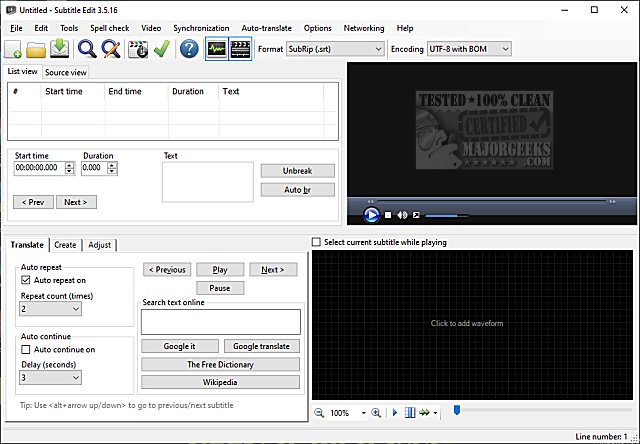
Subtitle Edit version 4.0.16 has been released, continuing its reputation as a powerful, free, and portable subtitle editor for video. Although it is available at no cost, its features and capabilities can rival those of professional software. Users can explore its extensive functionalities through a detailed feature list, screenshots, or by trying it out online.
Key features of Subtitle Edit include the ability to create, adjust, sync, and translate subtitle lines, and it supports over 280 subtitle formats, including SubRip, MicroDVD, and Advanced SubStation Alpha. The software boasts a unique audio visualizer that can display both waveforms and spectrograms, along with a video player that can utilize DirectShow, VLC, or MPlayer.
Subtitle Edit also allows users to visually sync and adjust subtitles based on their start/end positions and speed. It offers auto-translation via Google Translate and the option to rip subtitles from decrypted DVDs. Furthermore, it can import and OCR VobSub subtitles, Blu-ray .sup files, and subtitles embedded in various video formats like Matroska, MP4/M4V, and AVI.
The software supports multiple languages and encodings, allowing users to read and write in both UTF-8 and ANSI. Additional features include synchronization tools, merging and splitting subtitles, adjusting display times, fixing common errors, spell checking, and even effects like typewriter and karaoke. Users can also compare subtitles, perform multiple search and replace operations, and change casing using a names dictionary. Export options include PNG images, Adobe Encore scripts, and various subtitle formats.
In summary, Subtitle Edit 4.0.16 is a comprehensive tool for anyone working with video subtitles, offering extensive features that cater to both casual users and professional editors. With its user-friendly interface and robust functionality, Subtitle Edit is an excellent choice for effectively managing subtitle creation and editing tasks. Whether for personal projects or professional use, this software continues to impress with its capabilities and versatility
Key features of Subtitle Edit include the ability to create, adjust, sync, and translate subtitle lines, and it supports over 280 subtitle formats, including SubRip, MicroDVD, and Advanced SubStation Alpha. The software boasts a unique audio visualizer that can display both waveforms and spectrograms, along with a video player that can utilize DirectShow, VLC, or MPlayer.
Subtitle Edit also allows users to visually sync and adjust subtitles based on their start/end positions and speed. It offers auto-translation via Google Translate and the option to rip subtitles from decrypted DVDs. Furthermore, it can import and OCR VobSub subtitles, Blu-ray .sup files, and subtitles embedded in various video formats like Matroska, MP4/M4V, and AVI.
The software supports multiple languages and encodings, allowing users to read and write in both UTF-8 and ANSI. Additional features include synchronization tools, merging and splitting subtitles, adjusting display times, fixing common errors, spell checking, and even effects like typewriter and karaoke. Users can also compare subtitles, perform multiple search and replace operations, and change casing using a names dictionary. Export options include PNG images, Adobe Encore scripts, and various subtitle formats.
In summary, Subtitle Edit 4.0.16 is a comprehensive tool for anyone working with video subtitles, offering extensive features that cater to both casual users and professional editors. With its user-friendly interface and robust functionality, Subtitle Edit is an excellent choice for effectively managing subtitle creation and editing tasks. Whether for personal projects or professional use, this software continues to impress with its capabilities and versatility
Subtitle Edit 4.0.16 released
Subtitle Edit is a free, portable editor for video subtitles.