StasherX is a user-friendly application designed to enhance the security of your directories and folders by allowing you to selectively hide content. With a simple click, users can toggle the visibility status of files, and for additional protection, password options can be implemented. This is crucial for those who prioritize keeping their digital data secure, as StasherX provides a practical solution for hiding specific files and folders.
User-Friendly Interface and Functionality
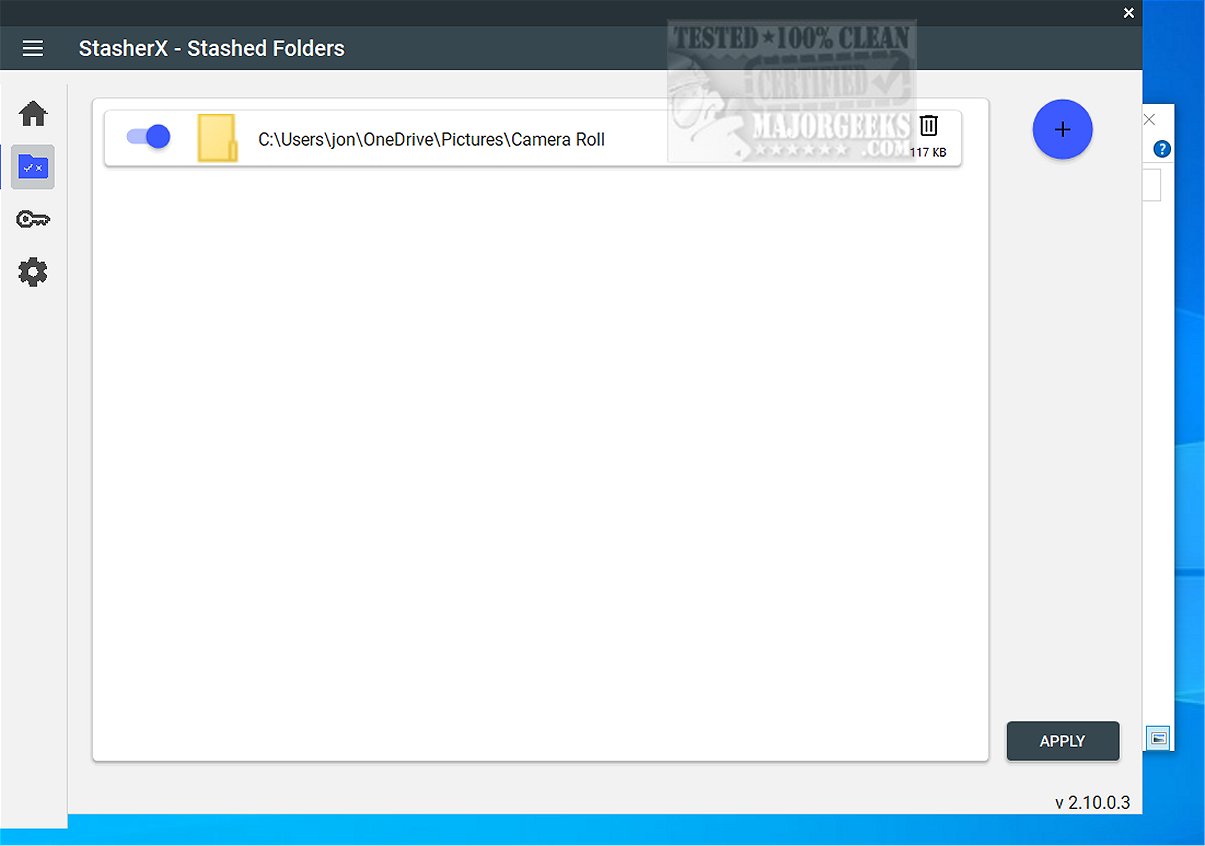
The installation of StasherX is quick and straightforward, enabling users to easily select multiple directories to be hidden. The application ensures that every action taken requires confirmation, which helps prevent accidental changes. It’s important to note that while StasherX does not encrypt files, it effectively makes them invisible, thus enhancing their security. Users can manage hidden folders through an intuitive interface where each entry includes a toggle switch for quick adjustments to visibility in Windows Explorer. Additionally, the application allows for the deletion of associated data if necessary.
Once directories are added, users can view them in a dedicated list, further simplifying the management process.
Highlighted Feature: Whitelist Exceptions
A standout feature of StasherX is its Whitelist exception capability, marked by a key icon. This allows users to designate specific applications that can access hidden folders. For instance, when an app attempts to open a hidden directory, it appears in the Whitelist section, and users can easily grant access by selecting the app and clicking "apply." This feature enhances user control over their hidden files, allowing for a tailored experience.
Storage Overview Statistics
Another noteworthy aspect of StasherX is its visual storage overview statistics, presented in a pie chart format. This feature provides users with a quick glance at the storage statistics for each selected directory, although customization options for the visualized data are not available.
Geek Verdict
StasherX is an innovative tool for safeguarding sensitive data, enabling users to discreetly conceal their chosen directories, folders, and subfolders. If you are seeking an effective yet straightforward method to prevent unauthorized access to your important files, StasherX emerges as an outstanding solution.
Future Enhancements
Looking ahead, StasherX could benefit from incorporating additional features such as file encryption, customizable visual statistics, and enhanced user support resources. Moreover, integrating a mobile version could expand its accessibility, allowing users to manage their hidden files across various devices seamlessly. Enhancing the user experience with tutorials or guided setups could also help new users maximize the application’s capabilities
User-Friendly Interface and Functionality
The installation of StasherX is quick and straightforward, enabling users to easily select multiple directories to be hidden. The application ensures that every action taken requires confirmation, which helps prevent accidental changes. It’s important to note that while StasherX does not encrypt files, it effectively makes them invisible, thus enhancing their security. Users can manage hidden folders through an intuitive interface where each entry includes a toggle switch for quick adjustments to visibility in Windows Explorer. Additionally, the application allows for the deletion of associated data if necessary.
Once directories are added, users can view them in a dedicated list, further simplifying the management process.
Highlighted Feature: Whitelist Exceptions
A standout feature of StasherX is its Whitelist exception capability, marked by a key icon. This allows users to designate specific applications that can access hidden folders. For instance, when an app attempts to open a hidden directory, it appears in the Whitelist section, and users can easily grant access by selecting the app and clicking "apply." This feature enhances user control over their hidden files, allowing for a tailored experience.
Storage Overview Statistics
Another noteworthy aspect of StasherX is its visual storage overview statistics, presented in a pie chart format. This feature provides users with a quick glance at the storage statistics for each selected directory, although customization options for the visualized data are not available.
Geek Verdict
StasherX is an innovative tool for safeguarding sensitive data, enabling users to discreetly conceal their chosen directories, folders, and subfolders. If you are seeking an effective yet straightforward method to prevent unauthorized access to your important files, StasherX emerges as an outstanding solution.
Future Enhancements
Looking ahead, StasherX could benefit from incorporating additional features such as file encryption, customizable visual statistics, and enhanced user support resources. Moreover, integrating a mobile version could expand its accessibility, allowing users to manage their hidden files across various devices seamlessly. Enhancing the user experience with tutorials or guided setups could also help new users maximize the application’s capabilities
StasherX 5.13.0.14 released
StasherX is an application designed to help you protect your directories and folders by selectively hiding content. The visibility status of these files can be toggled with just a single click. Additionally, you can set up password protection for extra security when needed.