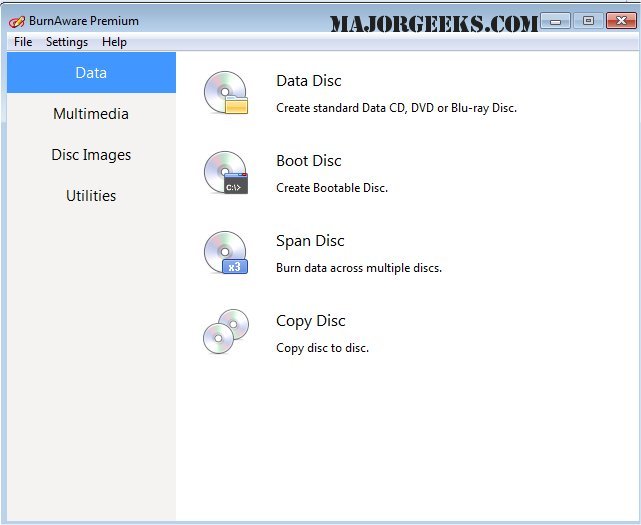
BurnAware Premium 19.3 has been released, enhancing the functionality of its free counterpart, BurnAware Free. This robust software specializes in the copying and recording of CDs, DVDs, and Blu-ray Discs, providing users with a comprehensive suite of tools for their multimedia needs.
The Premium version includes a variety of advanced features that facilitate the copying of digital content such as photos, documents, games, movies, and music. Users can also create bootable discs and disc images. Key features of BurnAware Premium include:
- The ability to create data, bootable, and multisession discs for CD, DVD, and Blu-ray formats.
- Options to create Audio CDs and MP3 compilations on CD/DVD/Blu-ray.
- The capability to produce DVD-Video formats.
- Tools for copying and backing up existing CDs and DVDs.
- Functionality for creating and recording disc images and boot images.
- Compatibility with all current hardware interfaces, including IDE, SCSI, USB, 1394, and SATA.
- Support for multiple file systems such as UDF, ISO9660, and Joliet Bridged, allowing for versatile data organization.
- On-the-fly writing, which eliminates the need for prior staging of files on the hard drive.
- Automatic verification of written files to ensure data integrity.
- Support for CD-Text and unicode characters, enhancing the audio disc experience.
- Compatibility with various Windows operating systems, including NT, 2000, XP, Vista, and 7 (both 32-bit and 64-bit), without requiring additional drivers.
In summary, BurnAware Premium 19.3 is an all-encompassing solution for users looking to manage their disc burning needs efficiently. Its array of features not only simplifies the burning process but also ensures high-quality results, making it a valuable tool for both casual users and professionals alike. Future updates may further improve functionality, expand format compatibility, or enhance user experience, solidifying BurnAware Premium's position as a leading choice in disc burning software
The Premium version includes a variety of advanced features that facilitate the copying of digital content such as photos, documents, games, movies, and music. Users can also create bootable discs and disc images. Key features of BurnAware Premium include:
- The ability to create data, bootable, and multisession discs for CD, DVD, and Blu-ray formats.
- Options to create Audio CDs and MP3 compilations on CD/DVD/Blu-ray.
- The capability to produce DVD-Video formats.
- Tools for copying and backing up existing CDs and DVDs.
- Functionality for creating and recording disc images and boot images.
- Compatibility with all current hardware interfaces, including IDE, SCSI, USB, 1394, and SATA.
- Support for multiple file systems such as UDF, ISO9660, and Joliet Bridged, allowing for versatile data organization.
- On-the-fly writing, which eliminates the need for prior staging of files on the hard drive.
- Automatic verification of written files to ensure data integrity.
- Support for CD-Text and unicode characters, enhancing the audio disc experience.
- Compatibility with various Windows operating systems, including NT, 2000, XP, Vista, and 7 (both 32-bit and 64-bit), without requiring additional drivers.
In summary, BurnAware Premium 19.3 is an all-encompassing solution for users looking to manage their disc burning needs efficiently. Its array of features not only simplifies the burning process but also ensures high-quality results, making it a valuable tool for both casual users and professionals alike. Future updates may further improve functionality, expand format compatibility, or enhance user experience, solidifying BurnAware Premium's position as a leading choice in disc burning software
BurnAware Premium 19.3 released
BurnAware Premium is the full-featured version of BurnAware Free, a powerful CD, DVD, Blu-ray Disc copying and recording software.