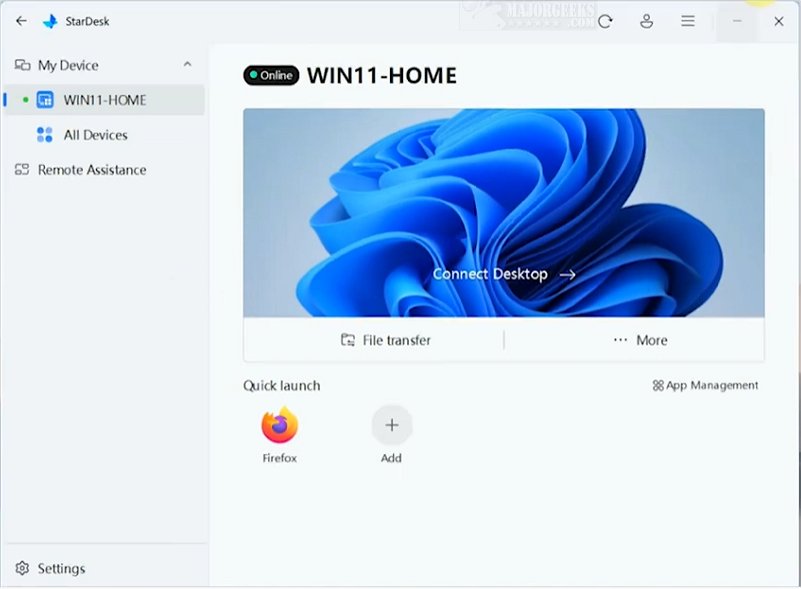
StarDesk is a cutting-edge remote connection software that emphasizes low latency, allowing users to enjoy highly responsive remote sessions with minimal setup time. This software presents a variety of features including file transfer, quick launch, and remote assistance, making it a robust solution for remote connectivity needs.
User-Friendly Setup and Experience
StarDesk prioritizes a streamlined user experience. Initially, users authenticate their accounts via a "Continue with Google" option, which leads to the automatic registration of relevant devices. This feature facilitates effortless switching between host and guest roles. Establishing a remote session is notably quick, taking only a few seconds, and once connected, the guest can control the host computer effectively. An additional functionality, Remote Boot, can be enabled through the Settings menu for enhanced capabilities. However, some users may prefer a self-contained access method similar to TeamViewer instead of the Google authentication.
Control Center and Quick Launch Features
The Control Center provides users with valuable options to manage various connection properties, such as display resolution adjustments, security settings, and a built-in File Transfer utility for easy file sharing. A highlight of StarDesk is the Quick Launch feature, which improves long-term usability by identifying software installed on the host computer. Users can create a customized list of frequently used applications, such as web browsers or system control panels, allowing for quicker access in subsequent sessions.
Geek Verdict
StarDesk stands out as a reliable desktop connection solution, designed to cater to the essential needs of users in this domain. Its intuitive interface permits even those with minimal experience to navigate the program confidently while leveraging its powerful features. This balance of sophistication and accessibility makes StarDesk an exceptional option for a wide range of users, enhancing productivity and simplifying remote connections like never before.
Future Prospects and Enhancements
Looking ahead, StarDesk may benefit from additional features such as improved security measures, enhanced customization options for user interfaces, and integration with more third-party applications. These enhancements would not only broaden its appeal but also ensure that it remains competitive in the evolving landscape of remote connection software. The ongoing feedback from users will be crucial in shaping future updates, ensuring that StarDesk continues to meet and exceed user expectations in remote connectivity
User-Friendly Setup and Experience
StarDesk prioritizes a streamlined user experience. Initially, users authenticate their accounts via a "Continue with Google" option, which leads to the automatic registration of relevant devices. This feature facilitates effortless switching between host and guest roles. Establishing a remote session is notably quick, taking only a few seconds, and once connected, the guest can control the host computer effectively. An additional functionality, Remote Boot, can be enabled through the Settings menu for enhanced capabilities. However, some users may prefer a self-contained access method similar to TeamViewer instead of the Google authentication.
Control Center and Quick Launch Features
The Control Center provides users with valuable options to manage various connection properties, such as display resolution adjustments, security settings, and a built-in File Transfer utility for easy file sharing. A highlight of StarDesk is the Quick Launch feature, which improves long-term usability by identifying software installed on the host computer. Users can create a customized list of frequently used applications, such as web browsers or system control panels, allowing for quicker access in subsequent sessions.
Geek Verdict
StarDesk stands out as a reliable desktop connection solution, designed to cater to the essential needs of users in this domain. Its intuitive interface permits even those with minimal experience to navigate the program confidently while leveraging its powerful features. This balance of sophistication and accessibility makes StarDesk an exceptional option for a wide range of users, enhancing productivity and simplifying remote connections like never before.
Future Prospects and Enhancements
Looking ahead, StarDesk may benefit from additional features such as improved security measures, enhanced customization options for user interfaces, and integration with more third-party applications. These enhancements would not only broaden its appeal but also ensure that it remains competitive in the evolving landscape of remote connection software. The ongoing feedback from users will be crucial in shaping future updates, ensuring that StarDesk continues to meet and exceed user expectations in remote connectivity
StarDesk 1.4.1 released
StarDesk is an innovative remote connection software designed to deliver low latency, ensuring that users experience highly responsive remote sessions with minimal setup time.