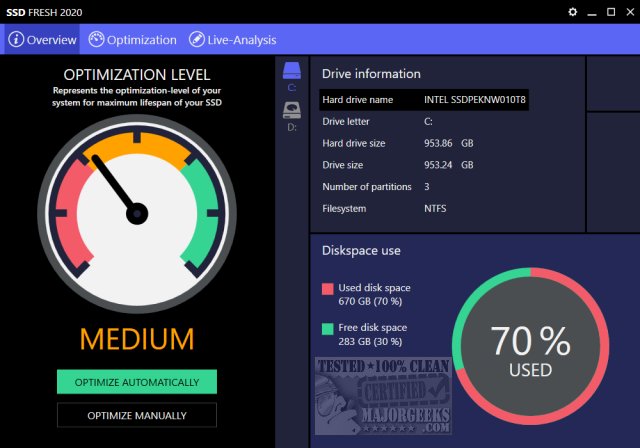
SSD Fresh has released an updated version, 2026.15.05, which aims to enhance the performance of solid-state drives (SSDs) by optimizing various Windows settings, analyzing drive activity, and disabling unnecessary services that can impede performance. The software features a user-friendly and colorful interface that indicates the SSD's health status through a color-coded system (red, yellow, or green).
Users have the option to optimize their SSD automatically, which is suitable for most people, but it's recommended to first explore the manual optimization settings. This allows users to customize which optimizations they wish to enable or disable. The Live Analysis feature provides real-time insights into which processes are consuming the most drive activity, helping users make informed decisions about their SSD usage.
While the application requires free registration with a name and email, which some users may find off-putting, Abelssoft has a reputable standing in the software community. The software is categorized as donationware, suggesting a donation of $10 for its use, which many users find reasonable considering the added peace of mind it brings by ensuring proper SSD optimization.
SSD Fresh offers various settings and explanations for optimizing key areas such as indexing, drive optimization, hibernation, kernel swapping, prefetching, defragmentation, event logging, and more. The application also includes ads for other Abelssoft products, but they are described as non-intrusive.
In additional resources, users can find links to guides on SSD TRIM support and methods for restoring SSD performance through secure erasing.
In summary, SSD Fresh 2026.15.05 provides essential tools and features for users looking to maximize their SSD's lifespan and performance. Its combination of automatic and manual optimization options, along with real-time analysis tools, makes it a valuable application for both casual users and tech enthusiasts. As SSD technology continues to evolve, tools like SSD Fresh will remain critical for maintaining optimal drive performance and longevity
Users have the option to optimize their SSD automatically, which is suitable for most people, but it's recommended to first explore the manual optimization settings. This allows users to customize which optimizations they wish to enable or disable. The Live Analysis feature provides real-time insights into which processes are consuming the most drive activity, helping users make informed decisions about their SSD usage.
While the application requires free registration with a name and email, which some users may find off-putting, Abelssoft has a reputable standing in the software community. The software is categorized as donationware, suggesting a donation of $10 for its use, which many users find reasonable considering the added peace of mind it brings by ensuring proper SSD optimization.
SSD Fresh offers various settings and explanations for optimizing key areas such as indexing, drive optimization, hibernation, kernel swapping, prefetching, defragmentation, event logging, and more. The application also includes ads for other Abelssoft products, but they are described as non-intrusive.
In additional resources, users can find links to guides on SSD TRIM support and methods for restoring SSD performance through secure erasing.
In summary, SSD Fresh 2026.15.05 provides essential tools and features for users looking to maximize their SSD's lifespan and performance. Its combination of automatic and manual optimization options, along with real-time analysis tools, makes it a valuable application for both casual users and tech enthusiasts. As SSD technology continues to evolve, tools like SSD Fresh will remain critical for maintaining optimal drive performance and longevity
SSD Fresh 2026.15.05 released
SSD Fresh increases your SSD's performance by optimizing, analyzing, and disabling useless services, write accesses, and other Windows settings that are SSD specific. Video tutorial available.