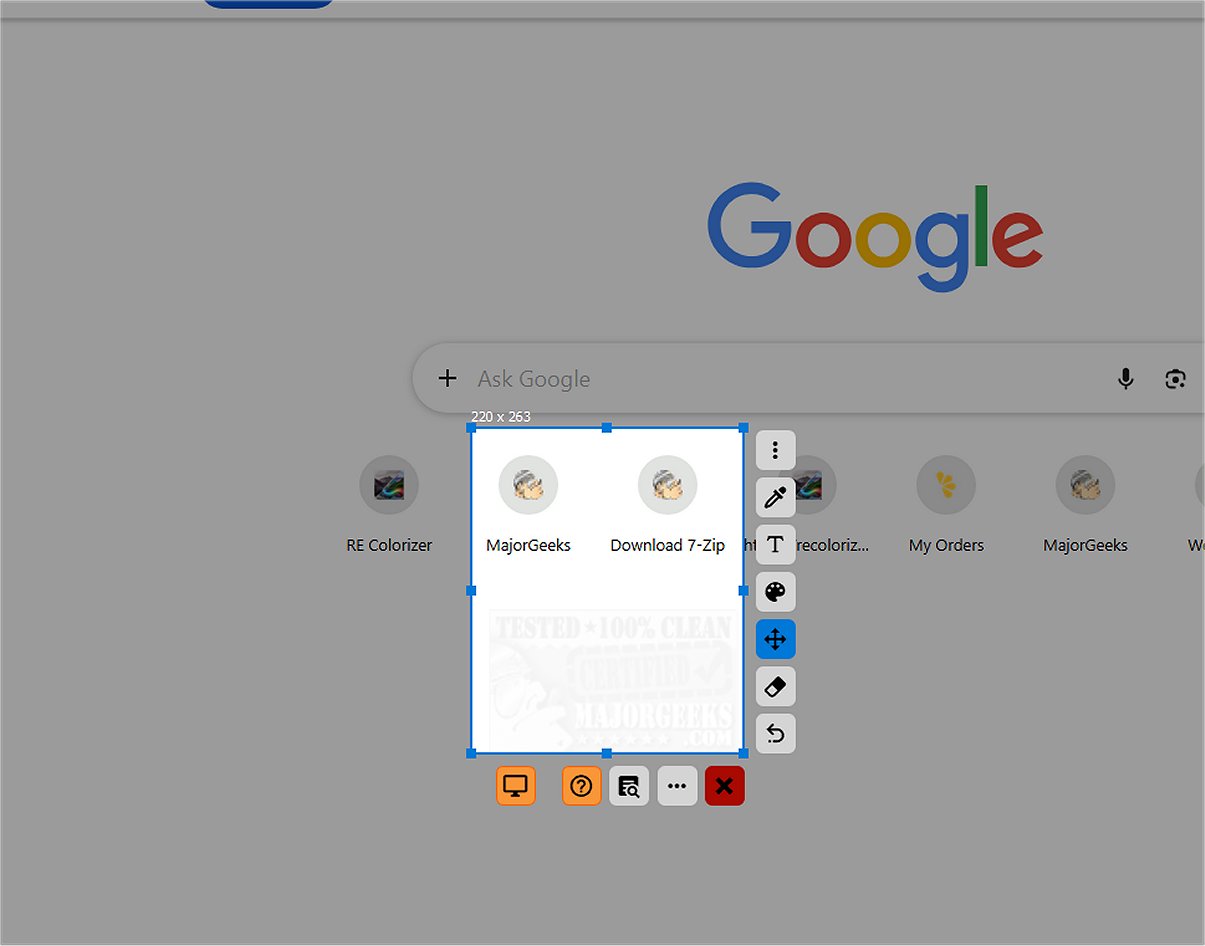
SnipFor is a powerful application designed to capture and save specific parts of your screen with precision. Users can select sections of their display, take snapshots, and store them for immediate or future use. The latest version, SnipFor 2.5.0, enhances user experience with a modern, intuitive interface that streamlines functionality.
User-Friendly Interface and Tools
The application features a straightforward layout, complemented by a selection of easy-to-use tools on the side. These tools allow users to quickly annotate their screenshots with drawing, text insertion, or markup. While these tools do not support text overlays, their icons are intuitively designed to reflect their functions clearly, ensuring that users can navigate and utilize them without confusion.
Precision Capture Capabilities
One of SnipFor's standout attributes is its precision capture capability, allowing users to adjust their selected area down to a single pixel. This meticulous control is particularly beneficial for those who need to capture specific content without clutter from their desktop or surrounding elements. As a result, users can produce clean and relevant screenshots tailored to their needs.
Advanced Optical Character Recognition (OCR)
Beyond standard screenshot functionalities, SnipFor incorporates an advanced Optical Character Recognition (OCR) engine. This feature enables users to extract text from images, making it useful in various contexts such as meetings, paused videos, remote desktop sessions, or when dealing with PDF documents that limit copying. Users can effortlessly convert visual text into editable content with just a few clicks.
Privacy-Centric OCR Functionality
SnipFor prioritizes user privacy by ensuring that its OCR functions run locally on the user's device. This means that any text extracted remains securely on the device and is not sent to external servers, safeguarding sensitive information. This local processing is critical for users dealing with confidential documents or proprietary information, providing a reliable solution for privacy-conscious individuals.
Geek Verdict
Overall, SnipFor stands out as a robust screen-snipping tool that allows for capturing, annotating, and storing screenshots efficiently. Users can also pin snippets on top of other windows for quick reference. However, a minor issue noted during installation is that not all elements are translated to English, although the main application functions correctly post-launch.
Extended Features and Future Enhancements
Future updates could include additional language support and enhanced annotation tools such as customizable text overlays. Improved integration with cloud services for backup and sharing, while maintaining user privacy, would also be a valuable addition. As SnipFor continues to evolve, it may incorporate features like automated organization of screenshots or AI-powered suggestions for common annotations, further enhancing user experience.
In conclusion, SnipFor 2.5.0 is a comprehensive tool that combines screen capturing with advanced text recognition and user privacy, making it an excellent choice for both casual users and professionals alike
User-Friendly Interface and Tools
The application features a straightforward layout, complemented by a selection of easy-to-use tools on the side. These tools allow users to quickly annotate their screenshots with drawing, text insertion, or markup. While these tools do not support text overlays, their icons are intuitively designed to reflect their functions clearly, ensuring that users can navigate and utilize them without confusion.
Precision Capture Capabilities
One of SnipFor's standout attributes is its precision capture capability, allowing users to adjust their selected area down to a single pixel. This meticulous control is particularly beneficial for those who need to capture specific content without clutter from their desktop or surrounding elements. As a result, users can produce clean and relevant screenshots tailored to their needs.
Advanced Optical Character Recognition (OCR)
Beyond standard screenshot functionalities, SnipFor incorporates an advanced Optical Character Recognition (OCR) engine. This feature enables users to extract text from images, making it useful in various contexts such as meetings, paused videos, remote desktop sessions, or when dealing with PDF documents that limit copying. Users can effortlessly convert visual text into editable content with just a few clicks.
Privacy-Centric OCR Functionality
SnipFor prioritizes user privacy by ensuring that its OCR functions run locally on the user's device. This means that any text extracted remains securely on the device and is not sent to external servers, safeguarding sensitive information. This local processing is critical for users dealing with confidential documents or proprietary information, providing a reliable solution for privacy-conscious individuals.
Geek Verdict
Overall, SnipFor stands out as a robust screen-snipping tool that allows for capturing, annotating, and storing screenshots efficiently. Users can also pin snippets on top of other windows for quick reference. However, a minor issue noted during installation is that not all elements are translated to English, although the main application functions correctly post-launch.
Extended Features and Future Enhancements
Future updates could include additional language support and enhanced annotation tools such as customizable text overlays. Improved integration with cloud services for backup and sharing, while maintaining user privacy, would also be a valuable addition. As SnipFor continues to evolve, it may incorporate features like automated organization of screenshots or AI-powered suggestions for common annotations, further enhancing user experience.
In conclusion, SnipFor 2.5.0 is a comprehensive tool that combines screen capturing with advanced text recognition and user privacy, making it an excellent choice for both casual users and professionals alike
SnipFor 2.5.0 released
SnipFor is a sophisticated tool for capturing and saving specific screen content. You can select a portion of the display, take a snapshot, and the application will store it for immediate or future use.