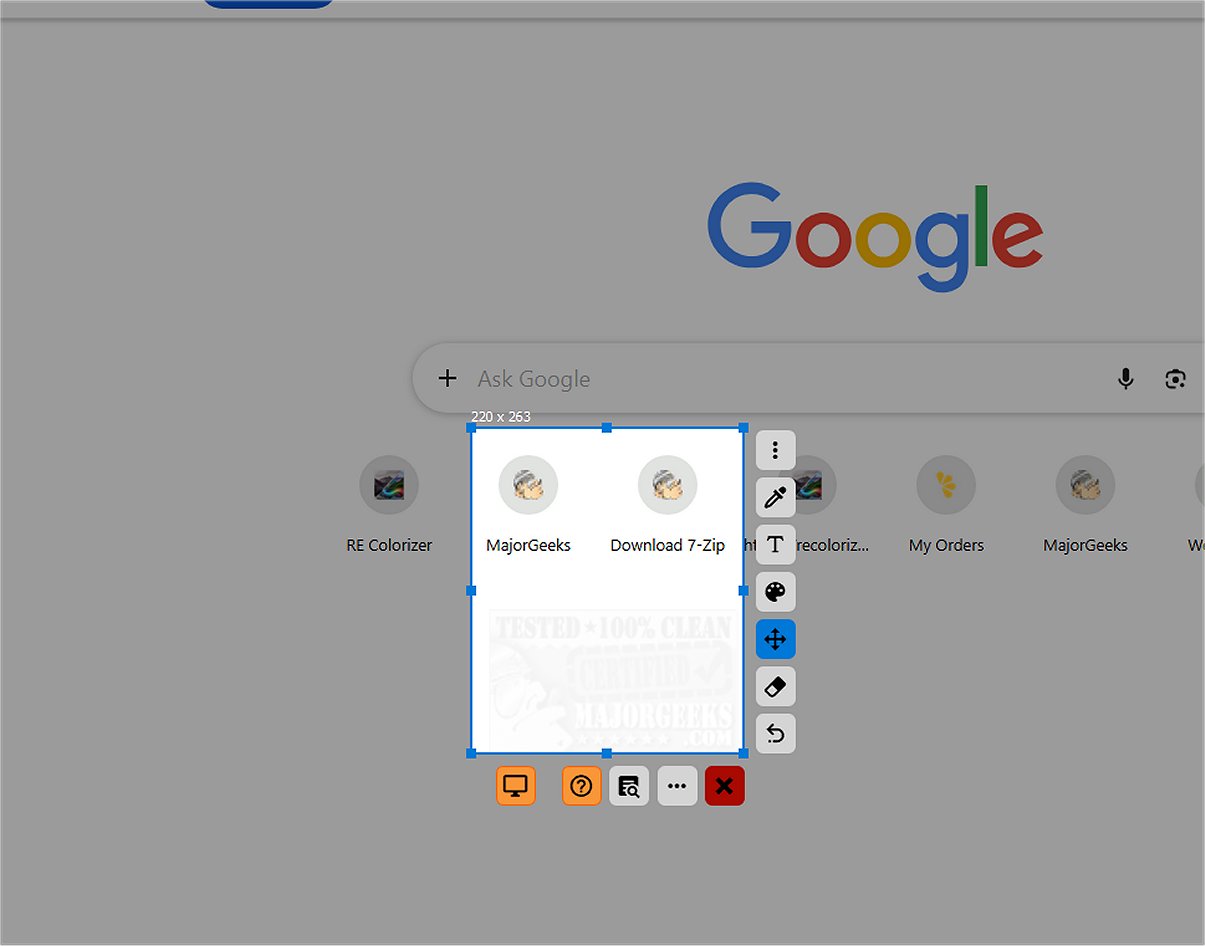
SnipFor is a powerful application designed to capture and save specific portions of your screen. With its user-friendly interface, users can easily select an area, take a snapshot, and store it for immediate or future use. The modern layout emphasizes ease of use, allowing for quick access to essential tools such as drawing, text insertion, or markup directly on the captured image. Although these tools lack text overlays, their intuitive icons make it simple to understand their functions, enhancing the overall user experience.
Precision Captures and OCR Technology
One of SnipFor's standout features is its precise capture-area adjustment, enabling users to modify their selection with pixel-level accuracy. This is particularly beneficial for those needing to isolate specific content without extraneous desktop elements, resulting in clean and relevant screenshots.
In addition to its capture capabilities, SnipFor integrates an advanced Optical Character Recognition (OCR) engine. This feature distinguishes it from standard screenshot tools, as it allows users to identify and convert text within their screenshots. This functionality proves invaluable in various situations, such as during meetings, while watching paused videos, or when dealing with PDF documents that restrict copying. Users can effortlessly extract text, enabling them to copy, save, and utilize information efficiently.
Privacy Protection
SnipFor is committed to user privacy. The OCR feature operates entirely on the user’s local device, ensuring that any extracted text remains secure and is not sent to external servers. This local processing is crucial for users handling confidential data, as it provides a layer of security against potential data breaches.
Overall Assessment
The Geek Verdict on SnipFor is quite positive, highlighting its capabilities in capturing screen snippets, extracting text via OCR, and offering instant annotation options. A minor drawback noted is the inconsistency in language translation during installation, though the app itself operates correctly once launched.
Future Directions and Enhancements
Looking ahead, SnipFor could benefit from additional features such as enhanced editing tools, better language support across its interface, and perhaps cloud integration for users who wish to access their snippets from multiple devices while still maintaining security protocols. Expanding compatibility with various file formats and enabling more robust organizational tools for saved snippets could also enhance user experience. As screen capturing continues to evolve, SnipFor's commitment to functionality and privacy positions it as a leading choice in the market
Precision Captures and OCR Technology
One of SnipFor's standout features is its precise capture-area adjustment, enabling users to modify their selection with pixel-level accuracy. This is particularly beneficial for those needing to isolate specific content without extraneous desktop elements, resulting in clean and relevant screenshots.
In addition to its capture capabilities, SnipFor integrates an advanced Optical Character Recognition (OCR) engine. This feature distinguishes it from standard screenshot tools, as it allows users to identify and convert text within their screenshots. This functionality proves invaluable in various situations, such as during meetings, while watching paused videos, or when dealing with PDF documents that restrict copying. Users can effortlessly extract text, enabling them to copy, save, and utilize information efficiently.
Privacy Protection
SnipFor is committed to user privacy. The OCR feature operates entirely on the user’s local device, ensuring that any extracted text remains secure and is not sent to external servers. This local processing is crucial for users handling confidential data, as it provides a layer of security against potential data breaches.
Overall Assessment
The Geek Verdict on SnipFor is quite positive, highlighting its capabilities in capturing screen snippets, extracting text via OCR, and offering instant annotation options. A minor drawback noted is the inconsistency in language translation during installation, though the app itself operates correctly once launched.
Future Directions and Enhancements
Looking ahead, SnipFor could benefit from additional features such as enhanced editing tools, better language support across its interface, and perhaps cloud integration for users who wish to access their snippets from multiple devices while still maintaining security protocols. Expanding compatibility with various file formats and enabling more robust organizational tools for saved snippets could also enhance user experience. As screen capturing continues to evolve, SnipFor's commitment to functionality and privacy positions it as a leading choice in the market
SnipFor 2.2.0 released
SnipFor is a sophisticated tool for capturing and saving specific screen content. You can select a portion of the display, take a snapshot, and the application will store it for immediate or future use.