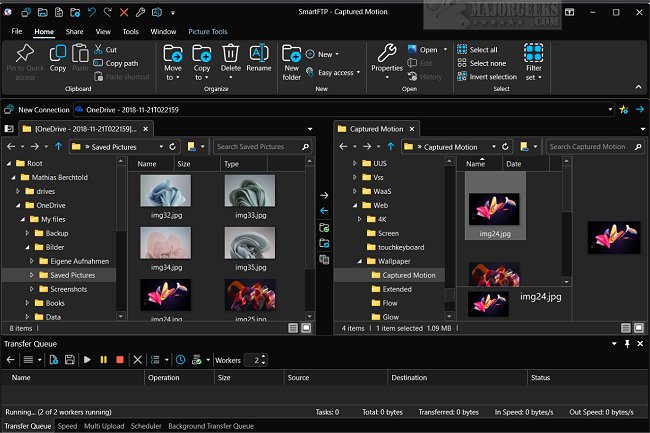
SmartFTP has launched its latest version, 10.0.3335, enhancing its reputation as a user-friendly client for various file transfer protocols. This versatile application supports FTP, FTPS, SFTP, WebDAV, and cloud storage services like Amazon S3, Backblaze B2, Google Drive, and OneDrive, along with SSH Terminal functionality.
What is SmartFTP?
SmartFTP is designed to simplify the process of transferring files between local computers and remote servers. It caters to a diverse user base, including web developers, businesses, and individuals who need reliable solutions for website maintenance, file synchronization, and secure data backups.
Key Features of SmartFTP
- Multi-Protocol Support: The application enables secure transfers through several protocols, including FTP, SFTP, and FTPS, making it adaptable to various server configurations.
- User-Friendly Interface: SmartFTP features an intuitive drag-and-drop interface, allowing for straightforward file management, along with additional functionalities like remote directory caching and automation of file transfers.
- Advanced Security: Users can transfer sensitive information securely, with features such as SSL support, transfer integrity checks, and compliance with HIPAA and FIPS standards.
- Automation and Scheduling: The new version offers enhanced capabilities for automating file transfers and scheduling tasks, improving efficiency for regular users.
- Comprehensive File Management: Users can easily search, synchronize, and manage files across different platforms, with multilingual support and advanced visualization tools.
Who Can Benefit from SmartFTP?
SmartFTP is ideal for anyone needing efficient file transfer solutions. Whether you're managing a website, backing up critical data, or synchronizing files across multiple locations, SmartFTP's extensive features cater to a range of needs.
Geek Verdict
SmartFTP 10.0.3335 stands out as a dependable solution for efficient and secure file transfers. Users can focus on their projects and tasks, knowing that their data is being handled with care and integrity.
Looking Ahead
As technology continues to evolve, SmartFTP is expected to integrate more features and enhancements to meet the growing demands of users. Future updates may include improved cloud integration, enhanced automation capabilities, and further security enhancements, ensuring it remains a leading choice for file transfer solutions
SmartFTP 10.0.3335 released
SmartFTP is an easy-to-use FTP, FTPS, SFTP, WebDAV, Amazon S3, Backblaze B2, Google Drive, OneDrive, and SSH Terminal client.