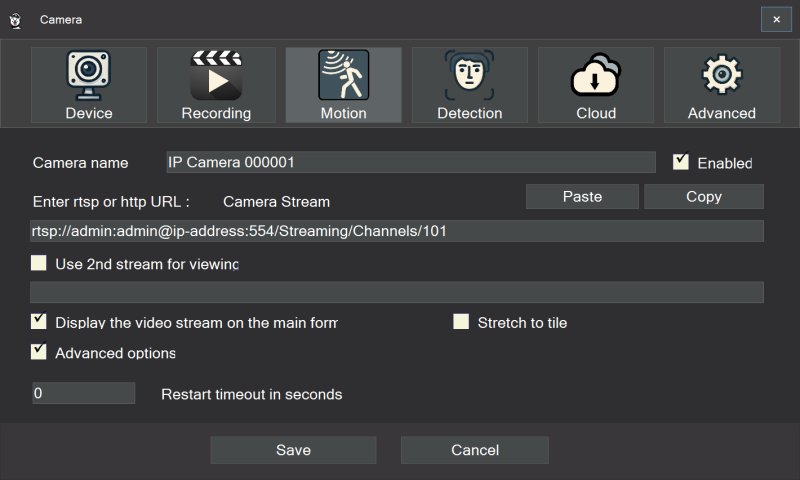
SmartVision 6.4 is an advanced video surveillance software designed for Windows that connects seamlessly to IP cameras. It enables high-quality video recording and integrates intelligent detection and analytics, enhancing the security capabilities of both homes and businesses.
What It Is
SmartVision acts as a multifunctional Video Management System (VMS) for Windows 10 and 11, transforming a PC into a central security hub. The software supports a wide range of IP cameras via RTSP or HTTP protocols and features ONVIF auto-discovery for quick setup. It utilizes GPU acceleration to minimize CPU load, ensuring that multiple high-resolution cameras can be monitored without compromising the PC's performance for other tasks.
Key Features
1. Camera Compatibility: SmartVision connects to most IP cameras, allowing for efficient setup and operation.
2. Recording Options: Users can choose between continuous MP4 recording using H.264 or H.265 for optimal storage.
3. AI-Powered Detection: The software includes intelligent detection capabilities for motion, objects, sound, faces, and license plates.
4. Advanced Analytics: Users can receive reports on presence and attendance, and track license plates and parking durations.
5. Audio Analysis: SmartVision goes beyond video surveillance by analyzing over 500 sound types, providing automatic speech recognition in more than 100 languages, which is particularly useful for monitoring environments like childcare or healthcare.
6. Stability and Scalability: Designed to recover from disconnections and network issues automatically, SmartVision can handle multiple camera setups and even scale to larger deployments with multi-server architecture.
7. Cloud Integration: The optional Cloud Video Surveillance feature allows for remote access and off-site protection, configurable based on user needs.
Pricing Structure
SmartVision operates on a hybrid model, offering both free and paid features. The free version includes essential functionalities like live viewing, basic motion detection, and local recording, making it suitable for basic home or small office monitoring. Paid features unlock advanced analytics, multi-server capabilities, and cloud services, catering to users requiring more sophisticated surveillance solutions.
Pros and Cons
*Pros*:
- Rich feature set with advanced analytics
- Smooth performance due to GPU acceleration
- Robust handling of unstable networks and camera connections
- Strong audio detection capabilities
- Flexible pricing model with free options
*Cons*:
- Increased complexity with a steeper learning curve
- Limited to Windows operating systems
- Possible additional hardware requirements for optimal performance
Conclusion
SmartVision 6.4 is a comprehensive surveillance platform that offers sophisticated analytics and stability, rivaling higher-end systems. It is particularly valuable for users seeking actionable insights from their surveillance data rather than just live feeds. However, for those needing only basic monitoring, this software may exceed their requirements. Users looking for assistance can find support through the MajorGeeks forums.
Future Developments
As technology continues to evolve, SmartVision may further enhance its AI capabilities, expand compatibility with additional camera types, and improve user interface intuitiveness. Future updates could also focus on mobile accessibility, enabling users to monitor their security systems from smartphones or tablets, increasing convenience and flexibility
What It Is
SmartVision acts as a multifunctional Video Management System (VMS) for Windows 10 and 11, transforming a PC into a central security hub. The software supports a wide range of IP cameras via RTSP or HTTP protocols and features ONVIF auto-discovery for quick setup. It utilizes GPU acceleration to minimize CPU load, ensuring that multiple high-resolution cameras can be monitored without compromising the PC's performance for other tasks.
Key Features
1. Camera Compatibility: SmartVision connects to most IP cameras, allowing for efficient setup and operation.
2. Recording Options: Users can choose between continuous MP4 recording using H.264 or H.265 for optimal storage.
3. AI-Powered Detection: The software includes intelligent detection capabilities for motion, objects, sound, faces, and license plates.
4. Advanced Analytics: Users can receive reports on presence and attendance, and track license plates and parking durations.
5. Audio Analysis: SmartVision goes beyond video surveillance by analyzing over 500 sound types, providing automatic speech recognition in more than 100 languages, which is particularly useful for monitoring environments like childcare or healthcare.
6. Stability and Scalability: Designed to recover from disconnections and network issues automatically, SmartVision can handle multiple camera setups and even scale to larger deployments with multi-server architecture.
7. Cloud Integration: The optional Cloud Video Surveillance feature allows for remote access and off-site protection, configurable based on user needs.
Pricing Structure
SmartVision operates on a hybrid model, offering both free and paid features. The free version includes essential functionalities like live viewing, basic motion detection, and local recording, making it suitable for basic home or small office monitoring. Paid features unlock advanced analytics, multi-server capabilities, and cloud services, catering to users requiring more sophisticated surveillance solutions.
Pros and Cons
*Pros*:
- Rich feature set with advanced analytics
- Smooth performance due to GPU acceleration
- Robust handling of unstable networks and camera connections
- Strong audio detection capabilities
- Flexible pricing model with free options
*Cons*:
- Increased complexity with a steeper learning curve
- Limited to Windows operating systems
- Possible additional hardware requirements for optimal performance
Conclusion
SmartVision 6.4 is a comprehensive surveillance platform that offers sophisticated analytics and stability, rivaling higher-end systems. It is particularly valuable for users seeking actionable insights from their surveillance data rather than just live feeds. However, for those needing only basic monitoring, this software may exceed their requirements. Users looking for assistance can find support through the MajorGeeks forums.
Future Developments
As technology continues to evolve, SmartVision may further enhance its AI capabilities, expand compatibility with additional camera types, and improve user interface intuitiveness. Future updates could also focus on mobile accessibility, enabling users to monitor their security systems from smartphones or tablets, increasing convenience and flexibility
SmartVision 6.4 released
SmartVision is powerful video surveillance software for Windows that connects to IP cameras, records high-quality video, and adds intelligent detection and analytics to your security setup.