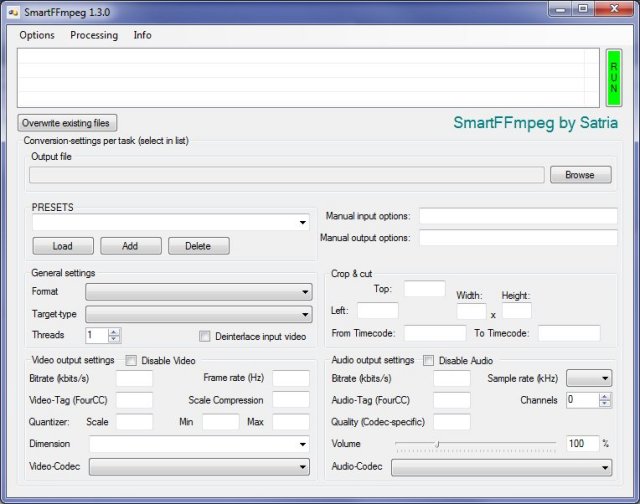
SmartFFmpeg has recently released version 1.6.5, enhancing the user experience by providing a graphical user interface (GUI) for FFmpeg, a widely-used command-line tool for converting audio files between different formats. This new version emphasizes ease of use, as it requires no installation; users simply need to extract the files into the same directory as FFmpeg and run SmartFFmpeg.
To utilize SmartFFmpeg, users must have Microsoft .NET Framework 3.5 or higher installed on their system. The updated features of SmartFFmpeg include:
- An internet update check upon startup, ensuring users are aware of the latest version.
- A well-structured GUI that presents all settings clearly and concisely.
- Drag and drop support for effortless file addition.
- Generalization of settings, allowing users to apply current configurations to each new task easily.
- Customization options for individual tasks, letting users select specific settings for each file.
- Pre-defined, extensible presets that save frequently used settings for quick access.
- The ability to expand selectable options via text files for custom resolutions and more.
- Full extensibility of conversion settings with any FFmpeg parameter in designated input and output fields.
- Preconfiguration options for output filenames and file extensions.
- A selectable process priority for the FFmpeg executable.
These features collectively streamline the audio conversion process, making SmartFFmpeg an invaluable tool for users who seek a more user-friendly alternative to the traditional command-line interface of FFmpeg.
In future updates, it would be beneficial for SmartFFmpeg to incorporate additional features such as batch processing capabilities, support for more audio formats, and enhanced error handling to further improve user experience and functionality. Additionally, integrating tutorials or tooltips within the GUI could assist novice users in navigating the software more effectively
To utilize SmartFFmpeg, users must have Microsoft .NET Framework 3.5 or higher installed on their system. The updated features of SmartFFmpeg include:
- An internet update check upon startup, ensuring users are aware of the latest version.
- A well-structured GUI that presents all settings clearly and concisely.
- Drag and drop support for effortless file addition.
- Generalization of settings, allowing users to apply current configurations to each new task easily.
- Customization options for individual tasks, letting users select specific settings for each file.
- Pre-defined, extensible presets that save frequently used settings for quick access.
- The ability to expand selectable options via text files for custom resolutions and more.
- Full extensibility of conversion settings with any FFmpeg parameter in designated input and output fields.
- Preconfiguration options for output filenames and file extensions.
- A selectable process priority for the FFmpeg executable.
These features collectively streamline the audio conversion process, making SmartFFmpeg an invaluable tool for users who seek a more user-friendly alternative to the traditional command-line interface of FFmpeg.
In future updates, it would be beneficial for SmartFFmpeg to incorporate additional features such as batch processing capabilities, support for more audio formats, and enhanced error handling to further improve user experience and functionality. Additionally, integrating tutorials or tooltips within the GUI could assist novice users in navigating the software more effectively
SmartFFmpeg 1.6.5 released
SmartFFmpeg adds a graphical user interface (GUI) to FFmpegg, a command-line utility that can convert audio files from one format to another.