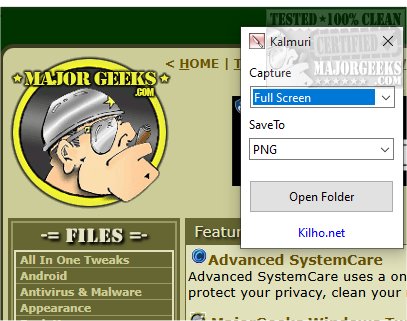
Kalmuri 4.2.7 has been released, providing users with an intuitive and efficient screen capture application. This tool allows for both screen snapshots and video recordings, operating discreetly from the system tray to avoid disrupting your workflow. Kalmuri's user-friendly interface features two main drop-down menus: the first for selecting actions and the second for choosing output formats. While the initial options may appear limited, a right-click within the main window reveals a comprehensive menu with additional features, such as renaming files, adjusting audio settings, setting hotkeys for captures, and specifying default save locations.
The application supports various output formats, including PNG, JPG, GIF, and BMP, catering to different project requirements. Users can save their screenshots locally, send them to the clipboard, print them directly, or upload them to Imgbox. Kalmuri also includes a built-in browser for capturing website snapshots. As a screen recorder, it enables users to record in MP4 format, capturing the entire screen or specific areas along with the cursor, making it ideal for creating video tutorials.
Kalmuri's simplicity and minimalistic design make it accessible to all users, allowing for quick and effective high-quality screenshot captures. Whether for presentations, tutorials, or saving critical information, Kalmuri is a reliable tool worth exploring for anyone in need of screen capture functionality.
Extended Version:
In addition to the existing features, Kalmuri 4.2.7 could benefit from further enhancements such as cloud integration for automatic backup of captured images and videos. This would allow users to access their files from multiple devices seamlessly. Implementing advanced editing tools within the app could also enhance its functionality, enabling users to annotate or edit screenshots before saving or sharing. Moreover, introducing customizable templates for frequently used capture settings could streamline the workflow for users who regularly produce similar content.
Furthermore, incorporating a tutorial or tips section within the application could help new users familiarize themselves with its features more quickly, improving the overall user experience. As screen capturing and recording become increasingly essential for online communication and education, Kalmuri has the potential to evolve into a comprehensive tool that not only meets current user needs but also anticipates future demands in a rapidly changing digital landscape
The application supports various output formats, including PNG, JPG, GIF, and BMP, catering to different project requirements. Users can save their screenshots locally, send them to the clipboard, print them directly, or upload them to Imgbox. Kalmuri also includes a built-in browser for capturing website snapshots. As a screen recorder, it enables users to record in MP4 format, capturing the entire screen or specific areas along with the cursor, making it ideal for creating video tutorials.
Kalmuri's simplicity and minimalistic design make it accessible to all users, allowing for quick and effective high-quality screenshot captures. Whether for presentations, tutorials, or saving critical information, Kalmuri is a reliable tool worth exploring for anyone in need of screen capture functionality.
Extended Version:
In addition to the existing features, Kalmuri 4.2.7 could benefit from further enhancements such as cloud integration for automatic backup of captured images and videos. This would allow users to access their files from multiple devices seamlessly. Implementing advanced editing tools within the app could also enhance its functionality, enabling users to annotate or edit screenshots before saving or sharing. Moreover, introducing customizable templates for frequently used capture settings could streamline the workflow for users who regularly produce similar content.
Furthermore, incorporating a tutorial or tips section within the application could help new users familiarize themselves with its features more quickly, improving the overall user experience. As screen capturing and recording become increasingly essential for online communication and education, Kalmuri has the potential to evolve into a comprehensive tool that not only meets current user needs but also anticipates future demands in a rapidly changing digital landscape
Kalmuri 4.2.7 released
Capture and record your screen with Kalmuri, the easy-to-use screen capture app.