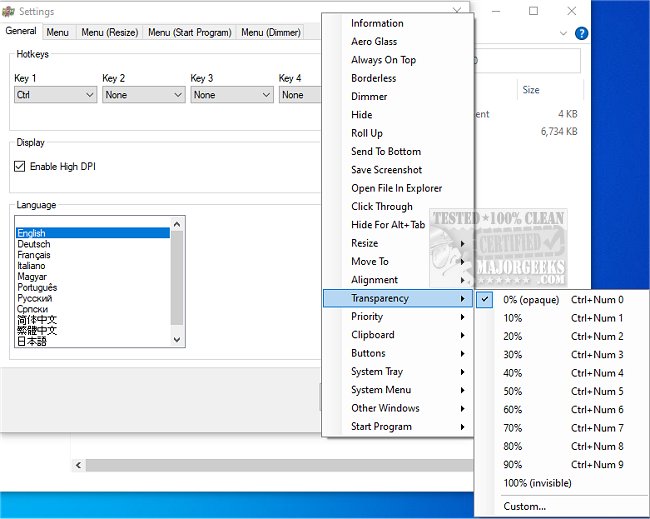
SmartContextMenu version 1.9.0 has been released, offering an enhanced alternative to SmartSystemMenu by adding context menus to all types of system windows, including those lacking a system menu. This application allows users to quickly access a context menu with a simple right-click, enhancing functionality and user experience.
One of the key advantages of SmartContextMenu is its high stability. Unlike other applications that rely on hooks in separate DLL modules, which can lead to instability, SmartContextMenu employs an integrated system that ensures consistent performance across various window types.
To utilize SmartContextMenu, users can run the executable file, hover over the desired window, and activate the context menu using the "Ctrl + Right Mouse Button" hotkey. Settings and hotkeys are customizable through the system tray's settings dialog or the SmartContextMenu.xml file. Additionally, the application supports command-line usage, with a list of accessible commands available on the developer's repository.
Overall, SmartContextMenu is an excellent tool for users seeking enhanced control over their window context menus. It boasts comprehensive support and stability, promising a seamless and efficient experience.
The menu items available within SmartContextMenu include:
- Information
- Roll Up
- Aero Glass
- Always On Top
- Send To Bottom
- Save Screenshot
- Open File In Explorer
- Click Through
- Hide For Alt+Tab
- Resize
- Move To
- Alignment
- Transparency
- Priority
- Clipboard
- Buttons
- System Tray
- System Menu
- Other Windows
- Start Program
In summary, SmartContextMenu is designed to empower users with extensive options for managing their windows, allowing for greater flexibility and improved usability. As users continue to seek ways to enhance their productivity, tools like SmartContextMenu are becoming increasingly valuable in customizing their digital environments. Future updates could potentially introduce even more features, further enhancing its capabilities and user satisfaction
One of the key advantages of SmartContextMenu is its high stability. Unlike other applications that rely on hooks in separate DLL modules, which can lead to instability, SmartContextMenu employs an integrated system that ensures consistent performance across various window types.
To utilize SmartContextMenu, users can run the executable file, hover over the desired window, and activate the context menu using the "Ctrl + Right Mouse Button" hotkey. Settings and hotkeys are customizable through the system tray's settings dialog or the SmartContextMenu.xml file. Additionally, the application supports command-line usage, with a list of accessible commands available on the developer's repository.
Overall, SmartContextMenu is an excellent tool for users seeking enhanced control over their window context menus. It boasts comprehensive support and stability, promising a seamless and efficient experience.
The menu items available within SmartContextMenu include:
- Information
- Roll Up
- Aero Glass
- Always On Top
- Send To Bottom
- Save Screenshot
- Open File In Explorer
- Click Through
- Hide For Alt+Tab
- Resize
- Move To
- Alignment
- Transparency
- Priority
- Clipboard
- Buttons
- System Tray
- System Menu
- Other Windows
- Start Program
In summary, SmartContextMenu is designed to empower users with extensive options for managing their windows, allowing for greater flexibility and improved usability. As users continue to seek ways to enhance their productivity, tools like SmartContextMenu are becoming increasingly valuable in customizing their digital environments. Future updates could potentially introduce even more features, further enhancing its capabilities and user satisfaction
SmartContextMenu 1.9.0 released
SmartContextMenu provides a more enhanced option to SmartSystemMenu, adding a context menu to all system windows.